Configuration - Remove Desktop and Universal Applications

I currently have Start1.71 and have the following questions on configuration.

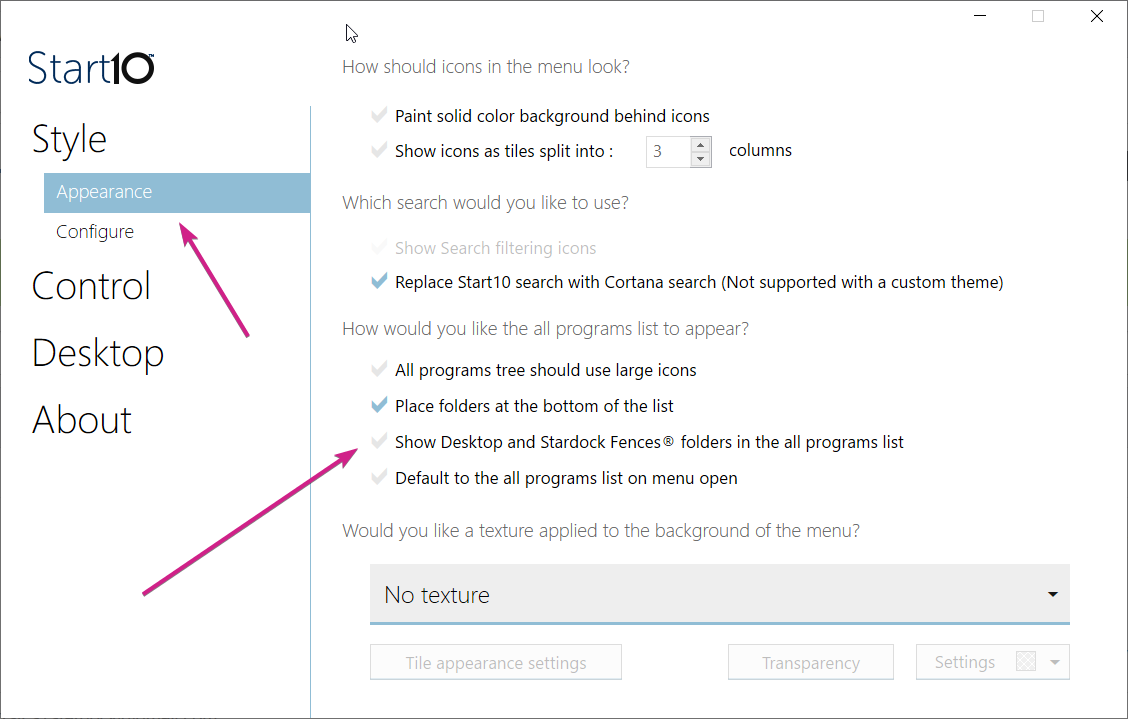
1. How can I get rid of the "Desktop" item when I go to "All Programs"?
2. How can I get rid if the "Universal Applications" folder in the "All Programs"? If I choose to not show "Universal Applications" it removes it from both "All Programs" as well as the list on the right side (second column). I want to keep it in the second column but remove it from the "All Programs"
 

1,846 views 3 replies
Reply #1 Top

Hello,

I have forwarded your report to the Stardock support team for their review and recommendations.

Please keep an eye on this thread for any updates.

We really do appreciate your feedback, thanks.

AzDude
Stardock Community Assistant

Reply #2 Top

Hello,

Sorry to hear you are having trouble.

1. How can I get rid of the "Desktop" item when I go to "All Programs"?
End of quote


2. How can I get rid if the "Universal Applications" folder in the "All Programs"? If I choose to not show "Universal Applications" it removes it from both "All Programs" as well as the list on the right side (second column). I want to keep it in the second column but remove it from the "All Programs"
End of quote

I am afraid it is all or nothing currently.

Sean Drohan
Stardock Support Manager