4K display scale switched between 150% & 100% zoom windows 10

Icons do not stay organized as placed

Fences is rearranging my icons when I switch display scale, and I don't want that to happen.

I have a laptop with a native 4k display but displaying at 100% makes everything to small to see so when I am using the laptop screen I use 150% display scale, but while connected to a larger 4k display I prefer to use 100% display scale. 

the trouble is switching between these display scales causes icons to move a lot so I wanted to give Fences a try especially because advertised in the key Feature list is...

Key Features


  • NEW! Use fences on modern, high DPI monitors.
  •  
  • Define rules to organize your desktop icons.


sadly Icons still move around inside fences when switching between display scales, here are some pictures linked to show what I am talking about.


Fence with Image of desk top before Fences


Display scale switched to 100% Fences added columns to the Fence


Display scale switched back to 150% and Fences rearranged my Icons differently


Verified that Fences is not* set to do any sorting

11,448 views 6 replies
Reply #1 Top

also note that when on 100% display scale, Fences made my Fence 8 columns wide.

it might make it easier to maintain consistent orientation if it did not change Column and row sizes.

Reply #2 Top

Hello,

Sorry to hear you are having issues. 

1) You should set sorting rule on each fences. Right click within the fence -> Sort Fence by -> None.

2) When you change display Scale, Windows 10 will scale your desktop icons accordingly. Hence when you go up on the scale from 100% to 150% than those icons size will grow. Which will make those icons move to make room for bigger size icons.

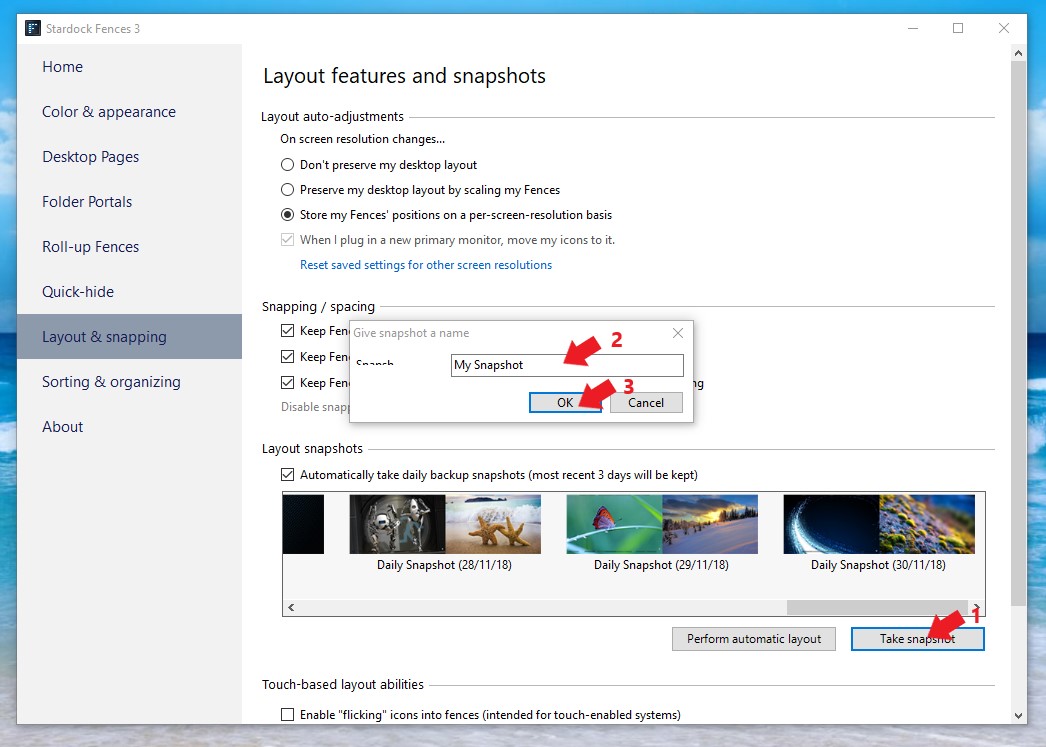
3) The only way I can think of is to create/save snapshots on each scale. And use the snapshots to get the icons arrange as your wish.

Basj,

Stardock Community Assistant.

Reply #3 Top

as you can see in the last of the linked photos I have Fences sorted by none as your first point indicates.

in the third point, what do you mean by Sanp shot? do you mean a screen shot picture as is in the first photo I linked?

and i have to manually sort them one by one? or is there a procedure to set up a snap shot?

Edit...

I wish I could simply reply below but it seems that there is a limit to the number of replies that I can make, any way...

I tried using the snap shots and it did work, how ever I want something more automatic than this, and progromatically it would be very easy to use these snap shots as a way of adding this desirable functionality to Fences.

when in "Configure Fences" there should be an option for...

"Store my Fences' position on a per-screen-Scale basis "

just as there is an option for this...

"Store my Fences' position on a per-screen-resolution basis "

using snap shots in the back ground as a means to accomplish this would be very easy functionality to add to this Fences application.


also the option to change screen scale as I do between my very small laptop 4k display and my very large external 4K disply, on a as-pluged-or-unpluged-screen basis would be great. 

that way I don't have to change these window settings and snap shot settings all the time manually. in other words they could be easily made automatic.

please add these features and I will buy it.

Reply #4 Top


Thank you,


Basj,

Stardock Community Assistant

Reply #5 Top

Is there a better solution for this other than manually restoring "snapshot" each time I log into my computer?  Icons change every time since I am logging into my cloud server from multiple places daily.


Robb

Reply #6 Top

Hello,
Sorry to hear you are having issues. But, I believe there is no other way at this moment.

Thanks
Basj,
Stardock Community Assistant.