How to custom sort shortcuts on right
from  Stardock Forums
Stardock Forums
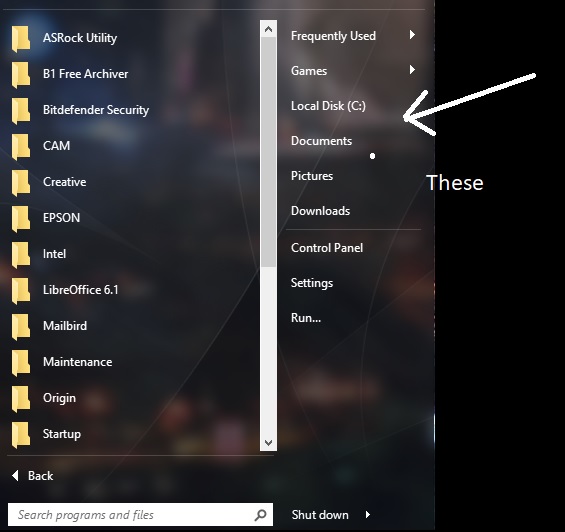
Does anyone know how to custom sort the shortcuts on the right hand side of the start menu?
 Stardock Forums
Does anyone know how to custom sort the shortcuts on the right hand side of the start menu?
Hello,
Yes you can. Just create a folder on your local drive. Create shortcut or move items into that folder and link Start10 to that new folder. To Link Start10 right panel to that folder:-
1) Right click on Start10
2) Select "Configure Start10"
3) Select Configure -> Click "Advance" button
4) Click "Add" button
5) Select the folder you just created, Click "OK" : Your folder now listed in Custom place locations box. Click "Close" button.
6) The "Folder Name" appear on the "Which shortcuts do you want on the right hand side?" listbox
7) You can choose To "display as a link or menu or don't display" from the drop down list.
That should do it.
Thank you,
Basj,
Stardock Community Assistant
I know how to make a custom folder but what I am trying to do is that I would like to move my custom location of "local disk C" down by the control panel, settings and run. But I cant figure out if how to do that (even if there is a way to)

I am sorry, I misunderstood you. I don't think there is an option to move that or sort that part.
Thank you,
Basj,
Stardock Community Assistant
Welcome Guest! Please take the time to register with us.
Select a reason for giving karma:
You're about to visit an external site:
Sign up here to get the latest news, updates, and special offers delivered directly to your inbox.