saved files to desktop

Afternoon,

At this time I have had to remove Fences for my Windows 10 Dual Monitor Setup.

I know about Create a Fence here on desktop then Organize - place all new files to this folder.

Unfortunately this is a Fence and not a folder and with this setup one can't list the files.

That leaves one to just saving the files to the desktop, the issue here it that this files are being saved right between the monitors at the top?

SOME OF THE LINKS I HAVE ALREADY TRIED ARE -

https://esupport.stardock.com/index.php?/default_import/Knowledgebase/Article/View/458/115/fencesicons-position-issues-with-additional-monitors-or-docking-stations

https://superuser.com/questions/1336733/in-windows-10-files-saved-to-desktop-show-up-on-the-secondary-mointor

There were a couple of others.

any suggestions?


Thank you

Sincerely 

6,429 views 3 replies
Reply #1 Top

Hello,

Sorry to hear you are having issues. But, I am not sure what is your issue. Could you please elaborate more so that we can understand more. Also please provide us with your Windows version (use winver.exe for full version number) and Fences version.

Thanks.

Basj,

Stardock Community Assistant.

Reply #2 Top

With Fences off, when once saves a file that they have downloaded to their desktop it will place it on the left side of the monitor.

In my case that is the top left side - left monitor.  I have two monitors.

With Fences on, a downloaded file goes to my desktop but it is saved top right and right in between both monitors.

One has to do a little maneuvering to get the file?

Reply #3 Top

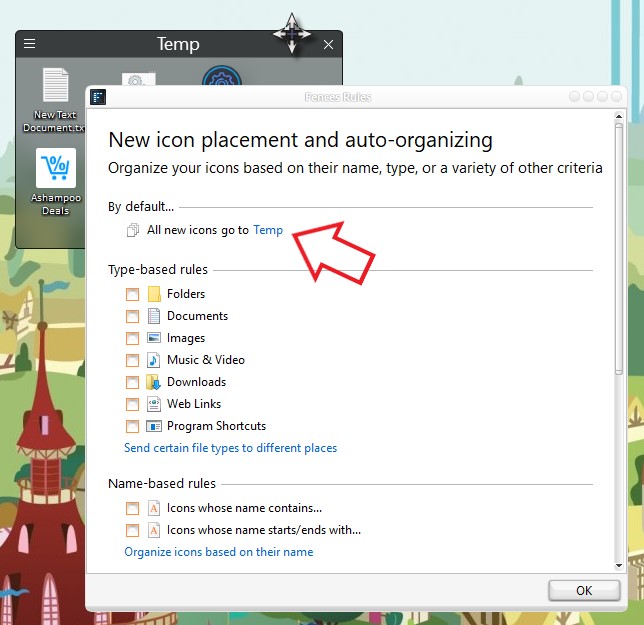
My suggestion is. Create a Fences name it "New Files. Place this new fence on your top left side of your left monitor. Create a rule for this fence so that all your new files/music/icons/download etc be automatically send to this Fence. That should solve your problem.

Something like screen shot below. I made a Fences named "Temp" . To get to "Fences Rules" setting windows. Click on that 3 bar icons -> Organize -> Manage Sorting Rules

Thank you,


Basj,

Stardock Community Assistant