WINDOWS FROZEN OR GLITCHED

Object Desktop Problems

Hello,

I just purchased Object Desktop software and installed everything.  I then rebooted.  Now when I right click, or try and click left button while dragging a window, I don't get any response on the screen.

ALSO,

I can't seem to get icons to change using iconpackager… just says it changes and yet nothing does..


Also, I have windows 10 education.. 
10,597 views 16 replies
Reply #1 Top

Hello,

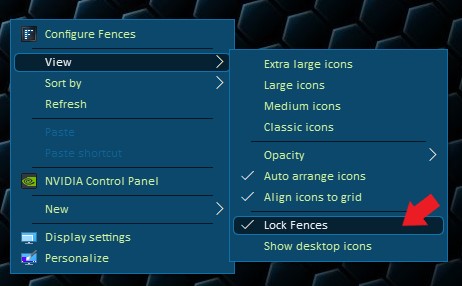
Sorry to hear you are having issues. Please try unlock Fences. Right click anywhere on desktop -> View -> Lock Fences <-un-select it.

Try that first and let us know.

Thank you.

Basj,

Stardock Community Assistant.

Reply #3 Top

Need more clear explanation. Just "window doesn't appear". Windows 10 don't load?

Thank you,


Basj,

Stardock Community Assistant

Reply #4 Top

Ok.

Windows Loads.

I cannot interact with the desktop.

menu doesn't pop up when I click the right mouse button.

I can use start button to execute programs.  I went to Fences and didn't see anything about unlocking or locking.

Not really sure what else I can say.  Just happened after installing object desktop.  I had fences already thru steam, maybe I should uninstall it and install again?


Reply #5 Top

You said, you've installed everything? Maybe you should uninstall everything and Start again one at a time.

What you should do is.

1) Uninstall everything that listed on ODM. Reboot.

2) See if everything back to normal as before.

3) Install one of Program. For example, Windowblinds.

4) Reboot. and Test. Apply some theme and see if it okay. Than move on to install others such as Fences, Groupy etc etc. Remember to reboot and test out everytime after you install one software.

Its not necessary, but it is advisable to do so.

Thank you,


Basj,

Stardock Community Assistant

Reply #6 Top

Hmm...

I'm upset a little..  I just don't have time for this..  I like the software and company.  The software had option for downloading and installing everything..  now I'm supposed to uninstall it all and try one at a time to find out which one screwed up my computer..

Please someone help me solve this?  Someone must have the same problem when installing object desktop software..

Reply #7 Top

Ok, just to update, I uninstalled everything and rebooted, and it still won't work...  right clicking on desktop is not working..  it happened only after installing software from stardock.  Very frustrated, please help me with advice on how to fix computer..

Reply #8 Top

Hello,

I have forwarded your report to the Stardock support team for their review and recommendations.

Please keep an eye on this thread for any updates.

We really do appreciate your feedback, thanks.


AzDude
Stardock Community Assistant

Reply #9 Top

Quoting chrismkirby, reply 7

Ok, just to update, I uninstalled everything and rebooted, and it still won't work...  right clicking on desktop is not working..  it happened only after installing software from stardock.  Very frustrated, please help me with advice on how to fix computer..
End of chrismkirby's quote

If you have no Stardock software installed at all, it would be VERY unlikely that it is the result of having any of it (the suite) ever installed.

What I would recommend is a clean boot of Windows to see what else might be the cause:

https://support.microsoft.com/en-us/help/929135/how-to-perform-a-clean-boot-in-windows

----------------
Sean Drohan
Stardock Customer Service Manager

Reply #10 Top

Ok, I figured it out, I'm confident that installing the object desktop somehow affected my NVIDIA control panel.  I couldn't right click to view it.  I downloaded and reinstalled my graphics drivers with clean install, I don't know why, all I know is it works now.

Please let me know what you think..  I love the software though, my computer looks better with it.

Is it possible for the install to affect my video card drivers?  I would normally say no, but I can't figure it out..

Reply #11 Top

Quoting chrismkirby, reply 10

I'm confident that installing the object desktop somehow affected my NVIDIA control panel. 
End of chrismkirby's quote

It's not the first time we have read that NVidia's 'features' cause an issue.  

----------------
Sean Drohan
Stardock Customer Service Manager

Reply #12 Top

ugh... so I fixed it yesterday, now today after rebooting it not working again..  You guys have any idea why NVIDIA and Object Desktop don't like each other?


I don't wanna delete your software, but I might have too if my computer doesn't run properly..

Reply #13 Top

I want to attach picture of desktop, but it doesn't show anything really, just frozen, when you right click the spinning circle just spins and spins and spins...


I have a gtx 1080 ti

Reply #14 Top

Quoting chrismkirby, reply 12

You guys have any idea why NVIDIA and Object Desktop don't like each other?
End of chrismkirby's quote

Object Desktop is not software, its a collection of.  

That said, if I had to venture a guess, it is not liking Fences.  What I would suggest is turning of any 'overlay' that Nvidia is producing.

Also, any actively running Nvidia software is largely unnecessary.  Other than its '3D Vision' product, it's uses are for reminding of updates and perhaps some video capture / gaming components.

----------------
Sean Drohan
Stardock Customer Service Manager

Reply #15 Top

I have had fences on here for like 1 year without an issue... only since I bought object and installed an update did I have problems..  I will try what you say, worked before with fences I had purchased through steam.

Reply #16 Top

Ok, so GeForce experience and the nvidia drivers seem to be uninstalled somehow automatically... I installed drivers for nvidia and it fixed problem again..  I not sure why its auto uninstalling or disabling..  I might have same problem when I reboot again.

I gonna disable any overlay and see if it helps..