How to Customize the Universal Applications Listed in the UA Folder — Flyout on Right Side of the Menu

Is there a way to DELETE applications from and ADD applications to the UA folder AND, then SAVE those changes?  I am able to delete apps that are listed here, but I see no way to save the changes OR a way to add applications.  I searched for a folder named "Universal Applications," but cannot find that.  Thanks for any help.

3,177 views 3 replies
Reply #1 Top

Hello,

Sorry to hear you are having issues. Please specify, which Stardock's Software your are referring to? Start10?

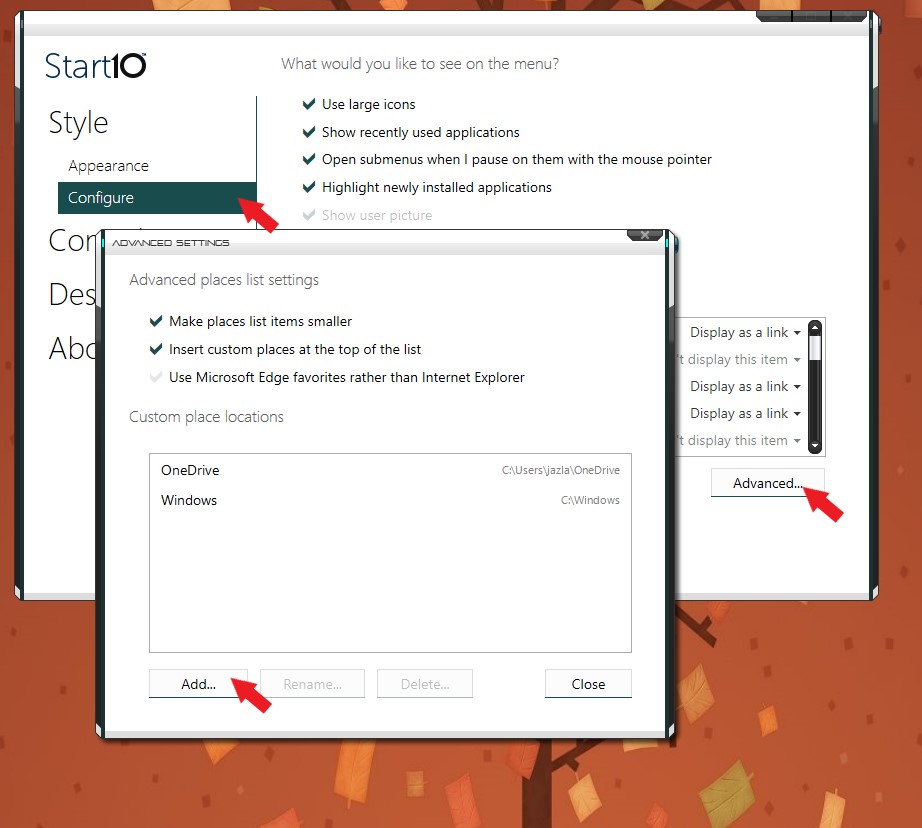
If it Start10, I don't think you can add application to the Universal Applications unless that application is from Microsoft Store. But you can create a new folder and put in all the application shortcut into that folder and get it to appear on your Start10 Right hand Side menu.


Basj,

Stardock Community Assistant.

Reply #2 Top

Thank you, Basj.  Yes, I was referring to Start 10 ( and, I thought I was posting on the Start 10 Forum).  I'll create a folder and give this work-around a try.  I'm surprised the developers would not have considered these TWO capabilities for the Start app; 1) that there is no reason to have "All Programs" on the left side of the Start 10 menu and "Universal Applications" on the right (1 or the other should be adequate, as long as my next item is covered) and 2) that apps (or other shortcuts) can be deleted, added AND (the list, as now modified can be) then saved.

If you are in communication with the Start 10 developers, please pass this along to them.  Thanks again!

—Richard

Reply #3 Top

On 1.

All Programs covers, all application you have installed including Universal Applications. While Universal Applications is just for "Microsoft Store Applications "and any application that come along when you install Windows 10. You can always disable Universal Application from appearing on your Start10 right panel. I believe the idea behind Start10 is to get away from Windows 10 Start panel and Stay with Windows 7 Style Start panel. One of main features that user loves about Windows 7 Start panel is its "All Programs".

On 2.

Can always be done using the right side just add or delete any shortcut into any folder and get it link.

Thank you,


Basj,

Stardock Community Assistant