Blurred box on desktop image
from  Stardock Forums
Stardock Forums
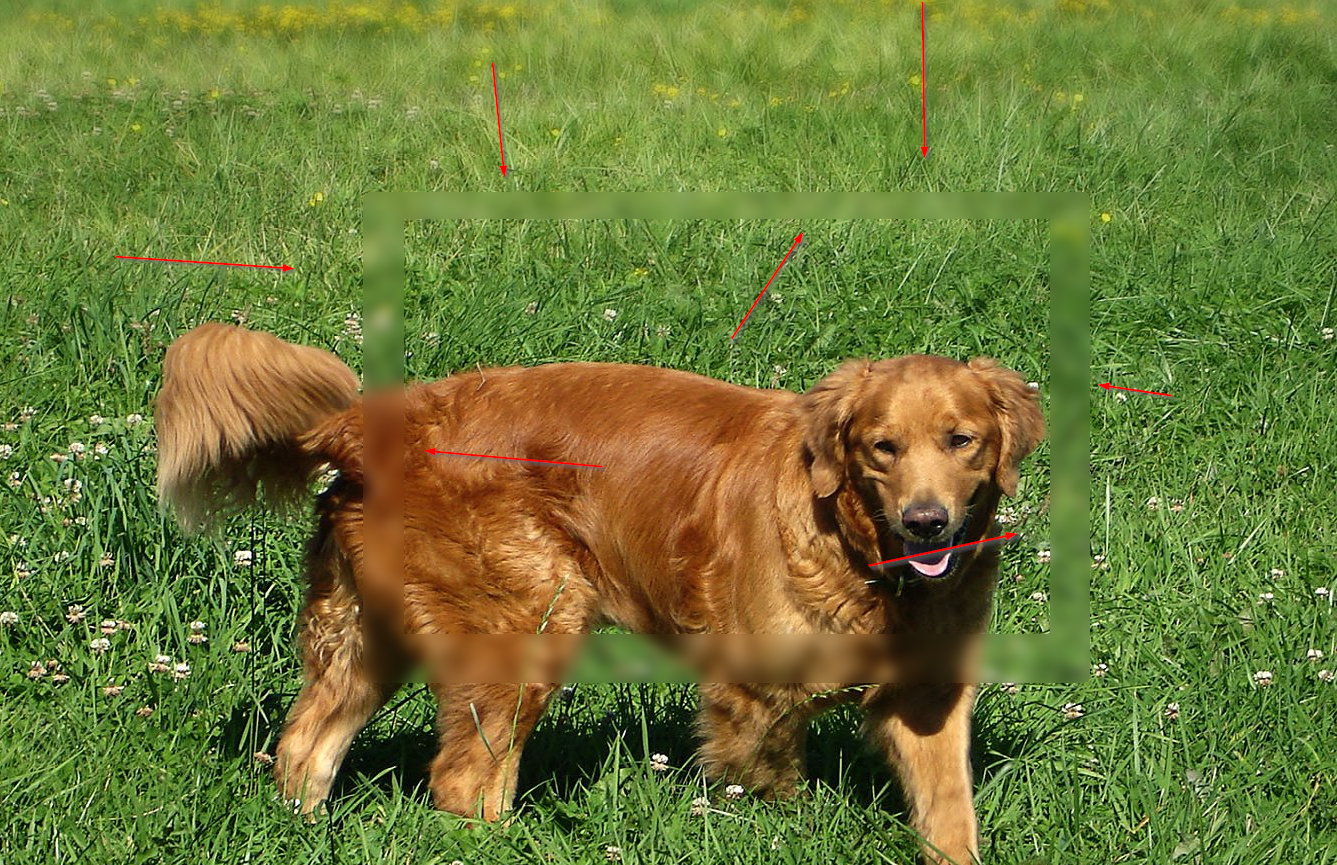
Why does WindowBlinds images leave a faint blurred square box on my desktop background image.
 Stardock Forums
Why does WindowBlinds images leave a faint blurred square box on my desktop background image.
Hello,
Sorry to hear you are having issues. Could you please show us a screenshot or a video grab for us to understand your problem better.
Thanks
Basj,
Stardock Community Assistant.
Will do. I'll post up shortly

Thank you, yes that is strange. Few questions.
1. Is the problem happened you close, minimize, restore windows?
2. It happened all the time with all the Skin styles? Or is there only on certain skin styles?
3. May I know what version of windows you have in your system? And is the problem started recently after windows update?
4. Is your graphics driver up to date?
Thank you,
Basj,
Stardock Community Assistant
1. Is the problem happened you close, minimize, restore windows?
Its on the desktop image. Restart, log off and back on. The shadow remains.
2. It happened all the time with all the Skin styles? Or is there only on certain skin styles?
All styles, all images. Included or if pulled from my picture folder. Its there
3. May I know what version of windows you have in your system? And is the problem started recently after windows update?
Windows 10 Home. Its there for all updates
4. Is your graphics driver up to date?
Yes.
Why is this showing up on all my background images? It wasn't there before Windowblinds. I wonder if Stardock needs to update. I'm running:
Wblind.dll 2017/09/05 07:42:33
Wblind64.dll 2017/09/05 07:42:00
Wbsrv.dll 2017/03/28 06:53:46
WB10Config.exe 2017/09/05 07:42:09
Wbload.dll 2017/09/14 13:51:13
Screen10.exe 2017/03/28 06:53:17
Screen 10's last update was March 2017. Wblind.dll last update was September 2017.
Thank you, for taking time in providing more info. Please try these steps it purge and reinstall Windowblinds : https://forums.stardock.com/486023/windowblinds-support-faq#reinstalling.
Reboot, retest and report back.
Thank you,
Basj,
Stardock Community Assistant
I'll try re-installing it. I'll update later
Reinstalled and it is just the same as before. No matter if I grab an image from my pictures folder, or use one in its library, that box is there. Maybe the developers are unaware of the problem as the box is about the same size as the Window Blinds splash screen, ergo, sloppy coding. My guess is none of the developers ever bother with chat forums so is there a way to contact them directly via email or twitter?
Hello,
Please be aware that the Support Desk is Closed for Summer Vacation will be back July 9th,
expect delays in response times, please.
but we have forwarded your report to the Stardock support team for their review and recommendations.
Please keep an eye on this thread for any updates.
We really do appreciate your feedback, thanks.
AzDude
Stardock Community Assistant
Just wondering, did you do the full purge or just uninstall and reinstall Windowblinds. Purge and uninstall is different. A lot of time Purge helps. BTW, for your info your problem is strange and as far as I can remember, this is the first time I see such problem here. I am sure it is not sloppy coding since if it is true than it should be a whole lot more report of it.
If you have actually done the full purge and reinstall. Please try the CleanBoot steps to iron out the conflicting apps : https://forums.stardock.com/486023/windowblinds-support-faq#cleanboot
Thank you,
Basj,
Stardock Community Assistant
Just out of curiosity, is it still there if you unload WB by loading the default style and restart?
I would like to know that as well - that if WB is eliminated from the equation (the default theme is actually WB being off), if you still have the issue.
Sorry for the long delay. The issue at the default, the image is the same. Shows that faint square frame in the image, no matter the image. If I uninstall WB, my images look normal.
Hello
Would you Please try this PURGE: https://forums.stardock.com/486023/windowblinds-support-faq#reinstalling
Reboot and ReInstall the latest version beta which includes some new fixes https://forums.stardock.com/486023/windowblinds-support-faq#reinstalling
and see if this fixes your issue and report back.
AzDude
Stardock Community Assistant
I recall for a brief while seeing something like this on my PC. Is your video driver up to date? Is your OS up to date?
Select and apply the Default theme and reboot. <- That prevents WindowBlinds from loading.
As I recall my PC cleared after I allowed both NVIDIA GeForce Experience and the Graphics Driver to update.
Yes it is up to date. My video card bugs me to death when there is an update. Bugs me intil its done. This is from today. Really makes my desktop look messy.

The box has moved to the lower right side of the screen. Really disappointing app. I think I've seen enough to know when a product simply doesn't work as expected and Deskscapes does not work as expected.
Hello,
Sorry to hear you are having issues. Your first few post was with Windowblind problem. Now you have new problem? With Deskscapes? Please elaborate.
Thanks
Basj,
Stardock Community Assistant.
Welcome Guest! Please take the time to register with us.
Select a reason for giving karma:
You're about to visit an external site:
Sign up here to get the latest news, updates, and special offers delivered directly to your inbox.
 WinCustomize Forums