Can we now order icons ourselves

One of the most common complaints way way back was how Fences didn't allow you to order icons yourself within a fence. I did buy Fences way back then (actually through different accounts on about 20+ computers), but eventually we had to give it up because of this.

For a number of reasons, I really don't want to install the trial - so can someone tell me if this issue has been resolved?

Thanks

19,345 views 11 replies
Reply #1 Top

Hello,

I am really not sure what you mean by "order icons". But if you mean Sorting the Icons order inside the fences. I can say that now the fences is sorting its icons properly. But I still suggest you to try it out to see if its what you want it to do for you.

Thank you,


Basj,

Stardock Community Assistant

Reply #2 Top

Thanks - by "order the icons" I mean setting the order/position in which they appear.

Sorting is NOT what I'm talking about - but rather we need to be able to drag the icons to where we want them, just like you've pretty much always been able to do on Windows (including, if necessary, leaving blank space).

Trying it out is not an option for me, hence the question. I've had bad experiences with Fences over the past couple of decades, and I don't want to take the risk unless it's really worth it.

Reply #3 Top

There is a no sort option where you can place the icons in any order.  Howevere, you can't leave spaces between icons, they will lock to a grid.

Reply #4 Top

Hello,

Sorry to hear you are having trouble.

No, any icon in a fence will always be sorted and aligned in a Fence - free placement anywhere is not an option. 

----------------
Sean Drohan
Stardock Customer Service Manager

Reply #5 Top

Thanks - useless for me then. Considering this has been a complaint/wish for perhaps 20 years, it's astonishing that this basic functionality is still missing. 

Reply #6 Top

Quoting sdRohan, reply 4

Hello,

Sorry to hear you are having trouble.

No, any icon in a fence will always be sorted and aligned in a Fence - free placement anywhere is not an option. 

----------------
Sean Drohan
Stardock Customer Service Manager

I tested the no sort option and it allowed me to arrange them in any order.  What did I miss?

Reply #7 Top

Interesting - thanks. I'm going to set up a spare machine on Win10 and try it in that case.

All I want is the icons in the fence to behave like normal Windows icons (I'm also assuming that desktop shortcuts still work as we use these extensively).

Reply #8 Top

Quoting gevansmd, reply 6

I tested the no sort option and it allowed me to arrange them in any order.  What did I miss?

Free order has always been an option (at least since Fences 2) but that is not how I understood the question.  Some ask to be able to place an icon in a Fence apart from the other Fenced icons - that is not possible.  

Reply #9 Top

OK cool, if "free ordering" of icons within a fence has always been an option since version 2 (I'm running version 3.0.9.11). Problem is how do you turn auto-sorting off? I've looked through the entire "Configure Fences" area and can't seem to figure it out. This is the MOST annoying thing I've found with Fences. If I drag an icon from the desktop to a fence and attempt to add it to the bottom of the set of icons already there, or just drop it in between icons already there it places itself were ever the snot it likes. From what I can tell its random, as it never EVER places the icon I'm dragging into the fence in the same place twice! (i.e., attempt to drop the icon where I want within a fence, it goes where ever it wants, remove icon I just tried to drop where I wanted it from the fence, attempt again to drop the icon in a specific location within the fence, it again goes where ever the snot it likes, not even in the same place it went last time I attempted to drop the icon where I wanted it to go, rinse, repeat, etc..)

So again, if you can do "free ordering" of icons within a fence, please, please tell me how because this is really driving me nuttier than I already am!

Thanks.

Reply #10 Top

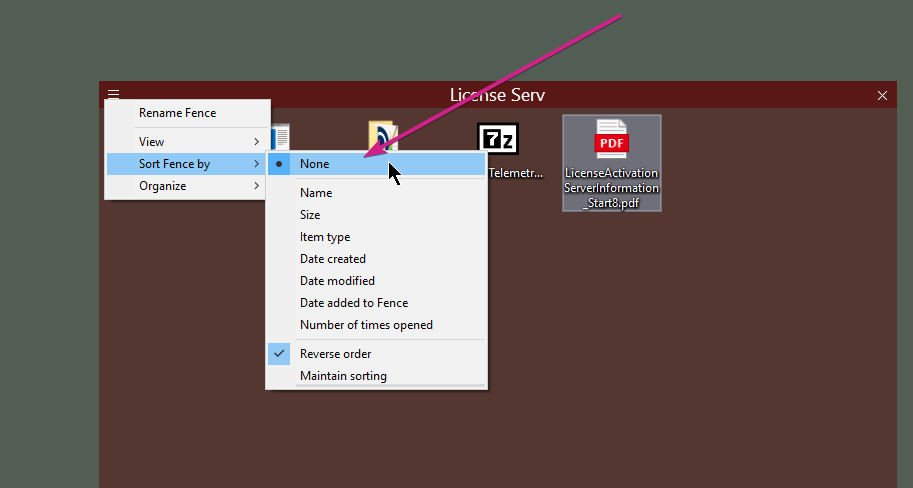
You need to make sure you have sorting to 'None'

Reply #11 Top

Quoting sdRohan, reply 4

Hello,

Sorry to hear you are having trouble.

No, any icon in a fence will always be sorted and aligned in a Fence - free placement anywhere is not an option. 

----------------
Sean Drohan
Stardock Customer Service Manager

Rather late in the day for me to reply, but it's free placement that I (and a bunch of others) are desperate for as this is logical behaviour, consistent with the long-held Windows design philosophy (ie you can turn "align to grid" on and off).

We arrange our (300+) icons according to multiple workflows (depending on the task at hand, such as audio editing, photo editing, web design work, finances and more), and this sometimes means aligning icons "off grid" and including empty spaces.

As a minimum, the ability to have empty grid spaces would go 30% of the way.