Having an issue with skinning the taskbar and start menu in Windows 10

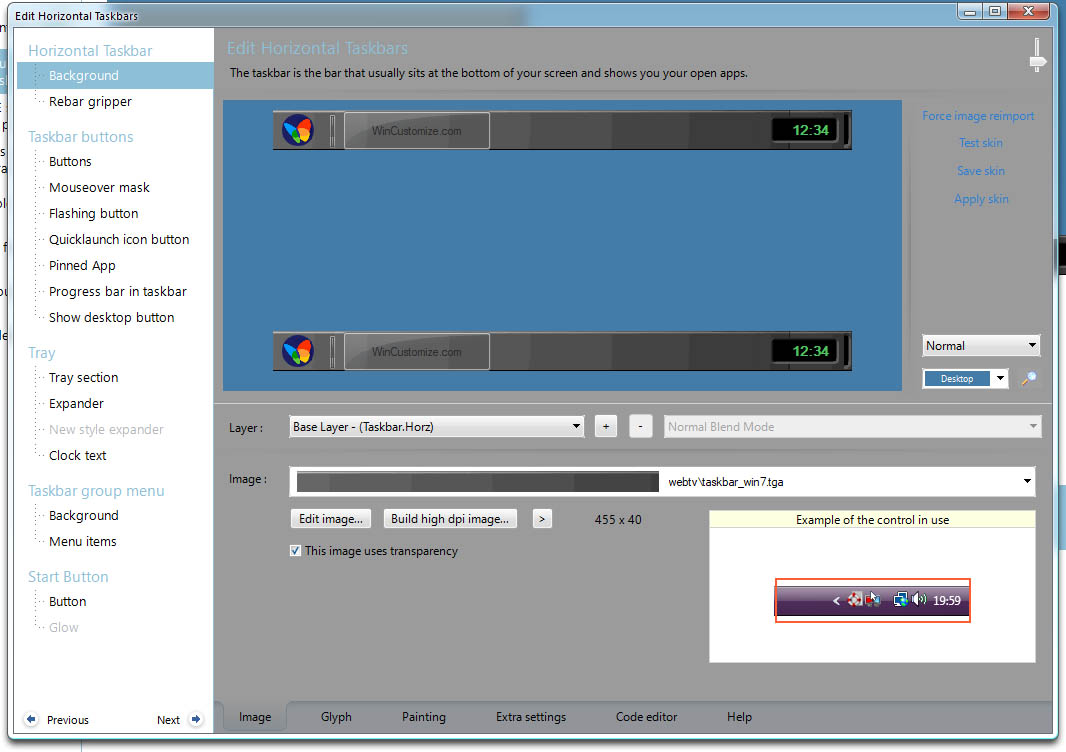
Below you can see the preview of my skin does not match how it actually appears. I replaced the taskbar background with a grey bar which shows up in the preview, but when I use the style the grey bar only shows up in certain areas. Most of my taskbar is black and the grey background image only shows up when I hover over the taskbar icons.


I also used an image to appear behind the clock on the right side (and I gave the time a green font). The color change for the time does not show up on my taskbar and the new image for the clock is also not visible.


I'll note that I'm using two monitors. On my primary monitor my clock text on the taskbar is green like the preview image, although the trey background image is still invisible.


Now for my next problem which concerns the start menu:

I replaced the mouse over image for the All Programs button. On the mouse over, the font color should appear Gold and the font should be Arial 16pt.


Here's what happens when I mouse over on my start menu:


The font color ans style does not change. :p


So I'm just very confused at this point why my changes aren't working. Is it an issue with WindowBlinds compatibility with Windows 10? Am I doing something wrong?

19,120 views 11 replies
Reply #1 Top

Just an update, I fixed the issue with the font color not changing when rolling over the All Programs text. Just need to figure out why the taskbar background image is glitchy.

Reply #2 Top

Quoting faulked, reply 1

Just an update, I fixed the issue with the font color not changing when rolling over the All Programs text. Just need to figure out why the taskbar background image is glitchy.
End of faulked's quote

I think you have the the setting not configure correctly. Please show us your setting on the Skinstudios on H. Taskbar background for "Image" setting and "Painting" setting.

Thank you,

Basj,

Stardock Community Assistant

Reply #3 Top

Okay. Hope you can tell me what the issue is here. :D


Reply #4 Top

From what I can see,

1) the Image you provided come with 4-5 states build on it. You just need 2 state. One on top of the other

such as this

2)Its simply your margin setting. You need to set the margin so windowblinds know where not to stretch and where to stretch. You setting "Stretch horizontally (no margins) pls try the "painting using margins" and adjust the top bottom left and right accordingly.

such as this

Reply #5 Top

Okay, so it turns out ALL my WindowBlinds themes have the same issue. Namely, the middle of the taskbar is full of black holes.


I'm at a loss now how to fix this problem. :rolleyes:


The problem seems to be related to 'Apply Accent Colors to backgrounds' setting in WindowBlinds.

Reply #7 Top

Fixed it. ClassicShell was conflicting with WindowsBlinds. I uninstalled ClassicShell and the taskbar skin is visible now. :beer:  

Reply #8 Top

Great, Thanks for reporting back.

Basj,

Stardock Community Assistant

Reply #9 Top

What version of Windows 10 are you using?

Is this an insider version?

Reply #10 Top

Windowblinds skinning of the taskbar, with Classic Shell installed, has never been an issue in even the latest version of Windows 7.  But with the latest version of Classic Shell installed (v4.3.1), Windowblinds has a problem skinning the taskbar with Windows 10 (v1803 Build 17134.228).

The workaround for this problem is to uninstall Classic Shell v4.3.1.  After the uninstall, Windowblinds immediately skins the taskbar correctly.  Then install  version 4.3.0 of Classic Shell  (one version older).  Windowblinds still skins the taskbar correctly with v4.3.0 of Classic Shell installed.  So this seems to be an issue with the latest version of Classic Shell (v4.3.1).

The original author of Classic Shell is no longer maintaining the program (see http://www.classicshell.net/forum/viewtopic.php?f=12&t=7814).

So as long as v4.3.0 works in Windows 10, my suggestion is to revert to this version of Classic Shell.  Otherwise, you may wish to consider Start10 (by Stardock), or some other start menu product.

~Roger

Reply #11 Top

Quoting r_pinkard, reply 10

So as long as v4.3.0 works in Windows 10, my suggestion is to revert to this version of Classic Shell.  Otherwise, you may wish to consider Start10 (by Stardock)
End of r_pinkard's quote

I vote for the latter ;)

----------------
Sean Drohan
Stardock Customer Service Manager