Oversized taskbar buttons with enlarged text size

edited: fixed theme name

Have a new Windows 10 Pro 64 installation; just installed Dark Mode theme Theme (by Vad_M, posted Jan 8, 2018 on Windowsblinds)  with one problem. My 3840x2160 UHD monitor needs Window system fonts enlarged to the system-recommended)300% to render them legible (System/Display/Scale and Layout menu). But this results in a corresponding vertical height increase in the taskbar buttons, to where only 4 pinned buttons can display without needing to scroll to the next column of taskbar buttons (the taskbar is docked on left edge of screen).

Interestingly, it occurs only with the pinned buttons; the Windows 10 default Cortana and Task View buttons retain their proper height, see below. Stepping down the system font size toward 100% produces successively smaller button heights. Any fix tips greatly appreciated, mahalo.
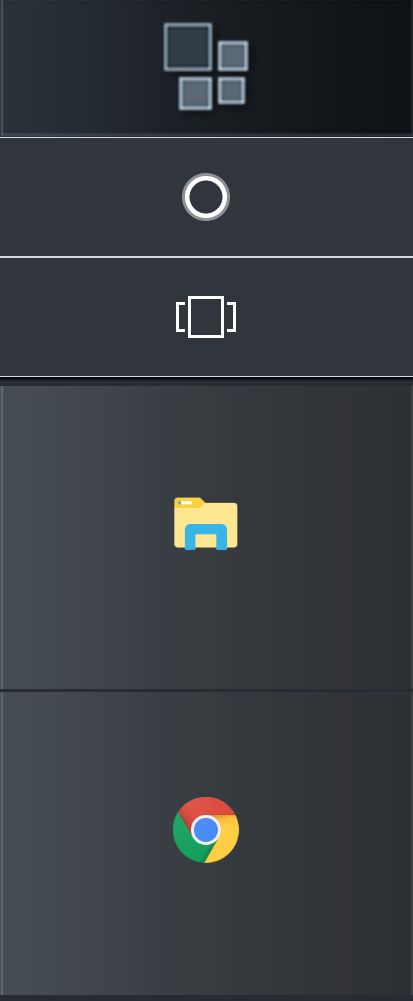
huge buttons at 300% windows display font size.

7,999 views 5 replies
Reply #1 Top

I can only find one skin as I should called Dark Theme. The skin was made in 2005 and may have several things wrong with it. Because it so old I can't point you to just one location that may fix your situation. Do you have this problem with newer skins. There are several that are dark to try. At the top of Wincustomize click on Explore and click Windowblinds. Top right in search area just type Dark and hit enter. Maybe you may find another dark skin you like there.


I make a lot of WindowBlinds but have no specific location to send you at this point. If the skin you are having the situation with is the only one it would have to be totally worked over. If you have this situation on all of the skins I have no answer for you.

Reply #2 Top

Thanks for the feedback Dave. Sorry for misspeaking, the theme I'm trying is Dark Mode by Vad_M, posted Jan 8, 2018 on Windowsblinds; it actually shows as #1 on the Wincustomize:Explore page's right-panel  "All Popular Skins" list. Was led to that theme by a HowToGeeks post, wasn't aware how many other dark themes are posted on the Wincustomize site; am new to this game (and to Win10) but seeing what a difference light-on-black text vs. the opposite makes when employed throughout the OS interface, I'm a newfound seeker. I tried out another 'Flat Dark theme' from WC, wasn't entirely satisfactory (folder navigation panel in Explorer was still white background), but the enlarged button problem went away, so that's apparently an oversight specific to the Dark Mode theme.

Anyway, you provided me a much larger toolbox to work with, thanks again!

Reply #3 Top

Lots of good skins available by talented skinners. 

I also have a pretty black skin called Flattened if you wish to check it out 

Reply #4 Top

That Flattened (or 'Flattered' during installation?) is clean-looking Dave, nice separation on the panels. Much fiddling to ensue here, cheers.

Reply #5 Top

Please check your PM (private message)