Island Dog Island Dog

WindowBlinds 8.09 Beta Update

WindowBlinds 8.09 Beta Update

Today we have released the WindowBlinds 8.09 beta.  This also addresses the issues from the last update that users reported.

Updated:

  • Fix for a fix for Firefox titlebar issue
  • Added better support for high DPI displays
  • Directory Opus and Skype 7 fixes

You can download the update from your Stardock account.  


137,437 views 53 replies
Reply #26 Top

Thank goodness I found this thread. I was going crazy uninstalling firefox and whatnot. Anyway, experiencing the same problem as above. Crash on startup. Titlebar error. Right now, I have firefox as an exclusion on WB (Beta one) and all seems to be ok.


Reply #27 Top

My first post here so firstly thanks to those who have offered their assistance with these issues. It is very much appreciated.

Regarding Firefox 35 crashing and the title bar showing no controls etc.

This worked for me (Running Windows 7 Home premium 64 bit and WindowBlinds 8.09).

To stop Firefox crashing on startup: (this workaround involves turning of FF's hardware acceleration)

1 Unload WindowBlinds.
2 Start Firefox 35, then Go to 'Options'.
3 Click the 'Advanced' tab and then untick the 'Use hardware acceleration when possible'.
4 Start WindowBlinds again and reapply.

Alternatively instead of unloading WindowBlinds, you could:

-Add Firefox to the 'Per Application' settings and select "Ignore this application and do not skin it'.
-Perform step 2 then 3 mentioned above.
-Before you Reapply the theme; either untick the "Ignore this application and do not skin it' or simply delete the entry since if this works you no longer need it.

Then to restore the title bar and 'minimise/maximise/close' buttons so everything looks right and works:

Do as has been suggested elsewhere here and

1 Start Firefox and select 'Customize'.
2 Turn the 'Title Bar' in the bottom left corner off then on again.

You may need to reapply WindowBlinds again.

This solved both my crashing and title bar issues.

My first post here since I don't stop by very often but I hope this is helpful.

Cheers :)


Reply #28 Top
Quoting GAIAStevef, reply 25
Do you have any custom addons in Firefox which possibly mess with text rendering?


A bunch, yeah,  but even starting FF in safe mode, (or Private mode) without loading any add-ons or extensions
results in the same crash immediatly at startup.

Would it help any if I send you a screenshot of the FF error page entry ?

End of GAIAStevef's quote

Unfortunately the address in that error is no help as that's just the throw exception handler and not where the issue is.

If you have further info from the crash could you send it to support@stardock.com please.

Reply #29 Top

I've been a member here since 2004 and I joined because the software made a nice change to an other wise boring desk top. I renew every year my subscription to Object Desktop for basically WindowBlinds, SoundPackager, and IconPackager. I use Firefox as my default browser and now I find that I can no longer do that because of windowBlinds. First, let say that I don't know my butt from my elbow about software that's the writers job. I purchase it expecting it to work across the board. I've read to do this and not to do the other. I tried to install Firefox 35, it downloaded and installed  but it crashed upon launch, so I opened WindowBlinds and exited the skin that I was in and chose one of the Aero skins, Aero metal by Stardock Design and Firefox launched and was also skined, but if I choose any other than the Aero skins by Stardock Design well we all know what happens.

Also, I've noticed that the WindowBlinds selections seen to have at least 4 pay skins on almost all the pages, it was not always this way, there seems to only be a handful of skinners. the Last time there was a new IconPackage was back in November of 2014. Soundpackager is worse yet with only two in 2014.

I sincerely hope that this trend will stop or I will have to rethink the value of your product to me.

Thanks for the ten years

Dave Crowell

Reply #30 Top

If you read Post #27 above davecrowell it should resolve the issues you are having, it has for others. As far as the amount of skins available for the Stardock software that you use, but unfortunately Stardock cannot force people to design for their products. I too would like to see more icon packages, more of everything for that matter, ut unfortunately it may never happen. I was hoping that Stardock themselves would hire designers to create packages for their software, but then that may mean they may have to charge for them to stay ahead. All we can do is hope.

Reply #31 Top

I've read your reply and would like to know how to unload WindowBlinds as I stated I know very little about software. Dumb it down works best lol.

Thanks Dave

Reply #32 Top

Quoting davecrowell, reply 31

I've read your reply and would like to know how to unload WindowBlinds as I stated I know very little about software. Dumb it down works best lol.

Thanks Dave
End of davecrowell's quote


Just right click on the icon in the system tray (far right of bottom taskbar) and select Unload Windowblinds Dave. When you do that Windows will apply a classic theme. Then just follow the instructions in Reply #27. :)

Reply #34 Top

Quoting davecrowell, reply 33

I'm happy, all is again well. Thank You.
End of davecrowell's quote


:)

Reply #35 Top

Quoting davecrowell, reply 29

I purchase it expecting it to work across the board. I've read to do this and not to do the other. I tried to install Firefox 35, it downloaded and installed but it crashed upon launch
End of davecrowell's quote

 Hey, it's WindowBlinds, not Mozilla frackin  Blinds.-  It works just fine with WINDOWS and IE....... maybe not so well with some sorry damn browser that wants to break stuff at every turn. Use FireFox, fine, but stop whining every time they update the damn thing and it breaks something. You FF users take the proverbial cake. Now, enjoy it.


Reply #36 Top

Quoting Wizard1956, reply 35


Quoting davecrowell,

I purchase it expecting it to work across the board. I've read to do this and not to do the other. I tried to install Firefox 35, it downloaded and installed but it crashed upon launch


 Hey, it's WindowBlinds, not Mozilla frackin  Blinds.-  It works just fine with WINDOWS and IE....... maybe not so well with some sorry damn browser that wants to break stuff at every turn. Use FireFox, fine, but stop whining every time they update the damn thing and it breaks something. You FF users take the proverbial cake. Now, enjoy it.


End of Wizard1956's quote


Such a nice response there. Just an FYI, complaints or concerns are not always "whining". I have been using Firefox for years, now, without it "breaking stuff" at every turn. It really has been compatible with Windowblinds for most of those years. This year, not so much. I'm not complaining or even whining, just putting it out there. If I have to go through multiple tweaks in order to have Firefox properly skinned by Windowblinds, then I will likely go without Windowblinds. My choice in browsers is deliberate and suits my needs. Windowblinds is mostly eye candy that I can do with or without.

Reply #37 Top

Reading through these comments I might be the only one having this problem. 8.09 of WB seems to be cutting off the top of the start menu in Win 8.1 using Start 8. I went back to 8.06 and everything is fine. Sorry I didn't take a screenshot of this. It's no big deal since I don't use any other browsers except IE. Just thought I'd throw in a report just in case someone else was having the same problem. 

Reply #38 Top

Quoting ALMonty, reply 37

Reading through these comments I might be the only one having this problem. 8.09 of WB seems to be cutting off the top of the start menu in Win 8.1 using Start 8. I went back to 8.06 and everything is fine. Sorry I didn't take a screenshot of this. It's no big deal since I don't use any other browsers except IE. Just thought I'd throw in a report just in case someone else was having the same problem. 
End of ALMonty's quote


Might just be your system AlMonty. Works perfectly here on Windows 8.1. Was it doing it on just one skin, or all skins? Did you try to apply the skin more than once to see if it cleared up?

Reply #39 Top

No it did it on all skins. Might just be me. It cut off about an 1/8 of an inch on the top of the start menus.

Reply #40 Top

Quoting ALMonty, reply 39

No it did it on all skins. Might just be me. It cut off about an 1/8 of an inch on the top of the start menus.
End of ALMonty's quote

What DPI are you using?

Reply #41 Top

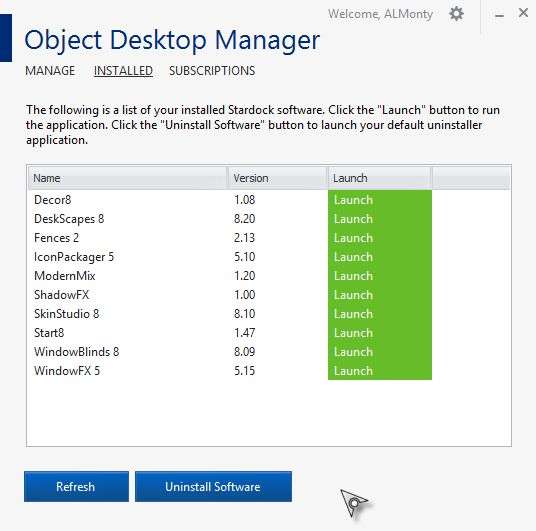
Neil I'm using a 1920x1200 monitor set at 100%. This is odd I installed 8.09 to take a screenshot to show what's happening WB shows that I have 8.06 installed but Object Desktop Manager says I have 8.09 installed.

Windows 8.1 Pro with Media Center (9600.winblue_r5.141029-1500)
WindowBlinds 8.06 (029 - Windows 8 Edition) - 64 bit OS

    Wblind.dll      2014/07/16 07:42:ll
    Wblind64.dll      2014/07/16 07:42:49
    Wbsrv.dll      2014/07/16 07:42:48
    WB8Config.exe      2014/12/19 15:10:54
    Wbload.dll           2014/07/16 07:42:43
    Screen.exe      2014/12/10 13:26:34


Reply #42 Top

Ok I fixed everything. I applied the default theme then uninstalled WB then rebooted. Installed 8.09 from ODM and rebooted again. Everything says I have 8.09 installed and the start menu is correct. I knew it was just me. Sorry I took up your time. :blush:  

Reply #43 Top

Tested the beta because of my chrome browser problem with 1 pixel gap on the left right and bottom frane with each skin.
I also opened a ticket and sended a screenshot of the problem - while i was told that there is no fix for it could you please consider looking into it.
Windows8.1 has no problem with the basic skin so windowblinds should be able to achive the same thing.Basic ( default) windows8.1 skin
The ticket is meanwhile closed since there was no fix at the time.

Reply #44 Top

Quoting benmanns, reply 43

Tested the beta because of my chrome browser problem with 1 pixel gap on the left right and bottom frane with each skin.
I also opened a ticket and sended a screenshot of the problem - while i was told that there is no fix for it could you please consider looking into it.
Windows8.1 has no problem with the basic skin so windowblinds should be able to achive the same thing.Basic ( default) windows8.1 skin
The ticket is meanwhile closed since there was no fix at the time.
End of benmanns's quote


Odd, I have been using Chrome for ages and never had an issue like that. Might be a display driver or your systems DPI settings thing.

Reply #45 Top

Quoting LightStar, reply 44

Odd, I have been using Chrome for ages and never had an issue like that. Might be a display driver or your systems DPI settings thing.
End of LightStar's quote

scaling is at 100% it is all like it should be (smaller) that is 100%.
Changed it once to simulate 4K with the use of windowblinds to show users that it is very easy to have bigger buttons so that even on a small dsiplay windowblinds could be used with this slider, also i had this problem before that.
Also scaling should have no affect on windowblinds.
And if i change the slider to medium Large ... the Problem scales aswell
 It also cant be the display driver since i update it on a regular basis also this problem existed on my previous card a GTX670 that is meanwhile replaced.
Driver is the current 347.09 i always do a clean install. 

Reply #46 Top

Quoting benmanns, reply 45


Quoting LightStar,

Odd, I have been using Chrome for ages and never had an issue like that. Might be a display driver or your systems DPI settings thing.


scaling is at 100% it is all like it should be (smaller) that is 100%.
Changed it once to simulate 4K with the use of windowblinds to show users that it is very easy to have bigger buttons so that even on a small dsiplay windowblinds could be used with this slider, also i had this problem before that.
Also scaling should have no affect on windowblinds.
And if i change the slider to medium Large ... the Problem scales aswell

Reduced 63%
Original 952 x 656

 It also cant be the display driver since i update it on a regular basis also this problem existed on my previous card a GTX670 that is meanwhile replaced.
Driver is the current 347.09 i always do a clean install. 

End of benmanns's quote


Just curious, if you're running a desktop system, have you been able to try a different monitor to see if it still occurs?

Reply #47 Top

I would like to support benmanns in this matter. Every skin has this chrome issue, exept the Aero skins by Stardock. It seems there is a transparent background layer which is too wide.

+1 Loading…
Reply #48 Top

^yay thanks so it cant be my monitor or my system
Karma for you 

Ps: I have tried another Monitor model a 24" Samsung same problem even though i knew it would not change a thing, now i have to quickly return it before class starts or someone will be pissed not having a screen at the seat LOL


Reply #49 Top

Well, I guess I have no idea then. Best to email support@stardock.com again and let them know.

Reply #50 Top

Mine still says 8.06

Windows 7 Home Premium (7601.win7sp1_gdr.141211-1742)
WindowBlinds 8.06 (029 - Windows 7 Edition) - 64 bit OS
WindowBlinds is installed correctly on this PC but the Desktop Window Manager is NOT enabled!

    Wblind.dll      2014/07/16 06:42:ll
    Wblind64.dll      2014/07/16 06:42:49
    Wbsrv.dll      2014/07/16 06:42:48
    WB8Config.exe      2015/01/13 11:30:54
    Wbload.dll           2014/07/16 06:42:43
    Screen.exe      2015/01/13 11:30:34