Does Start8 help with infernal charms pop-ups?

Hi there. I've towed with getting Stardock software for many years, having been through every edition of Windows for close to 25. Never quite did so.

Got a bit nervous today when it took a manual validation from a helpful Stardock rep at Facebook who helped me to even sign in and log into this forum! What does that say of the software itself? (Not necessarily anything I suppose :annoyed:

So I have a new Lenovo Z580, first time I've given up the (first beige, then black) big boxes for a laptop. Now that the price differential is all but gone, nice to be able to unplug and roam.

One reason I've never took the plunge on Stardock is that I liked Windows, lived with its shortcomings and didn't feel a need to futz or gussy it up.

BUT many a Z580 owner is being driven nuts by being working in the desktop, and using the trackpad just to do one's work, and the charms come up and you get dumped into TileWorld (as David Pogue's great book I just got so adroitly puts it.) I've tried changing the Synaptics and Win8 settings, to no avail. It doesn't happen hardly at all with my external keyboard plugged in, so ... maybe Start8 won't be able to resolve the trackpad issues.

SO, both Start8 and Classic Shell allow you to disable the 'hot corners.' Will that be enough to resolve or at least reduce the frustrating drop-to-TileWorlds?

The other concern I've had about trying these interface add-ons is that I don't want to 'break' Windows or find that uninstalling doesn't get me back to a clean default setup. Maximum PC gives this app a thumb's up, it's surely cheap enough, I just want to roll back in case Microsoft or Lenovo ever fix or resolve the issue (holding breath;-)

The fact there are few screams of dismay here in this forum, days between 'latest replies' gives me a sense that this stuff is solid and takes all those concerns into account. Is that your experience? Do you think I'll find it reins in the twitchy Charms?;-)

(OK, one more thing - the default type for this box, though changeable, should be a bit bigger for us tired ol' eyes who still kvetch about Facebook's years-ago change to tinier type. Give us old guys/eyes a break!;-)

 

3,605 views 9 replies
Reply #1 Top

PS - how does one edit one's profile here? I went to mine and don't see such an option. Thanks!

Reply #2 Top

We offer a free 30 day trial to see if the software suits your needs.

I should also mention that if you have a touch pad that certain movements on that can cause the charms bar to open.  This can be disabled from your mouse / touch pad properties in control panel.

Reply #3 Top

I loaded Start8 on our old Dell 1530 that I updated to Win8 and it works a treat.  I also loaded it on a (coincidentally) Lenovo Z580 that we bought my father in law recently.  Even with the hot corner disable, etc. checked, the charms bar and time/date keep jumping out when you move around using the trackpad in desktop mode.  I'm hoping an external mouse will help stop it, as it is really infuriating.  Start8 seems powerless to stop it.  Maybe I need to explore the Control Panel options too, next time I am round there.

I think there is something odd about that particular machine/trackpad. 

Reply #4 Top

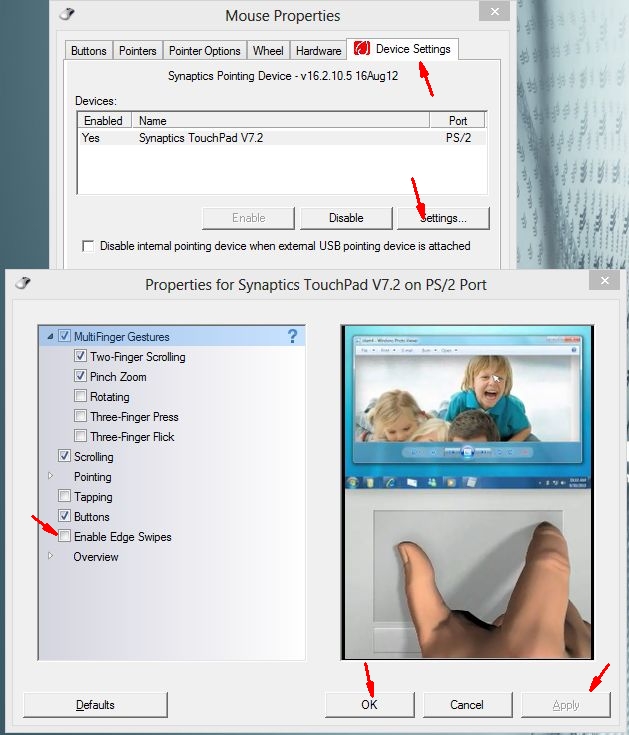
I'm guessing that you've got a Synaptics trackpad, which supports a feature called "Edge Swipes" under Windows 8.


Access the Mouse settings via Control Panel and uncheck "Enable Edge Swipes". Problem solved - no more annoying Charms Bar.


JohnB

Reply #5 Top

Yes, I have a Synaptics trackpad, but when I access the mouse settings on my Lenovo I do NOT see an 'enable edge swipes' to check or uncheck! Closest I see is 'edge motion' and it doesn't have any such setting. Can someone with a Lenovo Z580 please show me where this feature is, if it does exist in the ClickPad 8.1 software I got with the machine??

Reply #6 Top

Yes, Ianwood, an external keyboard/mouse DO reduce if not eliminate the infernal charms pop-ups on the Z580 - but I want to use my trackpad when mobile, not an external mouse! This is driving many Z580 owners nuts.

Reply #7 Top

Here's an image of the method for disabling Edge Swpes for a Synaptics touchpad.

If your Settings don't look like this, then you may be using an older driver (or possibly a more generic driver from Lenovo) which doesn't let you access the Edge Swipe option. If necessary, you can download the latest driver from Synaptics here:

http://www.synaptics.com/resources/drivers


Reply #8 Top

Well isn't that interesting!! Thanks for the screenshots. The device settings that pop up for ME (remember, I just got the Z580 - it was a Nov. 2012 build but the Staples set-up folks updated the drivers) aren't Touchpad 7.2, but Clickpad 8.1 - and that option is NOT in the list. BUT I believe the driver number is the same!! Not that I'd look forward to a rollback anyway. What the??? (Sometimes I don't blame some colleagues who simply tell me... Get a Mac!)

Reply #9 Top

PS - note that Synaptics recommends getting your driver from the manufacturer, not their stock driver. But... sigh;-/