Changing background of text boxes on Internet sites

Been using WB for many years, and have installed a skin I love except for how dark the text boxes on some sites are. I've purchased SKS Pro to deal with this...except I can't seem to find where this particular element is. The boxes are medium gray on some sites, which makes the cursor barely visible and any background text indicating what info is needed in box almost invisible. Running Win 7. I've tried changing background colors of presets for this skin, but I see no changes when applying. Although it say IE in SKS, does the browser actually matter -- I use Opera and Chrome. I thought this would be easy, but I'm not finding the appropriate setting to change.

3,464 views 4 replies
Reply #1 Top

open the "change skin color" section, click on the combo box to "show me the skin defined colors" and change the "window background" color.

of course this will change all of your window colors to this one.

Reply #2 Top


sks skin colors

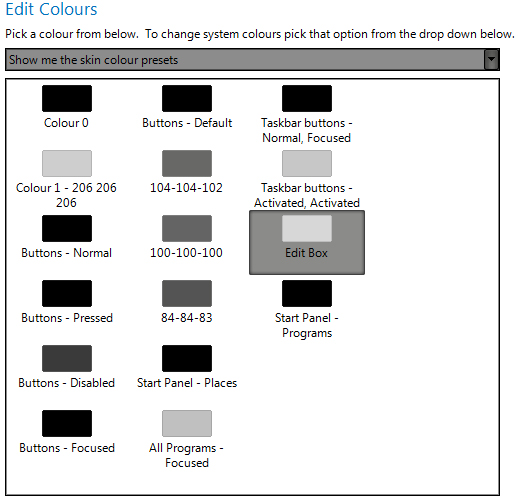
Here's the skin I'm trying to fix. Can I assume edit box is the background for those text input fields that are too dark? Oddly, there's no consistency. Some boxes on a site have white backgrounds, which is fine, but others have grey that is closer to Edit Box or even somewhat darker. Because the presets are not all labeled as they are in your example, I don't really know what to change.


Reply #3 Top

Quoting ed_b, reply 2
Because the presets are not all labeled as they are in your example
End of ed_b's quote

You are almost in the right place. Towards the top of the screen you have pictured, click on the arrow to the right of "Show me the skin colour presets".  A dropdown menu will pop up with "Show me the skin defined system colours" as in GMC's picture, click on that, the group will change to the group he's showing you.

Reply #4 Top

Ah ha. Thanks much for pointing the way.


Would the text input box background color be the window background color? If so, I'm assuming that when the box color isn't specified on the web page, the default background color appears instead. Lots to learn.