
New Skinner needing help

I am new to this, just started last night. I can not get the places list to align right. I have tried everything listed in Vampothika's tutorial and I can not seem to fix it. I am creating this for my son and daughter, this is the second theme I have tried I thought it was just the picture on my first one.

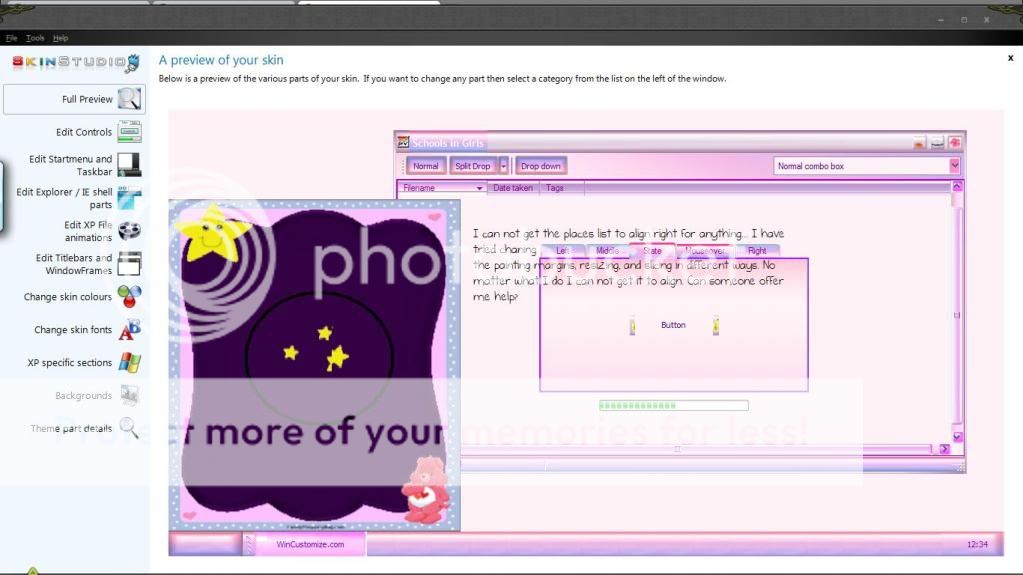
I circled the stars... the places list is sitting up to high. I don't know how to fix that. Can someone help?
 

9,337 views 18 replies
Reply #1 Top

Places stretches and moves around, so I think you're going to have to either make the stars a glyph, so you have more control over where they are, OR make them a separate layer and use that layer as a 1-layer start menu animation (which since it's just one layer, won't be animated.)

Reply #2 Top

Quoting k10w3, reply 1
OR make them a separate layer and use that layer as a 1-layer start menu animation (which since it's just one layer, won't be animated.)
End of k10w3's quote

Good suggestion, Karen. Just what I was gonna suggest (assuming the OP has sks pro).

Reply #3 Top

If you wonder what a glyph is It´s a "Png" image that sits on top of another layer and doesent get affected by the stretching that happens on some parts, for instance places-list ;)

Reply #4 Top

Ok so do I do that through photoshop or from sks itself?


Thanks for helping me out


Reply #5 Top

You create the image in photoshop, and then import it into the "glyph" section of the places menu in SKS.  Start menu-->Right hand side-->Places List-->Glyph tab

Reply #6 Top

Save image as png in photoshop then apply as Glyph in sks... If the image "passes" over on the progams-list side you have to make a glyph for each side and Position them so they fit together :star:

Reply #7 Top

lol ;)

Reply #8 Top

Ok thanks so much... I guess I will try that out now

Reply #9 Top

Quoting Vampothika, reply 7
lol
End of Vampothika's quote

Vamps and I are sympatico. :sun:

Reply #10 Top

Was Us both actually ^_^

Reply #11 Top

Kudos for the time and effort you are putting into making the computing experience fun, colorful and unique for your children. 5* Good luck with your project. :thumbsup:

 Have you considered uploading it here when you are done?

Reply #12 Top

Thanks Wizard... Yes I am... I looked everywhere just to download one but of course not many kids need windowblinds so no one ever made one for them. So far I am not liking what it is looking like lol


Reply #13 Top

Quoting neone6, reply 10
Was Us both actually
End of neone6's quote

That's scary, Andy.   But you know, I'm pretty sympatico with both of you.

Reply #14 Top

Are the margins supposed to be set to 0 or is that only when they are fine that they will be 0? I mean if there is a number say 60 do I need to change that to a 0? 

Reply #15 Top

Quoting k10w3, reply 13
Quoting neone6, reply 10Was Us both actually

That's scary, Andy.   But you know, I'm pretty sympatico with both of you.
End of k10w3's quote
We live together so although NOT mixing our accounts anymore it´s obvious we talk with eachother about stuff :sun:

EDIT: H4RDSTYLER on the other hand is a complete other matter, there the mixing is Full on ! ;)

Reply #16 Top

Quoting skysnav, reply 14
Are the margins supposed to be set to 0 or is that only when they are fine that they will be 0? I mean if there is a number say 60 do I need to change that to a 0? 
End of skysnav's quote
A glyph is not affected by stretching, so you dont have to "covre/safe" that with "Painting" margins.

Reply #17 Top

painting margins can also fix the issue push the top painting margin in places list down over that star. could help as well.

painting margins are used so graphics dont get stretched or distorted out of shape


didnt karen promise me a can of coke or something????..........