



Need serious help
can't get my skin right
 Stardock Forums
Ok, I am somewhat new to the whole skinning thing. I have skinstudio 7 (free) and I can't seem to get the skinning process correct.
I guess I just don't know what perameters in photoshop I can edit/make new files with.
Ok so here goes my explanation: I go into skin studio, I create a new skin. I then proceed to edit lets say.....the start menu. I go to either edit the "existing" top part of the menu bar or I create my own. When I do either of those though and I apply it, it doesn't have a transparent edge, instead I get a huge box around the whole top part of my new top part of my menu.
The same thing happens when I edit the borders of folder windows (sides, top, bottom). There isn't a transparent "shadow" instead it's a solid white back ground. Here is a link to show you what I mean and how do I take care of this.
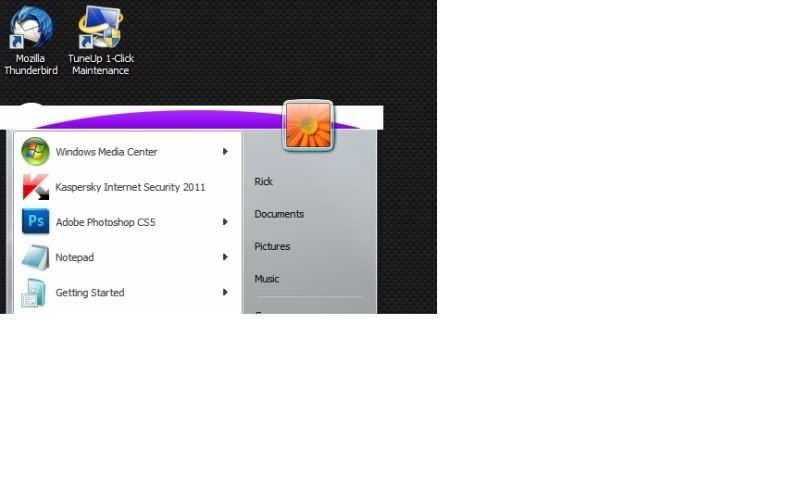
I am using the advanced section of skinstudio free, should I be using a different part like beginner, or the UI setting. And also if it is a problem in photoshop, how do I edit and save these in photoshop? I've noticed that people create their own size menus and buttons and everything. I can't get any of it to work without skin studio not reading it or it being "off". I'm so confused because I have so many great ideas.
Thanks guys anything will help
 WinCustomize Forums

