DX Drag & Drop menu size?
I need help with a decision.
from  WinCustomize Forums
WinCustomize Forums
Back after another long loss of motivation. Hopefully I'll get something finished this time...
I'm creating an all-in-one sidebar on DesktopX. Two sections - widgets, and drag & drop menus.
The amount of space I'll probably be working with for the DnD will be 200x475. I'm using sViz's scrolling DnD template.
I will probably create another version for higher resolutions when I get a new computer, so keep that in mind.
Anyway, I need help on how I should do the items on the DnD menu. There's two areas I need to make a decision in:
- On XP, icons are often in 32x32. I am going to do some code so you can change the icon of the dropped item, but should I keep the 48x48 icons (meaning default XP icons are pixelated)? Does Vista/Seven support 48x48 as standard?
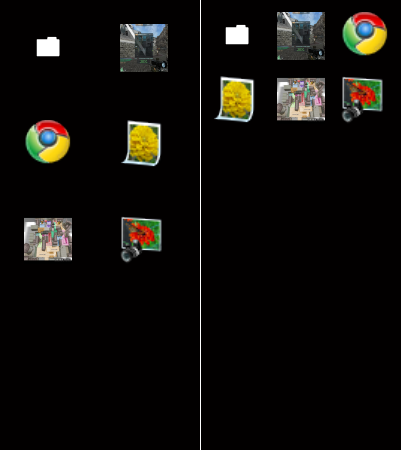
- I'm going to have space for ~8 different menus. Should I order the items as three horizontal (meaning heaps of icons), or make it more clean with two horizontal (still allowing 8 icons to be visible, keeping in mind there is scrolling support)
Here's a mockup I did of the "three horizontal items" and "two horizontal items" at 48x48. What do you think?