Start Menu moves upon mouseover

Good afternoon,


Pretty new to Objectdock and am thinking of purchasing the full version but one issue bothers me.  On my Windows 7 32 bit OS while using Version 1.90 build 536 of objectdock the start menu moves once I move the mouse over the menu. After pausing for about a second the menu will move to where my windows task bar is currently being hidden by Objectdock.


I have included a picture to show the issue.
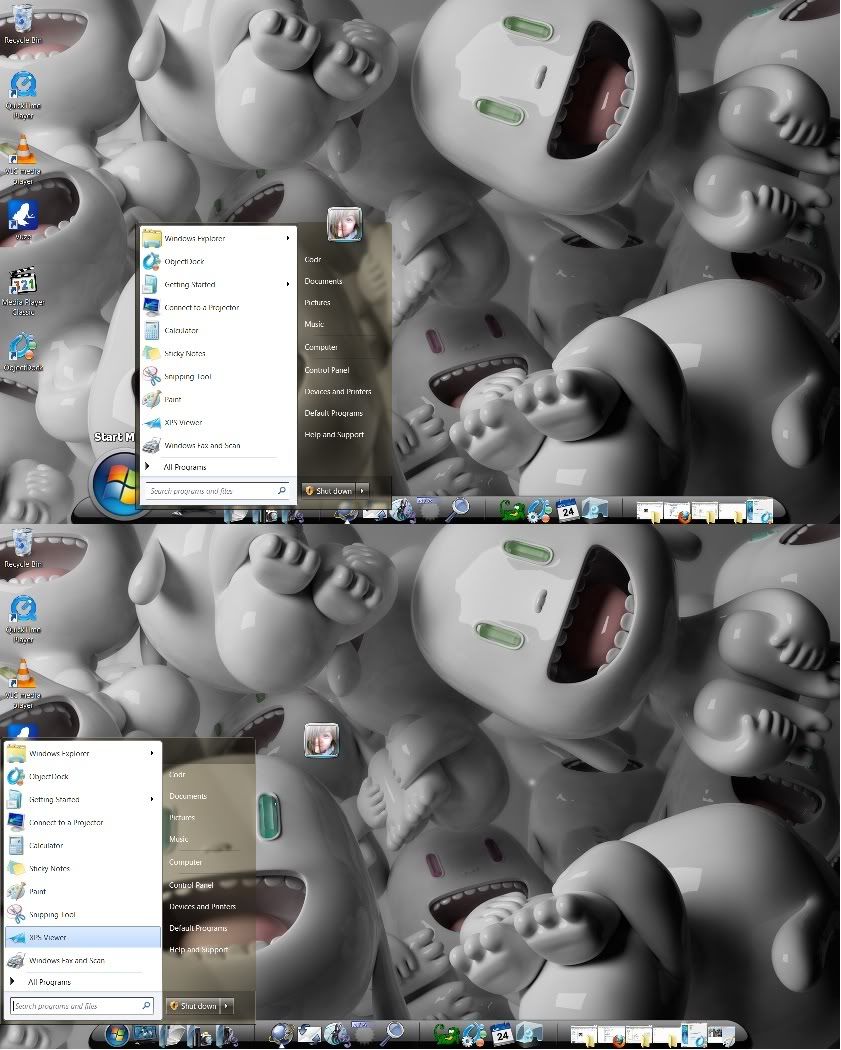
 

Screenshots of moving start menu


I have uninstalled and reinstalled. Not used any new docklets and the problem persists.


Any help would be greatly appreciated.


-djcodr

3,050 views 12 replies
Reply #1 Top

Try moving the Zoomer Dock at a different screen position. 

Even though you are using ObjectDock to hide the Windows Taskbar since you have the Dock at the bottom it may be picking it up for some reason.  You also just may have found a bug,  not sure if it is known.

Reply #3 Top

That's the dock you have create using Object Dock

Reply #4 Top

I moved the dock to all four positions, it keeps going back to where the taskbar is hidden.

Reply #5 Top

I take it you are running the free version of Object Dock.  I just looked at it on the Stardock Product page and you should be able to move the dock to all four edges and it stay there.  If it's not doing that I don't know what to say especially if you have uninstalled and reinstalled. 

Question, between uninstalling and reinstalling did you reboot?

Reply #6 Top

you should be able to move the dock to all four edges and it stay there.
End of quote

Psst, Phiily; it is the start menu from the start menu docklet that is moving not the dock.


It may be a version 1.9/Windows7 thing, the Beta of version 2.0 runnings much better on XP, Vista and 7 than version 1.9 did.

Since it is in beta there is no free version, you would have to purchase, the bundle includes both the 1.9 version and 2.0 Beta.

https://www.stardock.com/products/objectdock/

Reply #7 Top

Quoting Cavan1, reply 6

you should be able to move the dock to all four edges and it stay there.


Psst, Phiily; it is the start menu from the start menu docklet that is moving not the dock.


It may be a version 1.9/Windows7 thing, the Beta of version 2.0 runnings much better on XP, Vista and 7 than version 1.9 did.

Since it is in beta there is no free version, you would have to purchase, the bundle includes both the 1.9 version and 2.0 Beta.

https://www.stardock.com/products/objectdock/
End of Cavan1's quote

Yeah I caught that but just thought it might be the dock location (bottom of screen) that might be the problem.

Reply #9 Top

Well unless someone else comes by with the answer you should probably consider emailing support@startdock.com

Reply #10 Top

Thought I would add that with version 1.9 the start menu docklet is hit and miss at best on all Windows OSes.

It is one of the improvements in version 2.0.

Reply #11 Top

It is one of the improvements in version 2.0.
End of quote

Improvement? On Win7/64bit it launches the start menu(better than 1.9, yes) but the right side background  is missing. Half a start menu does not an improvement make.

Reply #12 Top

Half a start menu does not an improvement make.
End of quote

Did Jeff not get that fixed in the Beta update, I am still on XP.

As far as an improvement, in 1.9 even for some on XP it would not always work. It seems to be more stable in 2.0 at opening the start menu on all OS than 1.9 ever was.