Random Ship Extras Sticking Out

It's not game-breaking, but I'm facing a weird and annoying bug. I'm playing the game with the Dominion of Korx, but my ship designs are displaying an irritating bug. My design philosophy is to make ships semi-related to mythical creatures, and as such they go as: Wasp, Dark Phoenix, Gryphon, Roc and Dragon. The problem is that, in order to make the ships resemble the creatures they're named after, I make copious use of the extra part that looks like a sail or an insect carapace, which is cultural to the Korx. But once I build these ships, they will have this extra sticking in odd places of the design, for no apparent reason (I didn't design them like that). They also have some other critical parts with their position inverted. Anyone knows what is causing this? I really hate to spend that much time carefully designing my ships for this bug to screw all over the design...

Take a look, this is Exhibit C, how the Gryphon Class looks like:
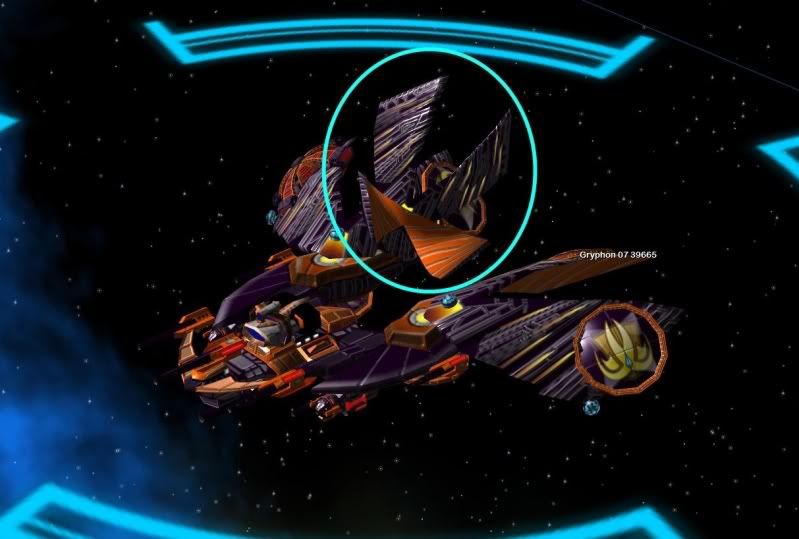
Exhibit C

Exhibit D, how the Gryphon Class SHOULD look:
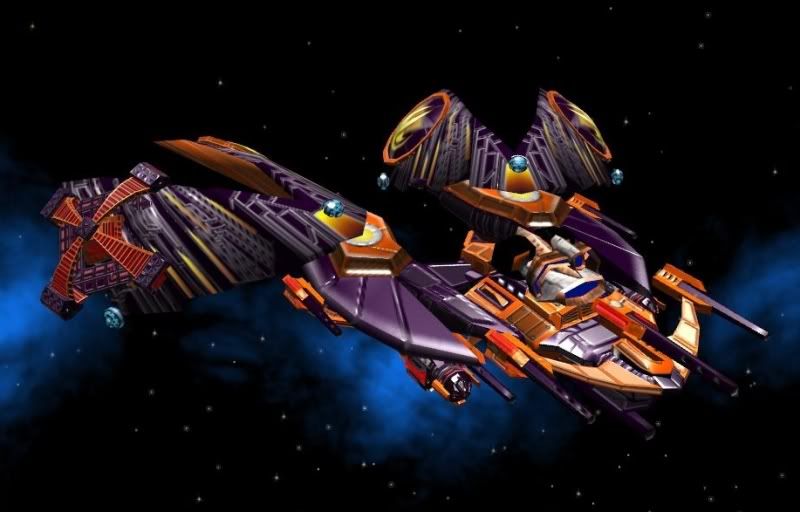
Exhibit D


Exhibit B 1-2, how the Roc should look:
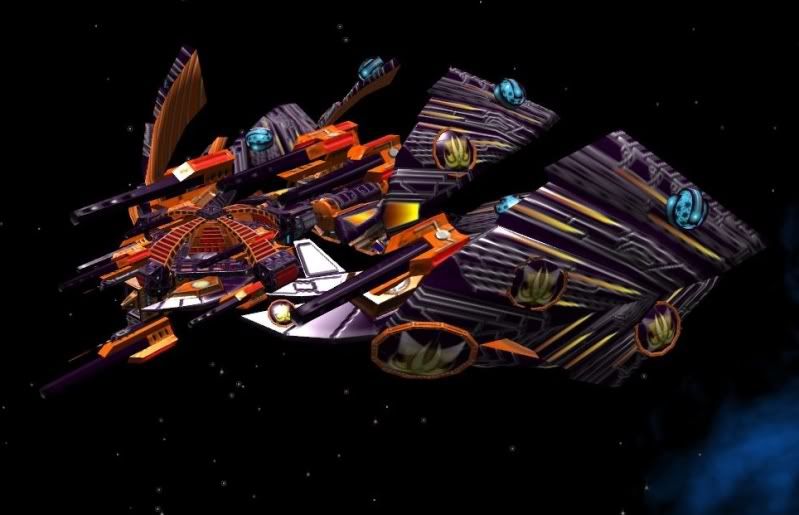
Exhibit B1


Exhibit B2


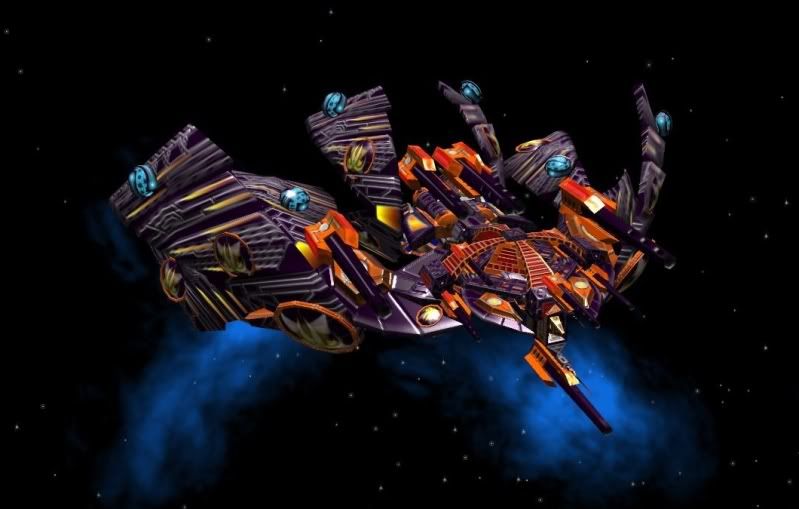
This is Exhibit A, how it looks when built:
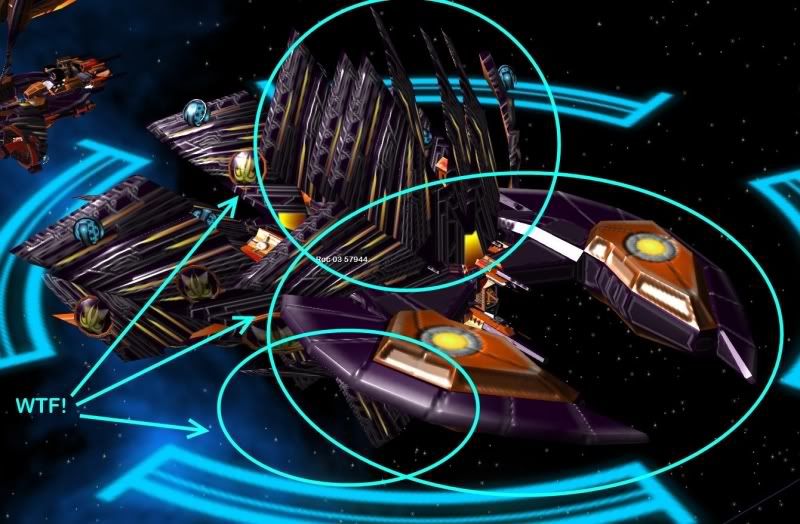
Exhibit A

I couldn't find a post dealing with this bug. Maybe I just couldn't find the right terms. But this is getting into my nerves and I can't get myself to play it with these ugly-a** ships under my command. Any clues?

8,655 views 14 replies
Reply #1 Top

As the Korx being the masters of Trade/Economic exploits, they'll surely get a refund from those that build their ships XD

Sorry, no clue....

Reply #2 Top

Well, that's precisely why the designs have my logo stuck in every single available space of the ships... unfortunately, I'm getting no refound. Even if I try and make the design again, the new design will still have the same problems.

Reply #3 Top

  I had something like this but I don't know if this will help. After you make a ship in ship template and save it and if it looks like not, what you made, keep it. Now make a new game and see if it is what you made or not. Most of the time, for me it is right but in your case I don't know. Try it and see?

Reply #4 Top

No deal. The templates show the ship exactly how it should have been by the design, but once built and in-game, it turns into the mess I`ve shown... and I`ve tried starting a new game. The same problem if I use the old designs or create new ones...

Reply #6 Top

I have a similar bug and it may be related.  If I put to many objects on a ship some of the objects will disappear when I go to build the ship.  They will look fine in the ship creator but as soon as I build them on a map parts will be missing or tearing will occur on some of the parts.  If I reduce the number of parts on the ship that seems to fix the issue for me.  Irritating I know and I don't know the exact number of parts it takes before this bug happens. It kinda defeats the purpose of being able to create a ship if you have a limit to the number of parts you can use before the ship starts screwing up.

Reply #7 Top

After all this time and a complete computer rework and still the same issue...


Started a new game, made new designs and still, the same issue. I don't even need to put many parts into a ship, with 10 parts it already start falling apart once I actually produce them.


Is there an way to find the files of the custom-made ships so I can poke around there. I'm having some trouble finding out where it is (if the game lets you work with them at all, that is).

Reply #8 Top

Try this location:

C:\Users\....\Documents\My Games\GC2TwilightArnor\ships

There's also a template-folder there, if you are using that.

Reply #9 Top

Have you had this problem?  After you make a some ships then start a new game thinking that you don't have make any more ships. The game dosen't find your ships but when you make the same ship it finds it and says you shouldn't make same ship with same name and about that time I want to smack CPU for being stupid :grin:   because I already made the ship in the last game. Now I am going to refresh but how?   I deleted the ship file and that didn't work. Tonight I am going to delete the My Game ToA file and start over.

edit:

@Mxxx

I didn't know that and that would solve some problems in the past. That is where your problems are then and possible mine too!


Reply #10 Top

Quoting GmOOnii, reply 9
Have you had this problem?  After you make a some ships then start a new game thinking that you don't have make any more ships. The game dosen't find your ships but when you make the same ship it finds it and says you shouldn't make same ship with same name and about that time I want to smack CPU for being stupid   because I already made the ship in the last game. Now I am going to refresh but how?   I deleted the ship file and that didn't work. Tonight I am going to delete the My Game ToA file and start over.
End of GmOOnii's quote

Same here, also vice versa: You uncheck "save ship design to hard drive" and delete a ship you won't need anymore,  and it won't show up in a current game. But if you start another game it will re-appear, and when you check the "ship"-folder you can see it hasn't been deleted at all.

Reply #12 Top

Well, what can I say.... Sandro's thread had ... more pics ....  :-"

Seriously, sorry, usually I ignore the Bug-section. GalCiv2 is a pretty hopeless in most cases... just made a joke in the first reply and thus, it stayed within "My replies".

Anyway, you're welcome to join us. Here :beer: the first is on the house XD

Reply #13 Top

If the parts themselves are getting corrupted visually, try turning off the advanced rendering options. If parts are just getting rearranged oddly, that's not something I recall seeing recently, so please contact support@stardock.com about that to see if they have any ideas.

Reply #14 Top

Done that, awaiting reply. It is not corrupted visuals, at least it doesn't look like it is corrupted. Anyway, already tried several graphical options, disabling Advanced Rendering does nothing.


Just like the googles...