Xen

...beta testing

Howdy all. :)

I'm working on a suite of DesktopX objects designed to make using DX Builder mode a little easier for users. I call it Xen. I'm looking for dedicated beta-testers to let me know what's broken, what could be improved, and what other features could be added.

The first component that's ready for testing is the Xen Group Control.
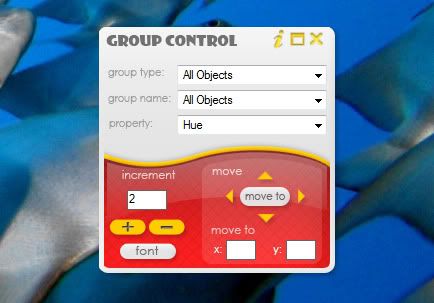
It is designed to make it easier to change the properties of a group of objects--be they an actual group, or just all text objects.

Features:

-Control All objects, children of an object, all text objects, or a group of objects.
-Control: font properties, hue, brightness, contrast, opacity, visibility, or move several objects at once.
-Includes a help document with instructions

With early feedback I've also added the ability to change text border.


To Use:

Just import the object into your DX Builder project, or load your project then run Xen Group Control. See the help document for details.


Download the Xen Group Control beta 2 - HERE

See it in action - HERE

13,727 views 24 replies +1 Loading…
Reply #1 Top

:grin:    I am a bit behind (oh, I started that again, look for thread hijack). But I am excited about trying this out! Thanks, Eve! I will be on it as soon as I get finished reinstalling my laptop.

Reply #2 Top

eve, that seriously looks awsome, and alot more easier than the current dx system way of doing things...!!! i would like to volunteer if thats okay,even though im still a newbie with dx and jim has to hold my hand 90% of the time lol

Reply #3 Top

Thanks. I'd love to hear from all skill levels. Let me know how it works for you or ways it can be improved.

Reply #4 Top

Cool, I've been wondering when We would start to see some of this stuff. :thumbsup:

Reply #5 Top

Xen...I love that name. It makes it sound like you are bringing serenity to the DX folks (I believe you are).  |-)   You, my dear, are brilliant!

Reply #6 Top

Looks useful and impressive as always. I am eager to try it.

404 not found for "Download the Xen Group Control beta 2 - HERE" Please correct it. Thanks.

Reply #7 Top

Quoting superman, reply 6
Looks useful and impressive as always. I am eager to try it.

404 not found for "Download the Xen Group Control beta 2 - HERE" Please correct it. Thanks.
End of superman's quote

Worked fine for me.  >_>

Reply #8 Top

My browser might be the problem. Actually I run backup only 2 days ago. So I only have Firefox 3.0.8 and IE 6.0.

The link for me when I click is http://www.box.net/shared/b8q7ks5of2 Whats urs. Thanks

Reply #9 Top

Quoting superman, reply 8
My browser might be the problem. Actually I run backup only 2 days ago. So I only have Firefox 3.0.8 and IE 6.0.

The link for me when I click is http://www.box.net/shared/b8q7ks5of2 Whats urs. Thanks
End of superman's quote

Same here...IE8.

Reply #10 Top
This looks Awesome.  Only been able to play with it for a little while but this will make things a lot easier  to work with groups. I really like the idea of being able to change the font and color of all the text objects at the same time. There have been so many times I have started with one color and then later decided another color would work best. This would make is so much easier.  Love the idea of being able to move  children inside the group
 
Thank you for all your efforts to make DX fun to work with.. And for all the help you have personally give me...  
Reply #11 Top

Thanks everyone. Looking forward to hearing your suggestions and bug reports.

superman, I don't think your security likes box.net website. Send me an email (check your PMs) so I can send you the Group Control.

Reply #12 Top

So, are we able to put in a specific color number code, or just bump the hue in increments? The latter won't alter the color of black or white text.

Reply #13 Top

Quoting RedneckDude, reply 12
So, are we able to put in a specific color number code, or just bump the hue in increments? The latter won't alter the color of black or white text.
End of RedneckDude's quote

Click on font you will see there is a place to pick the color you want for the text

Reply #14 Top

Click on font you will see there is a place to pick the color you want for the text
End of quote

Thanks! I missed that...

Reply #15 Top

Even I may be able to use this!;P You rock! 5* :thumbsup:

Reply #16 Top

Quoting RedneckDude, reply 14

Click on font you will see there is a place to pick the color you want for the text


Thanks! I missed that...
End of RedneckDude's quote


Your welcome..  Being able to change font and color of text all at once is the best thing since sliced bread...

Reply #17 Top

I tried my hand at the ability to do states separately [for text objects only at the moment], but hit a stumbling block. Oh, you can change the states separately all right, assuming that's what you want to do, but if there are any properties you don't want to change (i.e. the <No Change> option) that's when things get sticky and your alternate states will revert to the default state settings. 

There are two ways around this, though some expediency is lost. 

1) You have to set every property every time. Meaning if your text object's Mouse Over state has bold on and you don't want that to change, you'd have to set bold to on every time instead of just leaving it at <No Change>.

2) You could have a prompt (before you even get to the settings) asking which state you want to change (all or a specific one) every time.

Personally, I think option 2 is more sensible. But, what do you guys think? And is the added benefit of changing states separately worth this extra step on your end?

+1 Loading…
Reply #18 Top

Number 2, and it's worth it to me!  Wiz is right....you do rock!!   Thank you so much for all you do to advance DX!!!!

Reply #19 Top

Quoting RedneckDude, reply 18
Thank you so much for all you do to advance DX!!!!
End of RedneckDude's quote

Ditto

Reply #20 Top

Alrighty. Prompt it is. :thumbsup:

Reply #22 Top

Coming Soon...

Xen Quick Creation


  • Click to create
  • Set main properties on the fly
  • Drag and Drop to create
  • Drag and Drop as child


Reply #23 Top

neato!

Reply #24 Top

Wow....I think DX is gonna get a whole lot livelier, sViz!  5*