


Bug Report - OD+, Separators & Dual screens
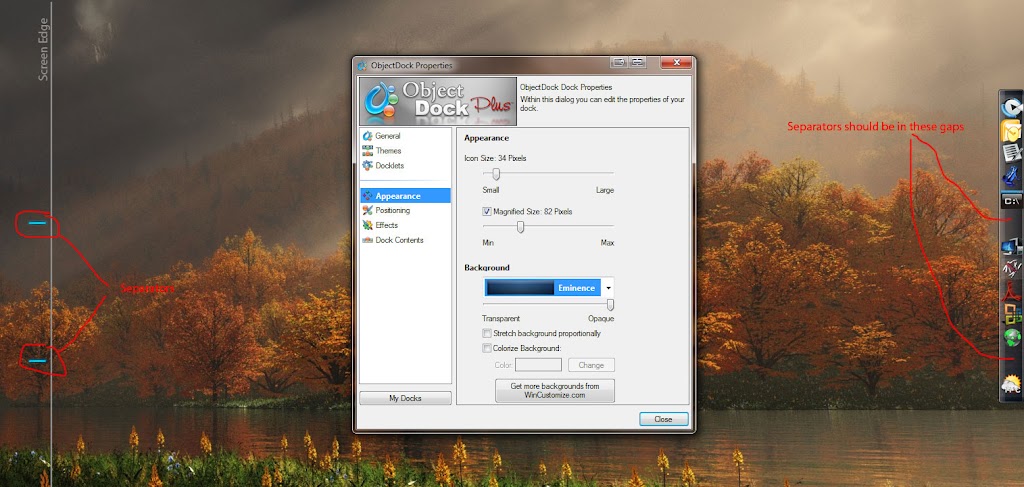
Separators appear on wrong screen
http://lh3.ggpht.com/_zqvSFl83xHU/Su7zHJpYMEI/AAAAAAAABIY/tJeP4QQ9Ekc/s1024/ObjectDock.jpg Stardock Forums
Hi,
Setting up OD+ on a dual screen system. The dock (non-tabbed) is on the right side of the right monitor, the separators appear on the right side, of the left monitor. The separators appear on-top of everything else.
Ok brief system specs:
- Windows 7 Pro x64
- ObjectDock Plus
- Dual screen (2 * 19" @ 1440x900)
- ATI Radeon 3850
Attached is a relevant screenshot. I have drawn in the left/right monitor boundary.
Also here is my current CurrentTheme.ini
[Settings]
NumberOfDocks=1
FinishedSaving=1
[Settings1]
AlternateZoomEffect=0
ZoomEnabled=1
ZoomEnabledOver128=0
ZoomMode=42
sizeNormal=34
sizeZoom=82
IconTransparency=255
ZoomToVisible=1
HideForMaxed=0
DockPosition=3
ZOrder=0
ProportionalStretch=0
autohideShowDelay=400
colorized=-1
TaskbarPosition=0
TaskbarEnabled=0
TaskbarMinimizedOnly=0
SystrayEnabled=0
ForcedEdgeOffset=0
taskbarOffsetLast=0
KeepAboveTaskbar=0
Autohide=0
ReserveEdge=1
LastMonitor=\\.\DISPLAY2
Group1Count=13
[Appearance1]
Background=..\..\..\Users\robinf\Documents\Stardock\ObjectDock Library\Backgrounds\Tabbed\Eminence\background.ini
BackgroundTransparency=255
RunningIndicator=.\Running Indicators\White Triangle.png
[Item(1-1)]
Type=Shortcut
Target=.mp3
RunVisibility=5
UsePopup=0
IconManuallySet=1
TextManuallySet=0
Title=Windows Media Player
Image=c:\users\robinf\documents\stardock\objectdock library\bundled images\hydropro\hp-mediaplayer-dock-512.png
[Item(1-2)]
Type=Shortcut
Target=Email
RunVisibility=5
UsePopup=0
IconManuallySet=1
TextManuallySet=0
Title=Microsoft Office Outlook
Image=c:\users\robinf\documents\stardock\objectdock library\bundled images\applications\softdimension\outlook .png
[Item(1-3)]
Type=Shortcut
Target=C:\Program Files (x86)\TextPad 5\TextPad.exe
RunVisibility=5
UsePopup=0
IconManuallySet=1
TextManuallySet=0
Title=TextPad
Image=c:\users\robinf\documents\stardock\objectdock library\bundled images\applications\notepad.png
[Item(1-4)]
Type=Shortcut
Target=C:\Program Files (x86)\Vuze\Azureus.exe
RunVisibility=5
UsePopup=0
IconManuallySet=1
TextManuallySet=0
Title=Azureus.exe
Image=c:\users\robinf\documents\stardock\objectdock library\bundled images\applications\azureus.png
[Item(1-5)]
Type=Shortcut
Target=C:\Program Files (x86)\JPSoft\4NT8\4nt.exe
RunVisibility=5
UsePopup=0
IconManuallySet=1
TextManuallySet=0
Title=4NT
Image=c:\users\robinf\documents\stardock\objectdock library\bundled images\applications\my ms-dos.png
[Item(1-6)]
Type=Separator
[Item(1-7)]
Type=Docklet
Docklet=.\Docklets\StackDocklet2.0\StackDocklet.dll
Title=Explore
Folder=14001F44471A0359723FA74489C55595FE6B30EE200000001A00EEBBFE2300001000D09AD3FD8F23AF46ADB46C85480369C700005600310000000000573BE974100053746172646F636B00003E0008000400EFBE563B7280573BE9742A0000005B3E0100000001000000000000000000000000000000530074006100720064006F0063006B000000180050003100000000005E3BAA541000537461636B7300003A0008000400EFBE573B54715E3BAA542A000000DB22020000001800000000000000000000000000000053007400610063006B0073000000160052003100000000005E3B195910004578706C6F7265003C0008000400EFBE573BBB725E3B19592A000000812302000000030000000000000000000000000000004500780070006C006F0072006500000016000000
ViewAs=Auto
Icon=Bundled Images\HYDROPRO\MyComputer.png
IconUse=Stack
ShowOpenFolder=True
[Item(1-8)]
Type=Docklet
Docklet=.\Docklets\StackDocklet2.0\StackDocklet.dll
Title=Dev Tools
Folder=14001F44471A0359723FA74489C55595FE6B30EE200000001A00EEBBFE2300001000D09AD3FD8F23AF46ADB46C85480369C700005600310000000000573BE974100053746172646F636B00003E0008000400EFBE563B7280573BE9742A0000005B3E0100000001000000000000000000000000000000530074006100720064006F0063006B00000018005000310000000000573BC1721000537461636B7300003A0008000400EFBE573B5471573BC1722A000000DB22020000001800000000000000000000000000000053007400610063006B007300000016005800310000000000573BEB7E1100444556544F4F7E310000400008000400EFBE573B5471573BEB7E2A000000FD220200000002000000000000000000000000000000440065007600200054006F006F006C007300000018000000
ViewAs=Grid
Icon=Bundled Images\Applications\dev2.png
IconUse=Stack
ShowOpenFolder=True
[Item(1-9)]
Type=Docklet
Docklet=.\Docklets\StackDocklet2.0\StackDocklet.dll
Title=Adobe
Folder=14001F44471A0359723FA74489C55595FE6B30EE200000001A00EEBBFE2300001000D09AD3FD8F23AF46ADB46C85480369C700005600310000000000573BE974100053746172646F636B00003E0008000400EFBE563B7280573BE9742A0000005B3E0100000001000000000000000000000000000000530074006100720064006F0063006B00000018005000310000000000573BC1721000537461636B7300003A0008000400EFBE573B5471573BC1722A000000DB22020000001800000000000000000000000000000053007400610063006B007300000016004C00310000000000573B5471100041646F626500380008000400EFBE573B5471573B54712A000000F0220200000003000000000000000000000000000000410064006F0062006500000014000000
ViewAs=Auto
Icon=Bundled Images\Applications\Adobe-Reader-3.png
IconUse=Stack
ShowOpenFolder=True
[Item(1-10)]
Type=Docklet
Docklet=.\Docklets\StackDocklet2.0\StackDocklet.dll
Title=Office
Folder=14001F44471A0359723FA74489C55595FE6B30EE200000001A00EEBBFE2300001000D09AD3FD8F23AF46ADB46C85480369C700005600310000000000573BE974100053746172646F636B00003E0008000400EFBE563B7280573BE9742A0000005B3E0100000001000000000000000000000000000000530074006100720064006F0063006B00000018005000310000000000573BC1721000537461636B7300003A0008000400EFBE573B5471573BC1722A000000DB22020000001800000000000000000000000000000053007400610063006B0073000000160050003100000000005E3B6E5410004F666669636500003A0008000400EFBE573B54715E3B6E542A000000092302000000020000000000000000000000000000004F0066006600690063006500000016000000
ViewAs=Auto
Icon=Bundled Images\Applications\OfficeLogo.png
IconUse=Stack
ShowOpenFolder=True
[Item(1-11)]
Type=Docklet
Docklet=.\Docklets\StackDocklet2.0\StackDocklet.dll
Title=Browsers
Folder=14001F44471A0359723FA74489C55595FE6B30EE200000001A00EEBBFE2300001000D09AD3FD8F23AF46ADB46C85480369C700005600310000000000573BE974100053746172646F636B00003E0008000400EFBE563B7280573BE9742A0000005B3E0100000001000000000000000000000000000000530074006100720064006F0063006B000000180050003100000000005E3BAA541000537461636B7300003A0008000400EFBE573B54715E3BAA542A000000DB22020000001800000000000000000000000000000053007400610063006B007300000016005600310000000000573B5471100042726F777365727300003E0008000400EFBE573B5471573B54712A000000F7220200000002000000000000000000000000000000420072006F0077007300650072007300000018000000
ViewAs=Auto
Icon=Bundled Images\Applications\Exodus Internet green.png
IconUse=Stack
ShowOpenFolder=True
[Item(1-12)]
Type=Separator
[Item(1-13)]
Type=Weather
ZipCode=Milton Keynes, UK
UseMetric=1
FlyoutMode=3
Scale=100
Title=Milton Keynes, UNITED KINGDOM - Partly Sunny 11°C
Image=.\docklets\weather\icons\30.png
Any advice on how to fix would be most appreciated - I realise I do have the option of using a theme with invisible separators, but that's not the point.
Thanks,
Thangobrind
 WinCustomize Forums