Dock for minimized applications?

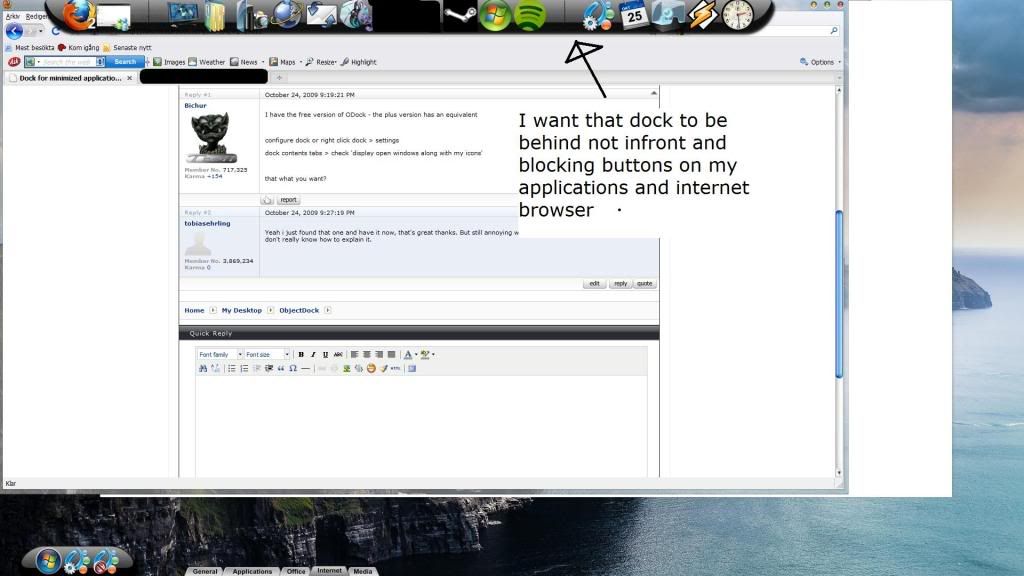
Im quite new to this but really liking it so far, i wanna know if there is a way to create a dock for minimized applications, because now i cant open my minimized applications with the mouse because i chose the "hide windows taskbar" option, so i have to use Alt+Tab to open minimized applications. And i wanna know if there's a way to make the docks hide "behind" my applications, because when i open internet or anything else, the docks are... above the internet window, it's overlaping it. I want it to be behind my program when i open one, i hope it's possible and would appreciate some detailed instructions on how to do this.


Thanks for reading.

1,663 views 6 replies
Reply #1 Top

I have the free version of ODock - the plus version has an equivalent


configure dock or right click dock > settings

dock contents tabs > check 'display open windows along with my icons'


that what you want?

Reply #2 Top

Yeah i just found that one and have it now, that's great thanks. But still annoying with the docks being infront of my programs, don't really know how to explain it.

Reply #3 Top

Here is a screenshot explaining what i mean:


I want the same thing for the Start menu-dock down on the right


And i know autohide helps, but i don't want it like that, i want the docks visible at all times when im on the Desktop but when i open a program shey should "stay" on the desktop so to speak.


Thanks

Reply #4 Top

Open configure Dock. Than click on Positioning. Look for

"Hide in background when not in use" Check it and you are good to go.

Reply #6 Top

You're welcome, glad I could help.