What am I doing wrong?

AniUtil

When I compose some animations in AniUtil I get 'frame' creep - image seeming to creep across the frame from one side to another.  When I've checked the image for 'center' in WindowsMovieMaker the animation progresses properly.  What can I do to correct this?
10,786 views 4 replies
Reply #1 Top

I suppose you are using them in DesktopX Builder.

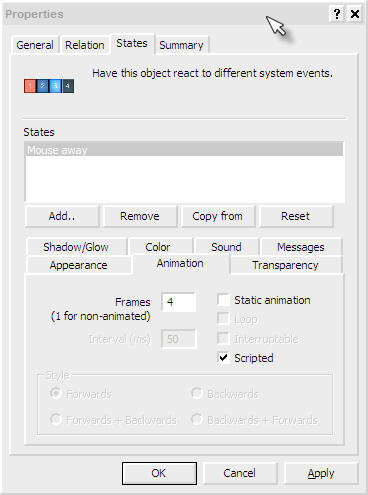
Go to Object Properties>States(Mouse away)>Animation then in frames box mention the no of frames.

The no of frames = the no of images you used as input in Aniiutil to get one image.

PS: Please don't check 'Scripted' if you have not added any script for animation.

Reply #2 Top

sounds like you need to set the frame count in whatever program your putting the animation in. Is it a cursor, WB, what are you making it for?

Reply #3 Top

Using it in "AniShortcut.dll' for an animated shortcut.  Some times they work with no prob; some times I get the frame creep.  All seem to be centered with no evidence of movement.  And the number of frames is only called for in AniUtil as far as I can see.  No need to set any thing any where else.

Reply #4 Top

FWIW, I think I've found the prob.  For AniUtil to work (or, maybe, it the shortcut docklet) the images have to be almsot dead-on centered or else the 'frame-creep' happens.  Will have some 'fixing' to do since I had like 9 sets of images of 100 images each to get done...

Thanks for getting me pointed in the right directions...