
Rendering Problem with WindowBlinds 6.3 Desktop

Hello all,

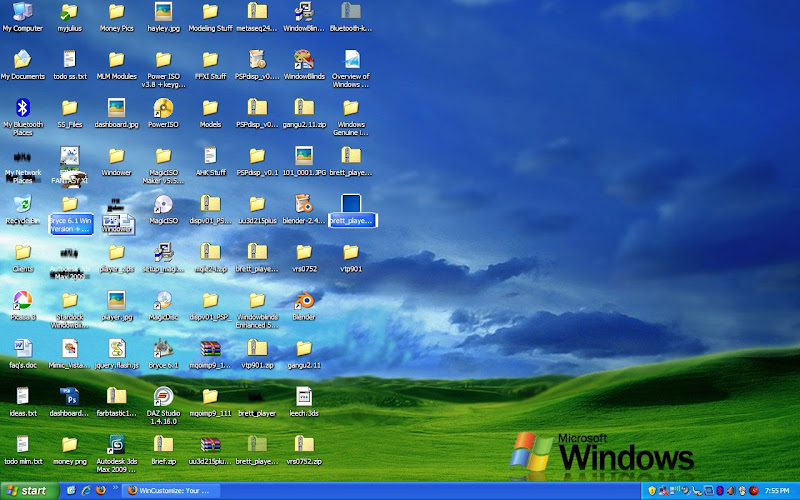
I just bought a new Acer Laptop (Aspire 4930) and I wanted it to look like Vista, so I decided to purchase WindowBlinds. It is really nice and I love it, except for one problem. It seems that whenever I minimize a full screen window, to see the desktop, I am left with these ugly shadows behind some (not all) of my icons on the desktop. In addition, some of the icons are not even shown, with remnants of the previous window in their place. The only way to get them to go away is to press Refresh many times (maybe 10) or to open window blinds and apply the skin again, or to move another open window over the icons and then off again. This only fixes it until another full screen window is minimized, and it is very annoying. In addition, I have experienced error with the right click menu being all black and unreadable. Attached is a screenshot of the former problem. Any ideas?
869 views 7 replies
Reply #1 Top

Here is my system info:


WindowBlinds version : WindowBlinds 6.3 (build 68 x86)

WindowBlinds is installed correctly on this PC
WindowBlinds appears to be activated on this PC
Your machine supports per pixel borders on WindowBlinds skins.

(Plug and Play Monitor) 1 is attached to Mobile Intel(R) 4 Series Express Chipset Family

Wblind.dll         2008/10/18 16:42:20
Wbsrv.dll         2008/09/16 08:44:42
Wbconfig.exe         2008/09/16 08:44:32
Wbload.exe         2008/04/26 16:14:14
Wbhelp.dll         2008/04/26 16:14:07
Wbui.dll         2008/04/26 16:14:05
Tray.dll              2008/04/26 16:14:21
Screen.exe         2008/07/15 11:31:09

Reply #2 Top

If you haven't done so already, please email support@stardock.com and start a trouble ticket. They will be able to assist you.

Support does monitor the forums also and WC members often assist when they can.

Reply #3 Top

I have opened a support ticket like you suggested, but still would like to hear if anyone else has encountered this problem before?

Reply #4 Top
I had this problem as well, opened a thread about that some hours ago. Know I know, however, what caused it. I am using a software called 'Gigastudio' which messed around with Windows Memory configuration (Memory Manager). I put these settings to 'Windows default', now the corruptions are gone. Unfortunately I don't know what Gigastudio exactly does to the registry, to cause this behaviour, so you could check your system for similar modifications.
Reply #5 Top

I was just about to post into my opened thread, that I fixed it, but it seems it has been deleted without comment. Good. But strange.

Do you have the /3GB switch in your boot.ini?

Reply #6 Top

I don't use Gigastudio or another memory manager as far as I know (though I am planning on installing Uniblue soon). I have 3gb ram but I haven't changed anything in the boot.ini. However, it may have come changed, because I had the ram installed at the time I bought it and the guy may have changed that part as well. Is it an issue if I have 3gb ram?

Reply #7 Top

I have been trying a few things and I still can't fix this problem. It's really too bad because I love my new skins, but if it keeps doing this, I am going to have to ask for a refund :(

Has anyone else encountered this problem? Any ideas?