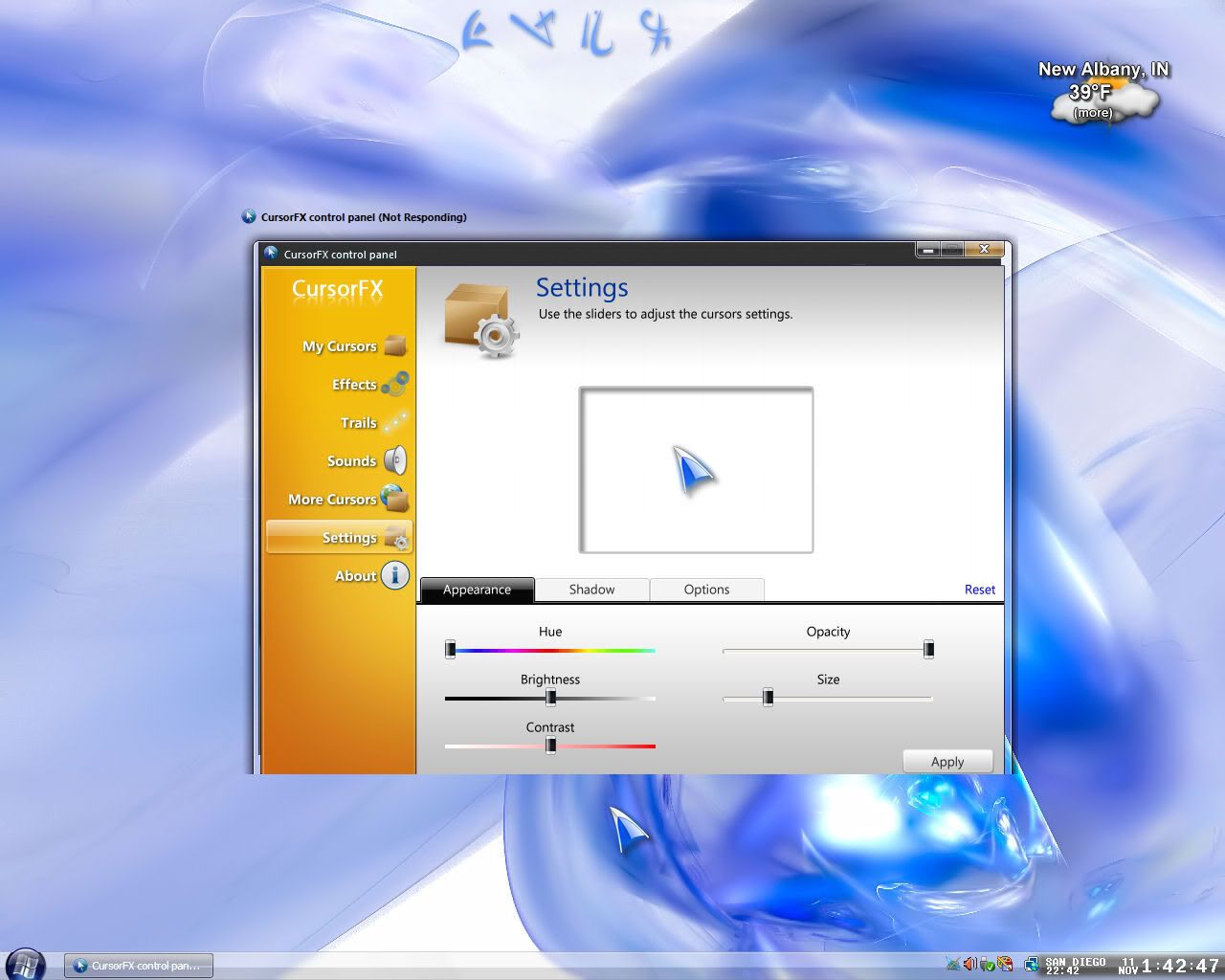
CursorFX

It keeps crashing.

    I have been using CursorFX forever on my Vista rig, and my XP rig. Yesterday I copied all my cursor themes to my flash drive, and moved them to my Vista rig. Not CorsorFX locks up on Vista. I can't change cursors. I uninstalled, reinstalled, ran system restore....nada. Still locks up when I open it.

15,745 views 12 replies
Reply #1 Top

Hmmm, you would think system restore would have corrected the problem.

Does Vista handle flash drives differently than XP?

Reply #2 Top

PDJ; Take a look at MTBman's post here

Is the fash drive new/old? Have you used it on the Vista machine before?  Is your Vista machine trying to use the flash drive as a ReadyBoost device (to speed up Vista)?

Could be a driver problem?

Because many USB flash drives have built-in software that runs every time you plug-in the drive into a PC yours might not have Vista compatable drivers.
Unfortunately the software loaded on these drives is incompatible with Windows Vista and not the drive itself.
You need to either update the software and download a Windows Vista compatible version or format the drive to delete everything that is included on it.

Also Jim, take a gander here

If the drive is found without errors, then Vista might not be assigning it a drive letter.
Right-click My Computer and select Manage.
Then select Disk Management.
See if the drive is listed there. If it is, right-click on the partition and select Change Drive Letter and Path...
Assign it a drive letter or change it to a different one. It may be trying to step on an existing drive letter or Windows may be confused on what to give it. If the last drive letter shown on a drive is H:, then give your flash drive I:. Once you save your changes, the drive should light up and be working. It is also possible that you need partition and format the drive.

If the drive doesn't show at all, check Device Manager for errors. You may have a conflict or need to update or load chipset drivers for your motherboard or USB card.

Hope some/any of what's here helps...if not, just hit me. X|


Reply #3 Top

Having a similar problem here...only it won't work...can't change anything....it just stays hung up untill I kill it in the task manager(Even let it sit for an HOUR to see if it would start working and it did'nt).Never had any trouble like this with software from stardock till now(I have Vista Home Premium By the way).

Reply #4 Top

If the drive is found without errors, then Vista might not be assigning it a drive letter.

Right-click My Computer and select Manage.

Then select Disk Management.

See if the drive is listed there. If it is, right-click on the partition and select Change Drive Letter and Path...

Assign it a drive letter or change it to a different one. It may be trying to step on an existing drive letter or Windows may be confused on what to give it. If the last drive letter shown on a drive is H:, then give your flash drive I:. Once you save your changes, the drive should light up and be working. It is also possible that you need partition and format the drive.


If the drive doesn't show at all, check Device Manager for errors. You may have a conflict or need to update or load chipset drivers for your motherboard or USB card.
End of quote
Is the fash drive new/old? Have you used it on the Vista machine before? Is your Vista machine trying to use the flash drive as a ReadyBoost device (to speed up Vista)?
End of quote


I moved the themes off the flash drive and into the CurFX folder where they are kept. I am not running them from the flash drive. 

Flash drive is fairly new, I have used it before on my Vista rig. It is not suitable for ready boost, according to my Vista lappy, and Cursor FX worked fine until I added oh, at least 50 CursorXP and FX themes all at once.

This flash drive was completely empty before I added the themes.

Reply #5 Top

Having a similar problem here...only it won't work...can't change anything....it just stays hung up untill I kill it in the task manager(Even let it sit for an HOUR to see if it would start working and it did'nt).Never had any trouble like this with software from stardock till now(I have Vista Home Premium By the way).
End of quote

Did you recently add a bunch of themes? Was it working before?

Reply #6 Top

I suspect you may have a bad cursor file.Most likely an older cursor.

But...I have had to re-install CFX(free version)11,yes, eleven times.It will work for about three weeks and then lock up.I learned from experience that a simple uninstall/reinstall usually results in it locking up again immediately.I use Revo to uninstall and it finds 168 files and 272 reg entries left behind.Remove those and CFX is ok again for at least another three weeks.

Try that,then add your cursors one by one and see if you have a bad one.

I noted this in an e-mail to support,you may want to send in a ticket as well so they are aware of your trouble,Jim.


Reply #7 Top

I noted this in an e-mail to support,you may want to send in a ticket as well so they are aware of your trouble,Jim.

End of quote

Hey,what are you trying to do, earn karma points?  You are already getting ahead of me in KP again.    *_* :rolleyes:   :grin:

Reply #8 Top

I suspect you may have a bad cursor file.Most likely an older cursor.
End of quote

You give up on YM?

Reply #9 Top

You give up on YM?
End of quote
Nope,me mudder doesn't want me to log her off so I can log on.

I hope to be back on my rig by the end of this month.Yippeeeeee!:w00t:

Reply #10 Top

just a thought...is it possbile there's a permission issue with the cursor files?

Reply #11 Top

just a thought...is it possbile there's a permission issue with the cursor files?
End of quote

Wouldn't suprise me...Vista sux that way. 

Reply #12 Top

Nope,me mudder doesn't want me to log her off so I can log on.

I hope to be back on my rig by the end of this month.Yippeeeeee!
End of quote

Hope that job is going well. Out of orientation yet?