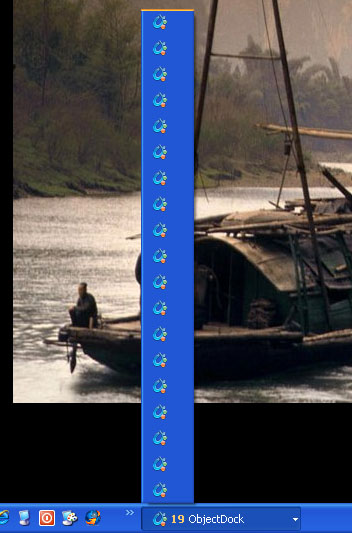
Objectdock puts 20 icons in the XP taskbar

(and also on MultiMon's taskbar)

Hey all,

Love OD, but as the title says it's adding many, many task bar buttons (seems to be one button for each object in OD.  (for comparison, Rocketdock only shows one button in the taskbar).  (my xp taskbar has them grouped, but that's hardly acceptable, seems a bug)

I'm sure there's a way to stop this, but I can't find it.


Ideas?

thx!

-b
1,457 views 8 replies
Reply #1 Top

Can you post a screenshot so I am clear what is happening.

Reply #3 Top

Is this the 'free' version or the Plus version?

Reply #4 Top

Free version? OD set to show in taskbar? That is the icon OD uses for its self in taskbar or for when properties dialog is open. To me it looks like either 19 instances of OD running or properties dialog opened 19 times and not closed. Or it could be a corrupt install.

Reply #5 Top

Opps, sorry, it's the free version just downloaded.  Windows XP.  Which ever monitor I have it on, I get all these taskbar items...

I've also seen this on my work computer (on both monitors)

Yeah, it does look like OD isn't cleaning up the icon when prefs are opened. 

Edit:

OK, confirmed, it's a conflict with MultiMon (dual monitor taskbar).  It you have OD on mon-1 and open prefs to scoot it to the other monitor (the one with MultiMon on it), you see about 19 taskbar buttons open up as OD goes to mon-2.  Bring it back to mon-1 and it shows as the pic I posted above.

I guess that absolves OD of any bugs, since it only happens with MultiMon loaded... MultiMon has a new "pro" version, I'll download and try them together...

Edit/Edit: Problem does not appear when using UltraMon.

Reply #6 Top

I have never seen such an issue.  I would think that you have some errors.  Try opening task manager and see if you have multiple processes of object dock running.  If so, I would suggest ending all but one process. 

The ultramon task bar most likely will not show this due to the limited compatibility

Free version? OD set to show in taskbar? That is the icon OD uses for its self in taskbar or for when properties dialog is open. To me it looks like either 19 instances of OD running or properties dialog opened 19 times and not closed. Or it could be a corrupt install.
End of quote

I would have to make this the most likely candidate.

Reply #7 Top

We have had work around troubles with UltraMon and Multimon in the past. Many users have reported it here as well. I have to say because of all that I'm not totally suprized. I will try it out come Monday and see what might be happening though, thanks very much for the info!

Reply #8 Top

Quoting Seabass, reply 7
We have had work around troubles with UltraMon and Multimon in the past. Many users have reported it here as well. I have to say because of all that I'm not totally suprized. I will try it out come Monday and see what might be happening though, thanks very much for the info!
End of Seabass's quote

For what it's worth RocketDock doesn't have this problem, though I much prefer to use OD. :)   Sounds like OD has several hooks out to something that MultiMon thinks are tasks...

Edit: Same issue with the new Pro version of MultiMon...