Launching Hotmail from Objectdock

Hi  there ! Someone knows how to launch Hotmail from Objectdock??
4,323 views 8 replies
Reply #1 Top
If you mean windows Live mail.. Then do this,

Find windows live hotmail in you all programs list or program files and drag that shortcut to the dock.

If you mean the acually hotmail site then this will work...

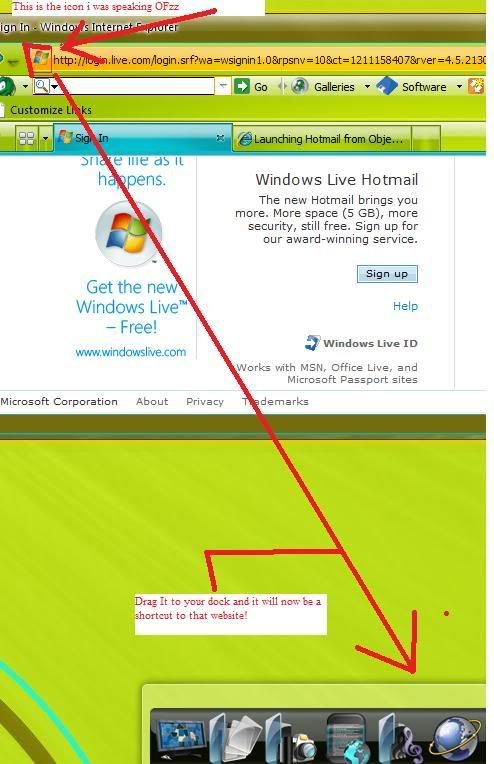
Go to hotmail.com and when the page is loaded you will see some icon before the adress. Mouse over this icon and a hand will apear as your cursor. Drag the icon directly to an empty space on the dock.

a third option would be to right click the dock and find "this dock" this brings up a submenu and in the menu is an ADD option. You will want to add a new shortcut. When the shortcut is on the dock the icon for it will be that question mark. Click on the icon and a diolog will pop up. This is where you will name the dock entry and configure the shortcut..

For example if you want it to go the hotmail site online you would type hotmail.com as the path.

If you need any additional help do not be affraid to PM me I am very glad to help.

Here are some images to show you what I mean


Reply #2 Top
If you are talking about the actual hotmail.com then do this.....
Just drag the icon on the left of your browsers adress box to an empty place on your dock

Or you can go into dock settings section and under docklets add a new shortcut. After the shortcut is on the dock it will have a question mark icon. Right click this icon and in the path section type http//:www.hotmail.com(or whatever site)

If you mean Windows live mail then find it in your start menu and drag its icon to the dock in an empty place. The icons that are already on the dock will automiatically move so that you can drop the icon onto the dock.
Reply #3 Top
I came back and It wasnt showing that first post so.. Sorry.
Reply #4 Top
Hey RobJK! thanks for your help. Great to have you there. I just started to use Objectdock a couple days ago and I'm still trying to discover all it's advantages. If you have any recommendation I'm all ears!
Thanks again RobJK for all the detail it was great!
Reply #5 Top
I think there are many advantages to object dock. Do you have object dock plus or the free version?
Reply #7 Top
Ok so then you have the option to make tabed dock which means you willl have one dock with multiple tabs, as many as you want. Each tab will represent a group of shortcuts. For example one tab is internet. You can put shortcuts to you favorite sites here and even shortcuts to any internet browser or email program. The tabed dock will hide of scree only displaying the tabs with there name and as soon as you click the tab the dock will slide on screen with all of your shortcuts. You can recolor any dock background. And you can have many docks. useing dock not only looks better and funner to use but way easier to acess your files and folders and programs right from the desktop. Of course you could just have normal destop icons but... not as fun to use!  :CONGRAT: 
Reply #8 Top
also rather than having all your desktop icons clutering up you desktop you can use object dock. It organizes all your short cuts and leaves them for easy acess! :CONGRAT: