First Logon Screen Creation Attempt

Stuck and need some help

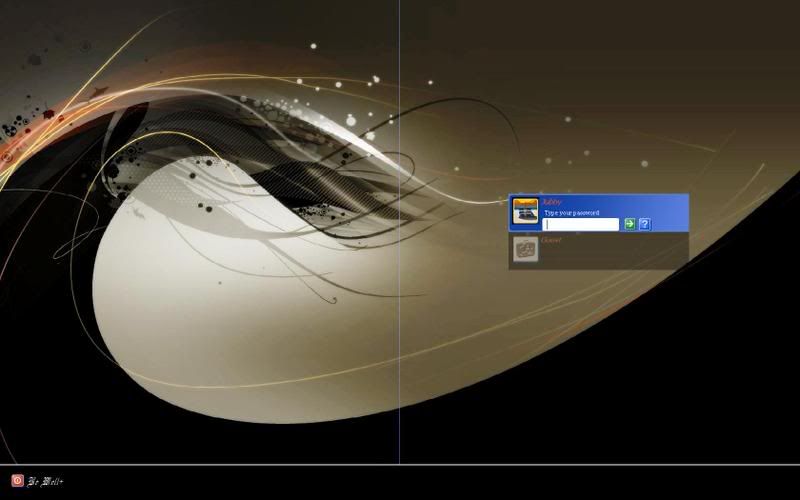
Well as you may suspect from my thread's title, I'm a complete noob when it comes to using LogonStudio.  I've started a custom logon screen and have found myself at a wall.  I'm not sure what to do to correct it in it's current state and need some assistance.  As you maybe able to tell from the image I posted, I can't seem to get rid of the line dividers on my logon screen.  Also I would like to try to change the "username box color"  maybe even make it transparent if possible. 

Also is there a way to remove username photos?

Thanks in advance.

5,614 views 13 replies
Reply #1 Top
I can't seem to get rid of the line dividers on my logon screen.
End of quote


in panels / dividers

pick one in properties = click to the right of (Bitmap} - there's a button that doesn't always show up right away - in the little edit pop up window, uncheck use picture
Reply #2 Top
click on the user name panel, look to the right, click the little color box, pick a new color

alpha states define visual from 0(invisible)- 255 ( full visible)
Reply #3 Top
Thank you, I fixed everything because of your help.

Now a new question...where do I find the theme file (.logonxp) to load to Wincustomize?
Reply #5 Top
I don't understand your question.  Logonstudio creates and applies logons.
Are you wondering where you saved the logon you created?
Reply #6 Top
Open LogonStudio have your Logon selected then hit the Export button and that will save the file to your computer then upload that file and a preview shot.
Reply #7 Top
Open LogonStudio have your Logon selected then hit the Export button and that will save the file to your computer
End of quote


the .logonxp will be located in C:\Program Files\WinCustomize\LogonStudio
Reply #8 Top
Most likely should be but not on my computer. Which could be why now only Logons I can use are ones I make. If I download one and open it it opens LogonStudio but Logon is not there and if hit export says it has exported file but it has not.

Ran search for .logonxp and found nothing even though there are 27 usable Logons in LogonStudio.

Reply #9 Top
:SURPRISED:

That's where the skin folders should be located.

Here's what I do: find the skin folder at the location i mentioned, zip the folder and rename the .zip extension to .logonxp (I have a shortcut to the skin folder on my desktop so I don't have to go through the hassle every time)
Reply #10 Top
Ran search for .logonxp and found nothing even though there are 27 usable Logons in LogonStudio.
End of quote


If you download a logon and select "open with" instead of "save to disk" then your computer won't have a .logonxp file for the skin. It creates a folder within the skin folder.
Reply #11 Top
zip the folder and rename the .zip extension to .logonxp
End of quote


Did try that before but did not work, just DL new copy of WinZip and looks like it worked so uploaded one to see if it works for the Mod.

Thanks.
Reply #12 Top
Thanks for everyone's help. I went ahead and made some final touches on the screen. If you would like, I have provided a link from which it can be downloaded from. I have to say, that the previews on those screens I've created look nothing like the final product.

If you do download it and use it, please give me some feedback as this is my first screen. Thank You


Link - WWW Link
Reply #13 Top
zip the folder and rename the .zip extension to .logonxp
End of quote


That worked ok this time thanks Tim.