
Quest theme breaks WB601.014 upper frame corners
from  Stardock Forums
Stardock Forums
The new Quest theme supplied with SDC and OD is broken in WB601.014. The upper corners are broken on the WB6 frame only. Other app frames work fine. 
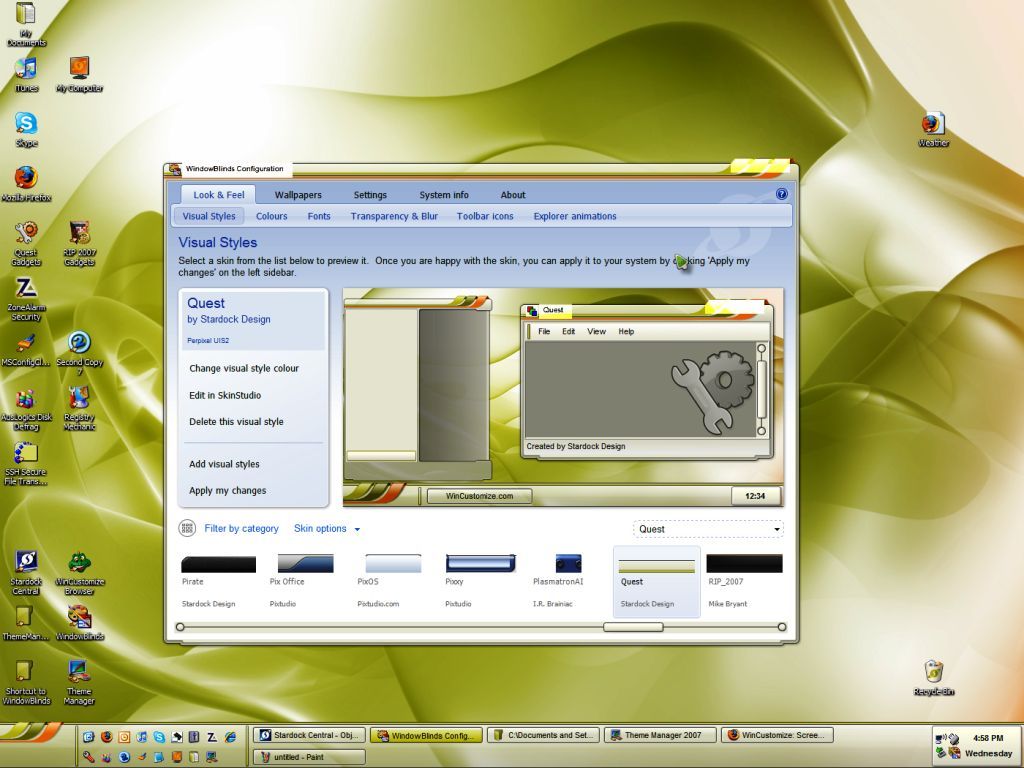
WindowBlinds version : WindowBlinds 6.01 (build 40 x86)
WindowBlinds is installed correctly on this PC
WindowBlinds appears to be activated on this PC
Your machine supports per pixel borders on WindowBlinds skins.
(Default Monitor) 1 is attached to MOBILITY RADEON 9000
Wblind.dll 2007/11/06 19:17:20
Wbsrv.dll 2007/10/04 17:58:04
Wbconfig.exe 2007/11/02 19:37:08
Wbload.exe 2007/09/27 17:47:44
Wbhelp.dll 2007/08/27 11:54:07
Wbui.dll 2007/11/06 10:13:05
Tray.dll 2007/09/12 17:58:21
Screen.exe 2007/11/02 19:37:51
WindowBlinds version : WindowBlinds 6.01 (build 40 x86)
WindowBlinds is installed correctly on this PC
WindowBlinds appears to be activated on this PC
Your machine supports per pixel borders on WindowBlinds skins.
(Default Monitor) 1 is attached to MOBILITY RADEON 9000
Wblind.dll 2007/11/06 19:17:20
Wbsrv.dll 2007/10/04 17:58:04
Wbconfig.exe 2007/11/02 19:37:08
Wbload.exe 2007/09/27 17:47:44
Wbhelp.dll 2007/08/27 11:54:07
Wbui.dll 2007/11/06 10:13:05
Tray.dll 2007/09/12 17:58:21
Screen.exe 2007/11/02 19:37:51
 WinCustomize Forums
