Asmodean_dk Asmodean_dk

Weird problem since updating to WB 5.92.090

Weird problem since updating to WB 5.92.090

Anyone else seen this?


First of all a disclaimer: I am not at all sure that the following problem is related to WB - nor do I blame Stardock in any way, should it be. I am aware that this is a beta version, and as such cannot be guaranteed to function 100% in all areas.

Then to my problem:

Yesterday afternoon, I updated WB to 5.92.090. SDC prompted me to restart my computer, and I did. Upon restarting, Windows Data Execution Prevention (nice name for a service, eh?) closed Windows Explorer. I went huh??? But then Windows Explorer started again the next second, and all was fine.

Since then, though, about 50% of the times I reboot my computer I get the exact same thing. Windows Explorer gets closed by Windows Data Execution Prevention, but starts again right after.

Anyone else seen this?

Asmodean
27,867 views 86 replies
Reply #26 Top
Damned, i was wrong, it still doesn't work this way ...   
Reply #27 Top
Thanks, everyone, for your input. At least this thread is still ative so maybe we'll get a fix soon. Using WIN XP SP2, WB5.51
Reply #28 Top
After each of the last 2 updates, the WBConfig preview & settings went weird (no StartPanel in the Preview at all, transparency settings changed without my input). I don't know why the updates are borking things up, but my display issues went away after deleting the skin's cache files (*.wb4, ~*.*, *.*~) and re-applying the skin, combined with altering & resetting to defaults all the transparency/blur settings in WBConfig to "wake them up" or whatever. Had to do it at least twice to get everything displaying correctly.

WB &/or SKS need a better way of handling/updating these cache files - I suspect they are a culprit (not necessarily the culprit) in a lot of the problems people have been reporting with the betas.

FWIW, I'm still developing & modifying skins with SKS5, which may or may not be a factor - I'm waiting for the SKS6 bugs to get sorted out a bit more before moving over.
Reply #29 Top
I was wrong to say i was wrong IT WORKS, i just omit to delete previously the lefted .wb4 made when applying skin through SKS V5 (BTW, it would be interisting to understand why SKS v5 is now obsolete ... )

Seldomseen, i also continue to use SKS V5, but for resolving the trouble for WB6, i just installed the SKS V6 beta (both version can be installed), just edit the .uis file of the skin which have a trouble, save it through SKS V6 and thing's are OK (well i hope, i did 3 reboot to see, if the skin is correctly applying ... and it is)
Reply #30 Top
Aaaaaaaaaaarrrrrrrrrggggggggggggggg, it doesn't work anymore

I've updated to latest WB6 build, reboot and then * BUMP *
Reply #31 Top
I have the same problem, Neophil. This is the first post I've seen that mentions the prob. I upgraded to WB6 and Start Meneu and Taskbar were skinned 'til I rebooted, then both were rendered in Windows Classic only. When I opened WBconfig, the skin did not show a taskbar in the preview! If there was a substyle to the skin, it still had the taskbar visible in the preview pane, and a skinned taskbar and Start Menu...until reboot, then also that substyle had no taskbar in the preview pane. Any skin I chose, same behavior. Diamond ran until I rebooted, then no taskbar skinned and none visible in the preview pane. Only way I fixed it was to delete the theme and reinstall it, then fine 'til next boot! Weird, yes. Have since gone back to WB5.51. Hope it gets fixed so I can use WB6...

mine did not go away help!

beta 1s all worked

even with the newest buid

WindowBlinds version : WindowBlinds 6 (6.0 (build 32 x86))

WindowBlinds is installed correctly on this PC
WindowBlinds appears to be activated on this PC
Your machine supports per pixel borders on WindowBlinds skins.

(Plug and Play Monitor) 1 is attached to NVIDIA GeForce FX 5500

Wblind.dll 2007/09/27 17:47:20
Wbsrv.dll 2007/09/24 19:08:43
Wbconfig.exe 2007/09/27 17:47:33
Wbload.exe 2007/09/27 17:47:44
Wbhelp.dll 2007/08/27 11:54:07
Wbui.dll 2007/09/24 19:08:06
Tray.dll 2007/09/12 17:58:21
Screen.exe 2007/09/17 12:24:52
Reply #32 Top
Is there anybody still out there...

I have been following this thread since it started. I too have been experiencing the same great features... eh issues that all of you have been experiencing. It is now 2 days into the official release of WB6 and I am still coping with the "unskinned taskbar and start menu trick" that has been plaguing you folks since the "let's move all of your skins somewhere else" beta was released. After not seeing any more replies in this thread for a number of days, has anybody found a permanent solution to this problem, or have you reverted back to WB5.51 until rescue arrives. Judging from the number of posts on the forum from people with Vista related issues, us folks who are still running XP are going to have to wait awhile before the cavalry arrives.

Just in case Stardock is still watching, here is my system info, FWIW:

WindowBlinds version : WindowBlinds 6.0 (build 32 x86)

WindowBlinds is installed correctly on this PC
WindowBlinds appears to be activated on this PC
Your machine supports per pixel borders on WindowBlinds skins.

(Plug and Play Monitor) 1 is attached to NVIDIA GeForce 7800 GTX
(Plug and Play Monitor) 2 is attached to NVIDIA GeForce 7800 GTX

Wblind.dll 2007/09/27 17:47:20
Wbsrv.dll 2007/09/24 19:08:43
Wbconfig.exe 2007/10/01 17:35:33
Wbload.exe 2007/09/27 17:47:44
Wbhelp.dll 2007/08/27 11:54:07
Wbui.dll 2007/09/24 19:08:06
Tray.dll 2007/09/12 17:58:21
Screen.exe 2007/10/01 11:23:24

By the way, now I have to re-enable ClearType every time I reboot.

I'd be perfectly happy with the first beta of WB6 back, it worked like a charm! Unfortunately I don't have auto-archive enabled in SDC.
Guess I'll have to go back to 5.51 until the rust stains are cleaned off
Reply #33 Top

Having to reapply cleartype suggests something odd is going on.  WB does not alter that setting.

What apps do you have running at startup?

Reply #34 Top
Is there anybody still out there...


Just us folks...
Still got the bug, too. Running WB6 for a day, now, reboots half-a-dozen so far, then, just now got the same-old same-old: Sexy, by vStyler, reboot and no taskbar skinned and NO taskbar in wbconfig preview...?! Hoping it was a one-time burp. Hoping.


Reply #35 Top
What apps do you have running at startup?


Now there's a possible clue. Every time I start up, Winamp is set to run, but I get an error saying winamp couldn't find so-and-so dll, and it can't run. I click that away and run winamp from winamp agent icon in systray. Quicktime also runs at startup and I can't find a way of disabling it without uninstalling iTunes for myiPod. Didn't make a difference with WB5.51, though. Everything just started up and ran as usual. Puzzling...
Reply #36 Top
Just uninstalled and reinstalled Sexy by vStyler, and it's fine, with skinned taskbar and tb showing in wbconfig preview pane. Maybe just never ever reboot...   
Reply #37 Top

Do you get that winamp message if WB is not running?

Reply #38 Top
Let me set it to not run at startup and see what happens.
Reply #39 Top

I personally use Winamp on most of my (both xp and vista) machines (I listen to music nearly the entire time I'm awake ), though I've never had a conflict with that and WB. One thing different with my setup is that I do not select to install the winamp agent, I just have it running in the taskbar.

I would be interested to know if you have any custom plugins loaded and what that dll is that's referenced.

-Mike
[Stardock Support]

Reply #40 Top
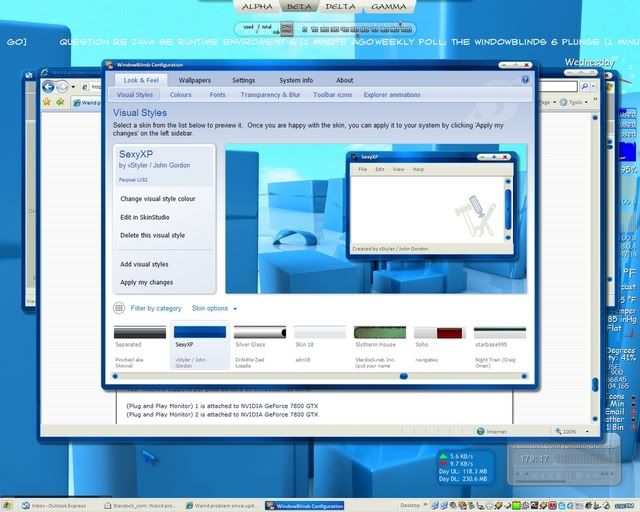
Just restarted, no winamp set to run at startup, and after bootscreen and logon, first thing showing was desktop, with taskbar white, as shown in shot. Preview pane in wbconfig shows NO taskbar after restart. Start panel unskinned. Uninstalled Sexy by vStyler, reinstalled, now shows taskbar in preview pane again

never had a conflict with that and WB


nope.

I do not select to install the winamp agent, I just have it running in the taskbar.


I'll try that. Also will see if I can generate that error again and screenshot of it.


Reply #41 Top
I would be interested to know if you have any custom plugins loaded


Not sure, so I probably don't. Only winamp skins I've dl-ed from here and winamp site...three or four.
Reply #42 Top
Do you get that winamp message if WB is not running?


I set winamp not to run at startup...didn't change the problem...now I'll see if I can set WB6 not to run at startup...
Reply #43 Top
As an aside . . Pandora.com FTW    
Reply #44 Top
Did msconfig. Stopped winamp from running at startup. Reboot. WB6 now keeps it's clothes on thru a reboot!! Not sure why disabling winamp at startup now allows WB6 to remember its settings. Will futz around a bit more now and then to see if something shakes loose. Thanks, Neil. Thanks, Mike. Great response and ideas on this. WB6 now appears to be happy. As for winamp, I'll poke and pry around there to see what's up.
Z, tried Pandora and went back to wmp and then ultimately back to winamp. Only other one I ever had was "Live 365", a paid subscription, and it was great 'til it ran out during one of my financial doldrums. Winamp it is.
Reply #45 Top
Neil,

I will try to determine if one of my startup applications is affecting WB6 by doing a bare boot and add apps until the problem re-appears (sometime tomorrow - it's getting late . As far as the ClearType issue, all I know is prior to updating WB6 to 5.92.xxx ClearType would be active at startup. The only changes to system software has been with WB6 (updated to the official release via SDC). TIA
Reply #46 Top
Maybe just never ever reboot...

and never change skin   

Reply #47 Top

and never change skin


Just because I'm running Odyssey now for the testing, right?   
Reply #48 Top
Till the same trouble as well for me with the WB6 release (after i thopught it was corrected: 5 reboots corect, then again while applyin wallpaper (smart mode) through WindowBlinds control panel, the trouble came back on the next boot ...

Though i uninstalled (again and again) WB6, cleaned up everything (as suggested by NEIL) as well on disk AND registry, (with all reboots needs) then reinstall WB6 released version WITHOUT using the Wallpaper feature, and the problem still goes on ...

I've not winamp loaded at startup (i don't know why winamp or anything else in fact would interact in this trouble apart WindowBlinds itself ...) BUT it seems to me there's something's wrong in WindowBlinds building .wb4 files and especially "NameOfSkin.uis_frames.wb4". If this file is not present in the skin folder there's the trouble ... I've tried to handly "buid up" one inspired from a skin (Arileen to name it) with which i don't get the problem. In first stage that permited to "rebuild" correctly the appearence of the skin badly applyed in the WindowBlinds Configuration Panel and though to apply it. On second stage (mean a reboot), the problem was back without a skinned StartPanel and Taskbar ... I Looked up in the folder and the "NameOfSkin.uis_frames.wb4" was disappeard   as if "something" in the WindowBlinds feature deleted it (is there in any kind of way a verification through internet on boot, linked to WindowBlinds ? i ask for that because i had a full day off internet connection and during this full day i didn't had the trouble ... and as soon as the connection came back and though i had to reboot, the problem came back also ...).

BTW, i'm pretty sure that problem is linked to a bad building list of skins (and/or a bad building feature of the .wb4 files.)


In another way i've also noticed that some (not so old skins) which are "qualified" as Perpixel UIS2 skins, are skinning correctly the ShutdownDialog panel but not the LogoffDialog panel ... It's pretty strange as both are defined the same way in the .uis file ... (yep it's another weird trouble   )
Reply #49 Top
Hey guys, i'm on trying another experience :

As the trouble is still on, that's what i just did with the skin i'm concentrated on (Artwork WB skin done by a very new skinner, mean treetog   - with little modification for the "All Programs" button to show in the right place on french version + a modified ButtonToolbar image)

If anyone want to test it for the trouble here's the version: WWW Link

Though here's the "new method" to apply the skin   :

- open the WindowBlinds Configuration panel
- choose the skin with trouble and edit any substyle of it with SKS V5 (think V6 will do the same)
- when the substyle skin is opened in SKS, choose to edit the "main" version
- just change anything (and change it back to his origial value), just to be able to save the "Main" skin
- close SKS
- close WindowBlinds Configuration Panel (which still must show the substyle version ... normally ...)
- right click on desktop and then ==> display properties / appearance
- you may still have the "main" skin selected ... and showing the taskbar (    )
- click "OK" and reboot, the skin may be applied correctly (well i'm at the third reboot this way for now ...   )

Tell us each other if something's better ...
Reply #50 Top
Though here's the "new method" to apply the skin
How many experiments did it take to get that chain of steps?  Amazing work. (Glad I don't use the French version of Windows.)