Zodiaq~ Zodiaq~

explorer.exe is rising...rising...rising

explorer.exe is rising...rising...rising

Over the last week I have noticed that the explorer process has steadily been climbing...I mean as high as 222,000K...

What could be going on?

If I restart, it is about 25,000...then it starts to slowly ascend...after about 3-4 days it reaches 150,000-200,000K.

btw...No viruses, spyware or anything like that.
24,243 views 81 replies
Reply #26 Top
Muuhhhaaaa...Maybe this is the one to stump you yrag...hehe...

Better not let China find out...You'll never here the end of it.
Reply #27 Top
#25 by yrag - 10/2/2003 1:08:07 PM is this machine doing anything else funny...no changes in anything else (restarts, shutdowns etc)?


Nope...Runs perfectly
Reply #28 Top
I think you might be right...here's the bottom line. If everything is working fine then let it go. That's easier said then done 'cause I would keep after it until the cows came home (character flaw). I will find an answer, but need to do a little research. In the meantime just keep 'putering until you or the machine stops working


BTW: you're right about China..../me can see this one coming


Powered by SkinBrowser!
[Message Edited]
Reply #29 Top
Thanks yrag...If you find out anything please let me know

I really do appreciate your help on this

Strange it's been doing this for only the last week or so

I'm going to do a little research and see if I can dig up something.
Reply #30 Top
Gary - have you changed anything in your shell (taskbar, desktop, icons etc) since last week when this started?


Powered by SkinBrowser!
[Message Edited]
Reply #31 Top
Gary...Actually yeah...I am always changing those things.

The only new program I have installed in the last week is ObjectDock...I don't know if that could effect it???
Reply #32 Top
It is really far fetched to think that anything could be giving you such a high resource hit, but you have to start somewhere. Since Explorer.exe is no more then a user shell, it might, repeat might, have something to do with the skin(s) you're using. Try loading and unloading 'shell' proggies and/or skins and see if it does anything.


Powered by SkinBrowser!
Reply #33 Top
I will give that a try and see what happens after awhile.

Please don't tell me it's that stuff...That's the important stuff to me

Be back in about an hour

Thanks for helping
Reply #34 Top
mm, just some suggestions

One thing I would do is view your tcp-ip status...
if the icon is in the system tray, right click it and then click (status)
then look as see if you have more packets going out than you do coming in when you click a link of something in IE...

Another would be to delete all activeX components installed under this users name in the IE settings.

IE tool bar - Tools - Internet Options - (Temp Internet Files section on first window) Settings - View Objects and then right click each one and view the version info...

Mine has IBM Access Support, acpRunner Class, the Java Runtime 1.4.1_01, Office Update Install Engine, Shockware Flash Object and Symantic RuFSI Registy Information Class... there things are a constant and should be there on my system, if for any reason IE flakes out and a simple restoring defaults does not work, I check here and almost always find something in there that is new and I delete it, seems to fix the problems 90 % of the time...

I would also consider the following for sanities sake

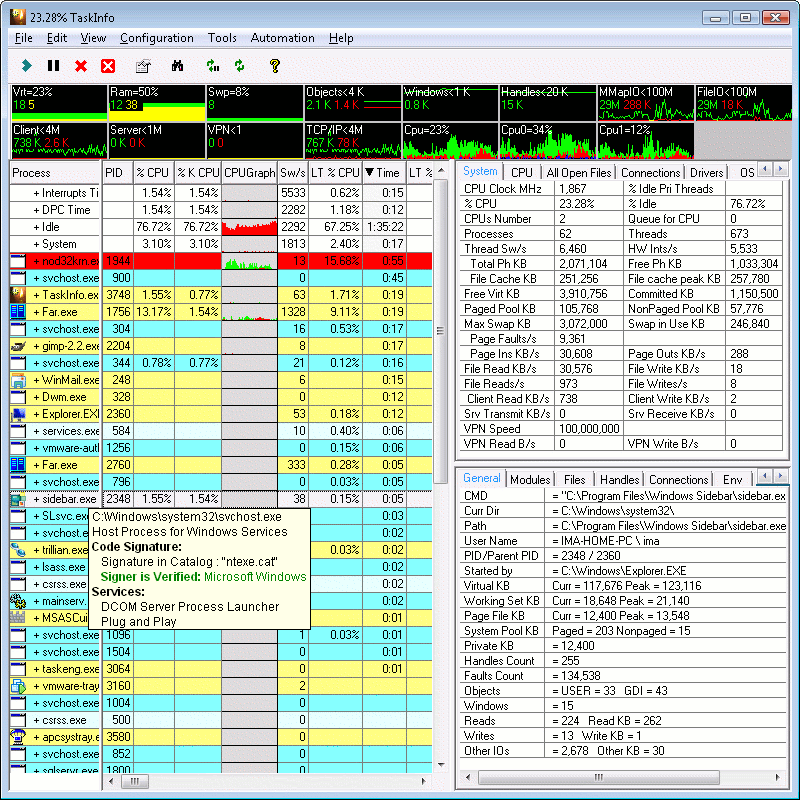
Iarsn System Software: download TaskInfo2003 demo and install it...
http://www.iarsn.com

It will tell you about everything that is running on your system. I would venture to bet that something is opening a thread in/under the IExplorer process and is transfering something or is bleeding all over your systems memory and cpu resources.


Powered by SkinBrowser!
Reply #35 Top
That's great John...it's explorer. exe


BTW: your presentation was great...


Powered by SkinBrowser!
[Message Edited]
Reply #36 Top
Oh and ObjectDock and IE might be fighting over a memory block...

does ObjectDock slowly slow down also? and if you do not load ObjectDock does IE still behave the same?

for some reason I can not run ObjectDock on this system and I didn't put any effort into figuring out why because I figure it has more to do with the Video Chipset for this laptop...

Which if it is doing this to you only when ObjectDock and IE are open I would venture to guess your running an older video chipset which can not handle the the punishment with all the graphics software running all at one time and IE constantly pushing for room and CPU time...

Low end video cards and some of the older higher end ones passed some work load to the CPU and at some point *pushed* it on top of the CPEver had your resources so low that if you moved your mouse your cursor would move in jerky motion and not keep up and your drive would grind away?


Powered by SkinBrowser!
Reply #37 Top
lol

I've had 6 hours sleep in 72 hours

sorry about that, Explorer...

same same...

Taskinfo will let you see what is opening up under explorers process in detail


Powered by SkinBrowser!
Reply #38 Top
need to re-read this, mind was on that thread that No.75 posted about IE...

lol


Powered by SkinBrowser!
Reply #39 Top
oh...

ObjectDock causes this same thing on this IBM T22 laptop...

900mhz
512 meg ram
1024x768 S3 SavageXI 8 meg video
WindowsXP Pro.

and the damn thing ends up crawling after a bit when I load ObjectDock...

it's the video Chip, I have basically the same laptop with the ATI in it and it flys right along....

guess I should play with it and record whats happening and send it in to SD (print outs in pdf) so if they are interested they can see if they can recreate it...


Powered by SkinBrowser!
Reply #40 Top
That most definitely was an awesome presentation

IPlural,

My Specs:

ASUS P4S533 MB
512 MB PC 2700
P4 2.53Ghz
ATI 8500DV (benched over 10,000 with 3dmark 2001se)
WD 80GB with 8mb cache
Antec True Blue 480 watt PSU
Pioneer DVD-RW A-04

Seems to handle any graphics or video related stuff with no problems

Gary,

I disabled/unloaded 'Everything' and restarted...was still just over 25,000K and an hour later it's at 31,000... That's without touching a thing.

Thanks you guys...This is very odd
Reply #41 Top
I have noticed the same thing,,Every since the WC Browser update Explorer has been booting into the high thirtyz here.Usually boots into 22 to 27k.I have tried everything I know--no luck.
As for the Object Dock issues,I have just discovered by telling the Dock not to magnify solved many of my problems with it.
The Exploder.exe is strange though,,It happened right after all the updates last week that required re-boots after install.I think there were 4 of them in row.Soon after,I noticed Exploder.exe doin'itz thang.I caught my Exploder at 43k,decided to re-boot and re-booted into 38k.I have no idea.I am glad to see someone else has noticed,,


Powered by SkinBrowser!
Reply #42 Top
exploder.exe

That's what I'm calling it now
Reply #43 Top
mmm

Is the SDMCP loading now with WincustomizeBrowser like it does with SDCentral?


Powered by SkinBrowser!
Reply #44 Top
I'm not using the WCBrowser or SDC myself...So I couldn't tell ya that

Well I'm off to a Casino tonight...I live in Utah, it's about a 2 hour drive. Wish me luck

Thanks again for the help IP and yrag
Reply #45 Top

Damn....my explorer.exe is on zero........


Oh yeah, that's right....I run LiteSTEP instead.....

Reply #47 Top
#45 by Admin Jafo - 10/3/2003 7:24:56 AM Damn....my explorer.exe is on zero........ Oh yeah, that's right....I run LiteSTEP instead.....


Thanks smart a@@
Reply #48 Top
lol

hey, have you run a registry cleaner?

System Mechanic, RegMedic and a few others do a pretty good job.
System Mechanic is the one I use and prefer enough that it is part of the utilities we suggest to customers. It will clean up your registry of all invalid entries and also compact it afterwards. I did notice a huge difference in speed of the system over all and also Explorer was not bloating on me afterwards. Now I run it once a week depending on what I've done with the system as far as trying to recreate issues in an attempt to revolve them.

...
side note: Jafo, that guy has been sent a registered letter and so have the owners of two businesses he had sent a CC attachment to with all those regkeys and serial#s to. SHould get intertesting here soon....


Powered by SkinBrowser!
Reply #49 Top
No not yet...I am going to download that System Mechanic one right now...I was actually thinking about doing that

btw...Thanks for the link on the TaskInfo2003 software...It's pretty sweet
Reply #50 Top
Just did a Windows Update,,2 Patches.Seemed to make a big difference.I booted into Exploder.exe to the tune of 23k,,just like it used to be.Just thought I would mention it.


Powered by SkinBrowser!