Fences 3.09 Keeps Asking Permission to Make Changes many times a day

Help Please

Fences 3.09 asks several times a day for Permission to make changes.  I have read the post pertaining to this on 3.08 and tried purging and reinstalling and still have the same issue.  I made sure it was run as administrator and even given the .exe permission to run as administrator.  Please help.  I love my new software but this is very annoying at the least.

21,082 views 20 replies
Reply #2 Top

AzDude,

I did what you asked here for the second time and I am still getting the pop up for permissions between 30 and 40 times withing a 12 hour period. I looked at a couple of details and they were for trimlog, pulse and many other to do with fences.  And I did download the latest from the website and run it as administrator.  Help.

Thanks,

Trey

Reply #3 Top

I have tried the purge option.  I am also having this issue.  Each time it pops up it is something different.  

....\Fences.exe" /update config.....

....\Fences.exe" /pulse

....\Fences.exe" /trimlog

....\Fences.exe" /auto snapshot

it is maddening as it is on my work machine that I am trying to Administer routers/switches on and it keeps going nuts. 

Reply #5 Top

Hello,

I have forwarded your report to the Stardock support team for their review and recommendations.

Please keep an eye on this thread for any updates.

We really do appreciate your feedback, thanks.

AzDude
Stardock Community Assistant

Reply #6 Top

Hello,

Sorry to hear you are having trouble.

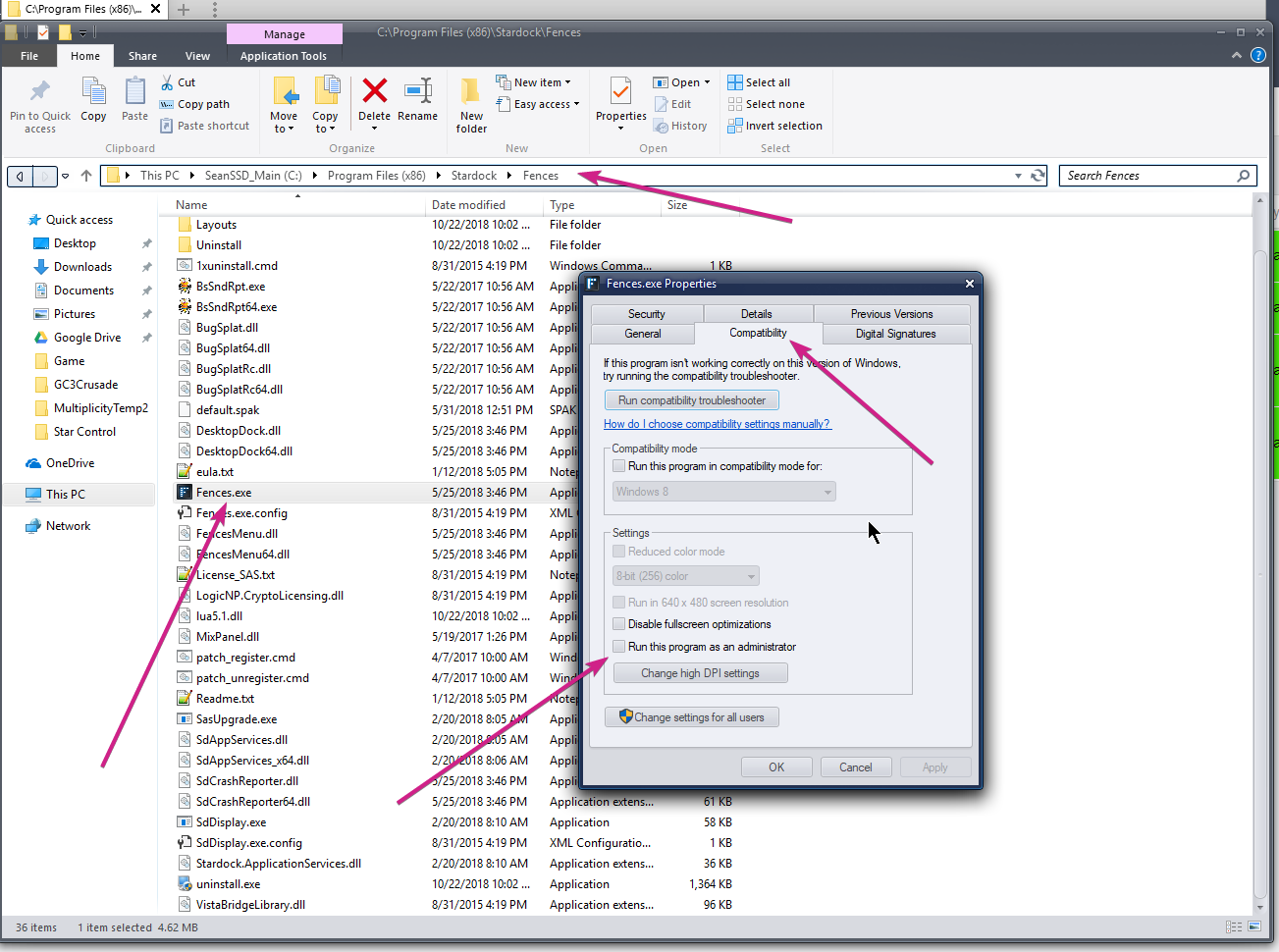
Fences will only do that if you have set it to run as admin - either manually or here:

Reply #7 Top

sd Rohan,

You are saying to not run as admin?

Trey

Reply #9 Top

Quoting treysvideo, reply 8

so uncheck run as admin?
End of treysvideo's quote

Yes

Reply #10 Top

Thanks!  That worked.  I thought it would be the opposite way around....thats what I get for thinking!

Reply #11 Top

Now...what is causing my Steam interface to just flash all over the screen....

Reply #12 Top

I figured out my Steam interface issue.  I had to eliminate steam.exe from  WindowsBlinds 10. Now it works fine.

Reply #13 Top

Hi
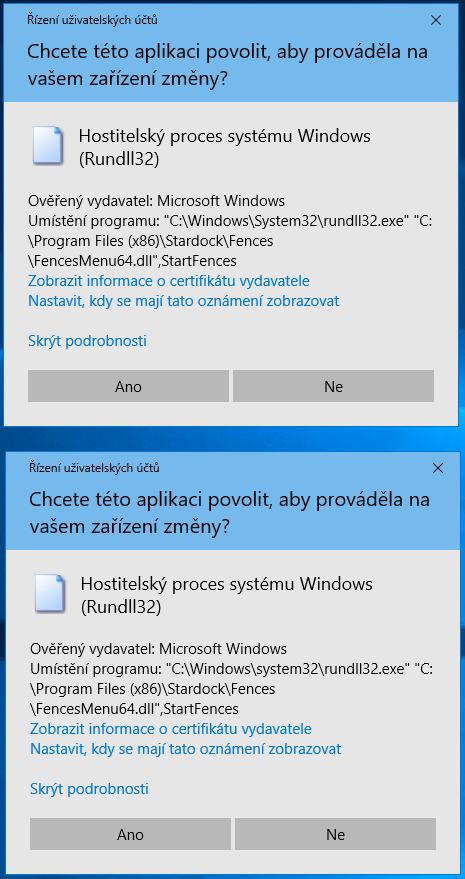
I recently bought many Stardock SW via HumbleBundle. I installed FENCES and after reboot, each time I log in to windows, I am receiving following pop-up. It is in CZECH but I believe you all know that. UAC is asking whether I approve Fences to make changes on my computer. The solution above does not apply to me as I can start FENCES from start menu with this UAC pop-up. It happens only on system startup. At least for now.

Fences UAC popup


Thx

Daniel

Reply #14 Top

Quoting urbandan, reply 13

Hi
I recently bought many Stardock SW via HumbleBundle. I installed FENCES and after reboot, each time I log in to windows, I am receiving following pop-up. It is in CZECH but I believe you all know that. UAC is asking whether I approve Fences to make changes on my computer. The solution above does not apply to me as I can start FENCES from start menu with this UAC pop-up. It happens only on system startup. At least for now.
End of urbandan's quote

Hello,
Sorry to hear you are having issues. If understand your issue correctly, you were asked to allow Fences to make changers to your system everytime you startup your computer.

I believe that Fences need to be allow to start (twice) and stay in the background to function.

Basj,
Stardock Community Assistant.

Reply #15 Top

Quoting basj, reply 14


Quoting urbandan,

Hi
I recently bought many Stardock SW via HumbleBundle. I installed FENCES and after reboot, each time I log in to windows, I am receiving following pop-up. It is in CZECH but I believe you all know that. UAC is asking whether I approve Fences to make changes on my computer. The solution above does not apply to me as I can start FENCES from start menu with this UAC pop-up. It happens only on system startup. At least for now.


Hello,
Sorry to hear you are having issues. If understand your issue correctly, you were asked to allow Fences to make changers to your system everytime you startup your computer.

I believe that Fences need to be allow to start (twice) and stay in the background to function.

Basj,
Stardock Community Assistant.

End of basj's quote

Thx BASJ for quick reply.
I actually don't care if the fence must start one or two instances. My complain is about - why it is "incompatible" with UAC? It's really annoying. I have checked the startup based on your picture and my looks a bit different

fences startup

In windows registry one Fences startup is in HKLM RUN
"C:\Program Files (x86)\Stardock\Fences\Fences.exe" /startup

And the same is in HKCU RUN
c:\program files (x86)\stardock\fences\Fences.exe /startup

The only difference I see are the DOUBLE QUOTES

Reply #16 Top

Quoting urbandan, reply 15

My complain is about - why it is "incompatible" with UAC? It's really annoying. I have checked the startup based on your picture and my looks a bit different

fences startup

In windows registry one Fences startup is in HKLM RUN
"C:\Program Files (x86)\Stardock\Fences\Fences.exe" /startup

And the same is in HKCU RUN
c:\program files (x86)\stardock\fences\Fences.exe /startup

The only difference I see are the DOUBLE QUOTES
End of urbandan's quote

Hello,
I have forwarded your questions/problems to the Stardock Support team for their assistance. Please keep an eye on this thread for any updates. We appreciate your feedback and patience.

Thank You,
Basj
Stardock Community Assistant.

Reply #17 Top

If you are running Fences.exe as admin, dont - that will cause it to prompt UAC with a fariety of acts.

Sean Drohan
Stardock Support Manager

Reply #18 Top

Quoting sdRohan, reply 17

If you are running Fences.exe as admin, dont - that will cause it to prompt UAC with a fariety of acts.

Sean Drohan
Stardock Support Manager
End of sdRohan's quote

So that if my accoount is an admin on that specific machine, I have no chance to resolve it, correct?
Note: pls, don't judge me for the admin account :-) I am an IT community member and my admin account is less dangerous than normal accounts of my wife and son, who click on everything "OK", even though I'm continuously trying to change their behavior :-)
Reply #19 Top
Quoting urbandan, reply 18
Quoting sdRohan,

If you are running Fences.exe as admin, dont - that will cause it to prompt UAC with a fariety of acts.

Sean Drohan
Stardock Support Manager

So that if my accoount is an admin on that specific machine, I have no chance to resolve it, correct?
Note: pls, don't judge me for the admin account :) I am an IT community member and my admin account is less dangerous than normal accounts of my wife and son, who click on everything "OK", even though I'm continuously trying to change their behavior :)
End of urbandan's quote

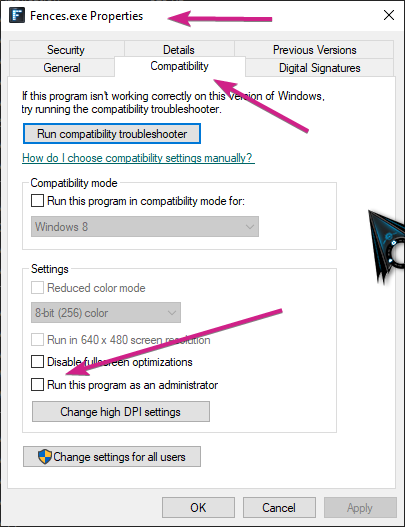
Running under an admin account is fine, just not 'as an administrator' for the fences.exe:

Sean Drohan
Stardock Support Manager


Reply #20 Top

Quoting sdRohan, reply 19


Quoting urbandan,


Quoting sdRohan,


If you are running Fences.exe as admin, dont - that will cause it to prompt UAC with a fariety of acts.

Sean Drohan
Stardock Support Manager

So that if my accoount is an admin on that specific machine, I have no chance to resolve it, correct?
Note: pls, don't judge me for the admin account :) I am an IT community member and my admin account is less dangerous than normal accounts of my wife and son, who click on everything "OK", even though I'm continuously trying to change their behavior :)


Running under an admin account is fine, just not 'as an administrator' for the fences.exe:


Sean Drohan
Stardock Support Manager


End of sdRohan's quote

Thx, I have already read it above in this thread. But this does not match my case. I do not run the app. It starts automatically via HKLM RUN and HKCU RUN.

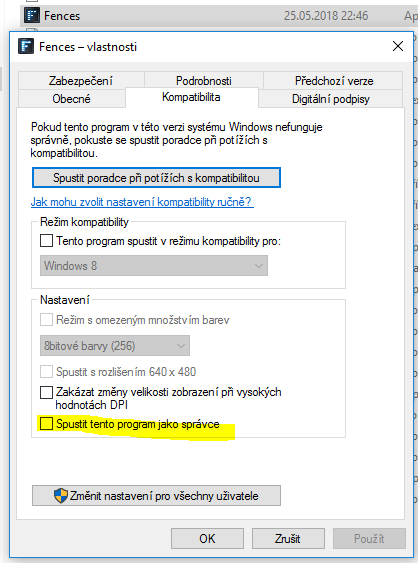
The checkbox, you are referring to, is not enabled in my FENCES.EXE file.

fences.exe settings

Daniel