Start11 - Displaying Outlook's Envelope Icon in Taskbar

I use Start11.  In Outlook 2021's I have specified that Outlook displays an envelope icon in the taskbar when a new email is received.  However no envelope icon is displayed.  Is there some way in Start11 to make this happen?  I should note that on another computer running Win 10 and Start10 the envelope icon does properly appear when I receive a new email.
1,571 views 3 replies
Reply #1 Top

Hello,

I have forwarded your report to the Stardock support team for their review and recommendations.

Please keep an eye on this thread for any updates.

We really do appreciate your feedback, thanks.

Reply #2 Top

Hi DavidL,

That is a Windows taskbar setting that likely need to be turned on on the one machine.

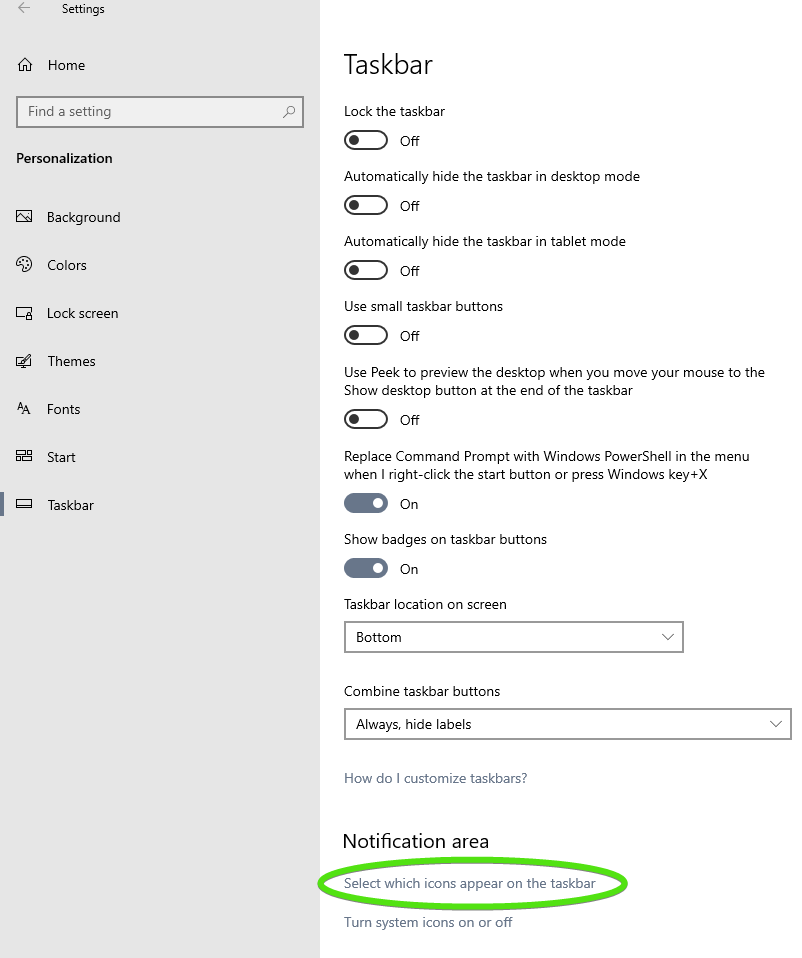
  • Windows 10: Go to Windows Settings --> Personalization and then Select Taskbar on the Left
  • In the Notification Area Section, click on "Select which icons appear on the taskbar"
  • Turn on the Outlook notification


Paul Scroggins
Associate Technical Support Analyst

Reply #3 Top

Hi Paul,

Thanks.  As I was unclear that it is my Windows 11 machine with the 'problem', I used your suggestion as a guide, and found a setting in the Win 11 settings that let me turn on an envelope icon in what used to be called the tray and now seems to be called the 'taskbar corner'.  Hopefully that will work, as I am used to seeing an envelope appended to the Outlook title in the main part of the taskbar.  But I'll get used to looking in the tray going forward.  Thanks.

David