Someone with razor sharp eyes... please see if you know how to fix this..

I'm almost embarrassed to say how anal I am when it comes to making a perfect skin. Most people probably dont notice or care, but I really do.

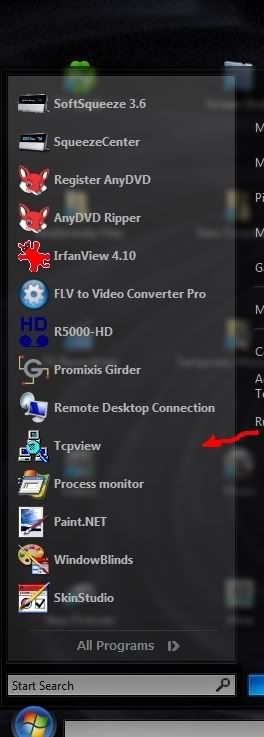
I am trying to make a background for the Start Menu's "Programs list (left)" to have a gradient + transparency which is perfect when using 24bit full color depth. However, with my limited ability in paint programs I notice very minor "breaks" in color when the background is stretched to fit the start menu program list... instead of having a VERY smooth gradient (look carefully at the start menu picture below). I have also included a picture of the original png file... which doesnt appear to have that "break" to my eyes. Maybe I need a more refined method to to make my background?

Could somone please tell me the easiest way to make a transparent background like the one below, which has a PERFECT gradent ... even after its stretched?

I dont know... maybe other people aren't as anal as me, but for me, I need to either fix this problem, or realize that it's just a limitation of SKS/WB when a background with a gradient is stretched.

Thanks for much,
Michael


6,522 views 15 replies
Reply #1 Top
For clarity's sake . . I'd look at it again (and repost) with a solid, light background.
Reply #2 Top
I can see gradient lines in that lower pic. Stretched, I'd imagine it would look worse... maybe try to find a better gradient.

Are you using photoshop? If so ...try the adobe exchange site ...lotsa free [and some very good] gradients available there. :)

Adobe website, under 'community'

Reply #3 Top
I'm really, really bad with paint programs. I actually, dont have the expertise to create my own transparent background with a gradient; which is why I was trying to use one from another skin.

Don't laugh, but I spent my entire evening last night cutting and pasting and stretching a tiny background I found from another skin. I think I messed up the original background when I stretched it. It wasn't tall enough.

The problem I'm having is finding a transparent png that has this kind of gradient. Could someone please point me to a URL which has a background very close to what I'm using? I'm a complete newbie, I get completely lost when I see too many backgrounds!

Edit: I am looking and looking, under Adobe's website, there's a "Community" section with dozens of categories. I have no idea where to look.

I'm so desperate, I'm would GLADLY pay someone via Paypal to just do this for me... (adding top, programs list, bottom backgrounds to my skin). Anyone want to make quick money? As a last resort maybe someone can at least point me to a specific place to look.

I can see gradient lines in that lower pic. Stretched, I'd imagine it would look worse... maybe try to find a better gradient.

Are you using photoshop? If so ...try the adobe exchange site ...lotsa free [and some very good] gradients available there.
Adobe website, under 'community'


Reply #4 Top
Okay Erik, I looked through all the gradients listed on adobe's exchange website. The closest thing I could find to what I have doesnt seem to be transparent. I'm not even sure what to do to make it look like the one I'm using. Could you (or anyone) please help me with this? Or, at least point me to a resource on the web that can help me with this (either professionally or free)? I've already spent too much time for something that should be pretty simple.

It doesn't seem like I can find someone to help me even if I'm offering to pay.

http://www.adobe.com/cfusion/exchange/index.cfm?event=extensionDetail&loc=en_us&extid=1044271


I can see gradient lines in that lower pic. Stretched, I'd imagine it would look worse... maybe try to find a better gradient.

Are you using photoshop? If so ...try the adobe exchange site ...lotsa free [and some very good] gradients available there.
Adobe website, under 'community'


Reply #5 Top
For stuff like that, I think Inkscape should create good results. It's great for vector images.

http://www.inkscape.org/

Some things to note:

-WARNING: Anybody with lower number of colors will see gradients with banding and/or dithering. Keep that in mind when designing a skin with a gradient.

-Not all LCDs that claim to have true color really do. There was a big dispute about Apple's LCDs, which apparently dithered a lower number of colors to create their images.

-ALWAYS check it on multiple monitors, preferably both CRT and LCD.

-Check it with clean backgrounds! With transparent menus, often it's the background causing the problems.

-I really prefer to create stuff myself, since many skins seem to use images that seem to have been through JPEG compression at one point or another. JPEG creates artifacts, and many people use it for non-photos when they should only be using it for photos.

-You're going from (73, 73, 72) to (40, 39, 39). In other words, 33 levels of each color over a distance of 448 pixels. Each color band is about 13.57 pixels thick. Normally, the color difference is too small to be noticeable, but with a large gradient with small color differences on a monitor with large contrast, they may actually be visible. Some dithering may help.

I can probably create a gradient for you, if you know the color range and transparency you want.
Reply #6 Top
You could make the gradient so that it does not go entirely from top to bottom.

Your image height is 448px. You could make the gradient start at the top and then fade out until it is gone at the 444th pixel.
Then set your sizing margins to stretch the area between the 444th and 448th pixels.

This way you are not stretching the gradient at all.
Reply #7 Top
The first gradient is MUCH more slight than the one you tried to do.. gradient 'banding' which is what your trying to avoid can be hard to get rid of in some case if not tackled properly.

Adding some slight Noise and using slight gaussian blur can help.. One thing, using Photoshop layer styles will almost always leave banding over a stretched out gradient, always best to rasterize the layer and use the gradient fill tool. In some cases, depending on color and \ or translucency it can be almost impossible to avoid it, especially on white over black images.

What you have there in your second image, considering the gradation.. is pretty close to being as good as its getting.

Even the Vista start panel has banding.

Reply #8 Top
Also if your not seeing it in original grapchic but ARE in SKS.. then make sure to check your sizing margins at different settings, vertically, for best results.
Reply #9 Top
Hi Cobra, YES! Will you please make this for me? It's rare to find someone who is not only good at creating images, but also understands the intricacies of SKS/WB.

I will send you a private message and send you my skin. All I want is to replace the existing background which spans across top, all programs (left), and more programs with one that is super clean.. as good as it can be. Of course, I'll gladly pay you for this small job.

-Michael

For stuff like that, I think Inkscape should create good results. It's great for vector images.http://www.inkscape.org/Some things to note:-WARNING: Anybody with lower number of colors will see gradients with banding and/or dithering. Keep that in mind when designing a skin with a gradient.-Not all LCDs that claim to have true color really do. There was a big dispute about Apple's LCDs, which apparently dithered a lower number of colors to create their images.-ALWAYS check it on multiple monitors, preferably both CRT and LCD.-Check it with clean backgrounds! With transparent menus, often it's the background causing the problems.-I really prefer to create stuff myself, since many skins seem to use images that seem to have been through JPEG compression at one point or another. JPEG creates artifacts, and many people use it for non-photos when they should only be using it for photos.-You're going from (73, 73, 72) to (40, 39, 39). In other words, 33 levels of each color over a distance of 448 pixels. Each color band is about 13.57 pixels thick. Normally, the color difference is too small to be noticeable, but with a large gradient with small color differences on a monitor with large contrast, they may actually be visible. Some dithering may help.I can probably create a gradient for you, if you know the color range and transparency you want.


Reply #10 Top
It's rare to find someone who is not only good at creating images, but also understands the intricacies of SKS/WB.


LOL, I'm okay with images, and I know all of the technical stuff (computer programmer), but I just started learning SKS a week ago. I'm still frustrated with bugs in my own skin.

Image editing is hobby for me, so I don't really consider myself a professional, but I am very technical, and can get done anything I set my mind to.

Anyways, I've done the best I can to improve that part of the skin and I've sent the result to you. Please tell me if what I've done helps.
Reply #11 Top
Thanks cobra! BTW, I dont want you to get the wrong idea, I'm actually a senior network engineer supporting enterprise network OS's and respective hardware for over 18 years; and, extremely technical. Unfortunately, I've just never had the motivation to learn how to use paint programs... but with SKS, it looks like I'll need to be. I just started using pbrush.exe and Paint.NET about a week ago when I bought SKS.

BTW, your background is perfect! I didn't notice any imperfections even on my 46" 1080p display which all PC black levels (0-255) are distinctly displayed at 24bit color... I sit 5 feet from it :)

Thanks again for your help!
-Michael

It's rare to find someone who is not only good at creating images, but also understands the intricacies of SKS/WB.LOL, I'm okay with images, and I know all of the technical stuff (computer programmer), but I just started learning SKS a week ago. I'm still frustrated with bugs in my own skin.Image editing is hobby for me, so I don't really consider myself a professional, but I am very technical, and can get done anything I set my mind to.Anyways, I've done the best I can to improve that part of the skin and I've sent the result to you. Please tell me if what I've done helps.


Reply #12 Top
Thanks cobra! BTW, I dont want you to get the wrong idea, I'm actually a senior network engineer supporting enterprise network OS's and respective hardware for over 18 years; and, extremely technical. Unfortunately, I've just never had the motivation to learn how to use paint programs... but with SKS, it looks like I'll need to be. I just started using pbrush.exe and Paint.NET about a week ago when I bought SKS.

BTW, your background is perfect! I didn't notice any imperfections even on my 46" 1080p display which all PC black levels (0-255) are distinctly displayed at 24bit color... I sit 5 feet from it :)

Thanks again for your help!
-Michael

It's rare to find someone who is not only good at creating images, but also understands the intricacies of SKS/WB.LOL, I'm okay with images, and I know all of the technical stuff (computer programmer), but I just started learning SKS a week ago. I'm still frustrated with bugs in my own skin.Image editing is hobby for me, so I don't really consider myself a professional, but I am very technical, and can get done anything I set my mind to.Anyways, I've done the best I can to improve that part of the skin and I've sent the result to you. Please tell me if what I've done helps.


Reply #13 Top
Unfortunately, I've just never had the motivation to learn how to use paint programs... but with SKS, it looks like I'll need to be. I just started using pbrush.exe and Paint.NET about a week ago when I bought SKS.


Yeah, I've been using Inkscape and the GIMP. Underneath all of those pixels, it's all just numbers, usually integers from 0 to 255. Add some layers, and you can do some really cool stuff.

I used a Floyd-Steinberg dither to dither the colors smoothly instead of banding them. I find that helps for gradients that are problematic.
Reply #14 Top
Corbra... you have a PM!
Reply #15 Top
Hi Cobra... when you get a chance... please check your PM. Thanks a million!