Object update status for Fences and Start11 doesn't change after updating

Windows 11 ver 10.0.22621 build 22621

Object Desktop 4.03

4.3.7830.30748

Start11 1.47

Fences 4.196

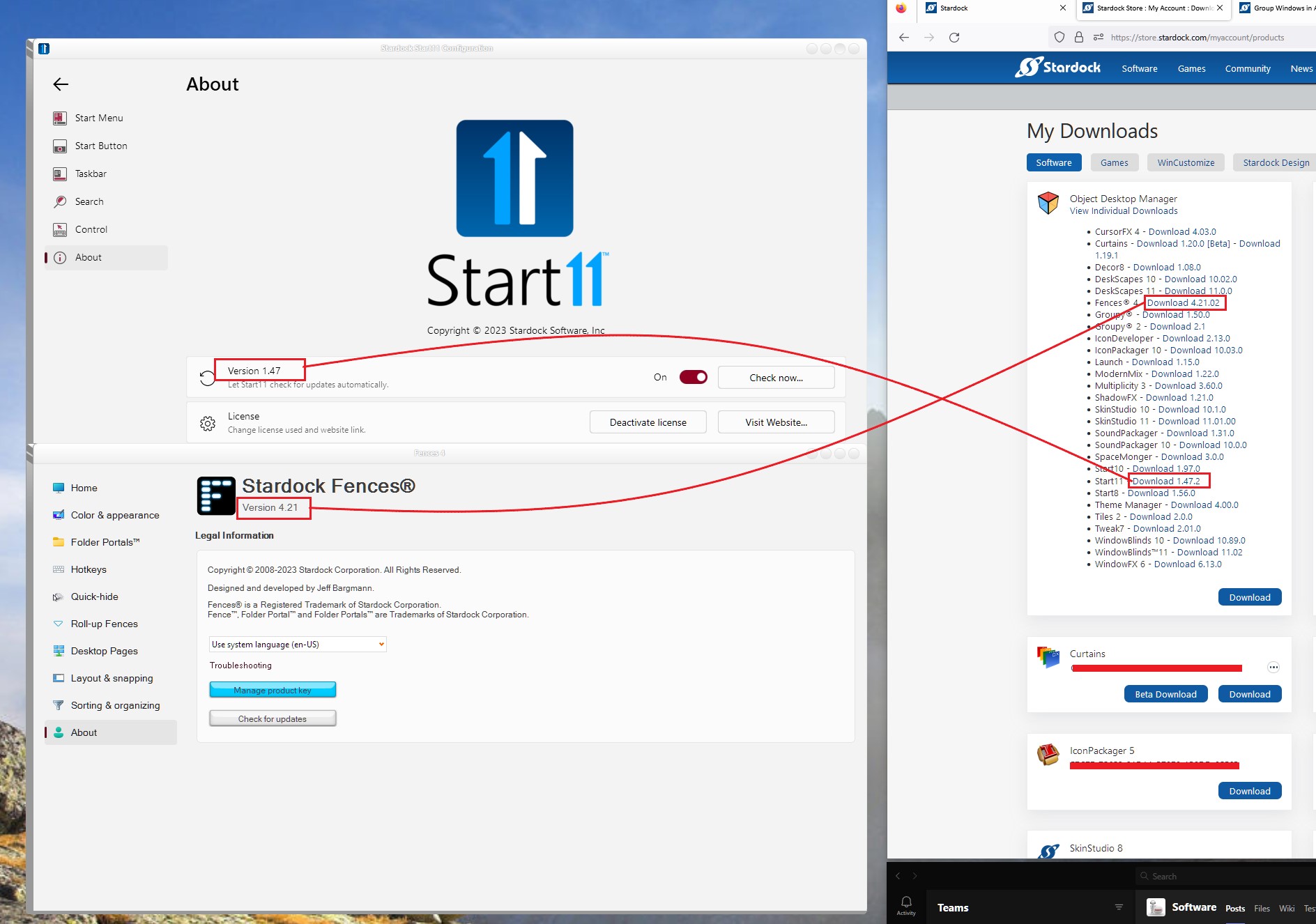
the about  screen, update check for Start11 and Fences, says "up to date" but Objects keeps showing "update" even after rebooting.

Does this on more than one PC with same Win 11 build, same user

6,283 views 15 replies
Reply #1 Top

Unfortunately the Object Desktop app hasn't been fixed yet.

The best way to check if you're current is to click on your icon in the band where email and thread subscriptions are at the top of this page and then > Downloads. Then, under Object Desktop, > click on View Individual Downloads and compare version numbers.

Clunky but that's the best way atm.

Reply #2 Top

if i open Fences, Start 11 etc directly not from Objects: will t he update check from there be valid?


Reply #3 Top

Yes, that should work properly. Just that, it will not detect if there is beta update available.

Thank you,

Basj,
Stardock Community Assistant

Reply #4 Top

hmm. most of my subscriptions were for Objects, not standalone apps. So when i click where you say, i have drill to see the versions for separate apps. 

Way too much hassle to bother doing.

What if I uninstall everything, and only install the separate apps.

Will that allow me to easily check for beta updates, or is it the same issue?

Reply #5 Top

Quoting lenraphael, reply 4

What if I uninstall everything, and only install the separate apps.

That is what you do anyway. Windowblinds, Start11, Skin Studio, Groupy2, etc...all are apps. 

Quoting lenraphael, reply 4

hmm. most of my subscriptions were for Objects, not standalone apps.

What do you mean by "Objects"?

Reply #6 Top

1. the last digit of the beta version shown on the web site does not display in the app "about". 

1. If i disable updates for beta, will I stop geting false update notifications and only get genuine ones going forward or do i have to uninstall and reinstall?  Too time consuming to manually check updates for the beta vers.


Reply #7 Top

Quoting lenraphael, reply 6

2. If i disable updates for beta, will I stop geting false update notifications and only get genuine ones going forward or do i have to uninstall and reinstall?  Too time consuming to manually check updates for the beta vers.

The problem isn't RTM vs Beta. The problem is that the Object Desktop app doesn't recognize your installed versions correctly. You can only compare versions correctltly here:

https://store.stardock.com/myaccount/products

by comparing installed version to what's available in the list (after navigating to the above link and clicking View Individual Downloads). Disabling beta updatevnotifications will only disable that, not all false notifications).

You didn't answer the question I asked you in reply #5.


Reply #8 Top

re reply #5 I should have typed Object Desktop app


my question: 1. the last digit of the beta version shown on the web site does not display in the app "about"  ?

new question: should i see the latest ver number for Objects Desktop app in the same list as the othere apps?

Reply #9 Top

Quoting lenraphael, reply 8

my question: 1. the last digit of the beta version shown on the web site does not display in the app "about"  ?

That you'd have to ask basj the Community Support Assistant. He'll be by. Until then, check the forum dedicated to the specific app. The relevant number should he in a sticky post.

Quoting lenraphael, reply 8

new question: should i see the latest ver number for Objects Desktop app in the same list as the othere apps?

I don't use the app as it really doesn't give me any benefit. I look at the View Individual Download list.

Reply #10 Top

Quoting DrJBHL, reply 9

Quoting lenraphael,
reply 8
my question: 1. the last digit of the beta version shown on the web site does not display in the app "about" ?

That you'd have to ask basj the Community Support Assistant. He'll be by. Until then, check the forum dedicated to the specific app. The relevant number should he in a sticky post.

I believe, its is known that Stardock product drop those last two digits for its about page. From what I observed those two last digits are for version comparison for internal release reference.

Thank you,

Basj,
Stardock Community Assistant

Reply #12 Top

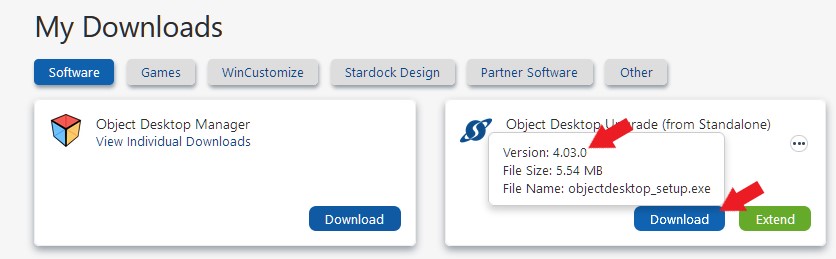
where would i find online the version number for Object Desktop app itself? 

Reply #13 Top

Try mouse over the download button. The popup will show you the version number.

Thank you,

Basj,
Stardock Community Assistant

Reply #14 Top

so even with beta, if hovering shows the old cf to new version, does that mean I have the old version?


Reply #15 Top

I don't really understand what you're asking about. Please elaborate.

Thank you,

Basj,
Stardock Community Assistant