Desktop Icons fall under fences since NVIDIA driver update

Updating to newest NVIDIA driver and newest Fence 4 update has not fixed

Since updating my NVIDIA driver a few months ago, icons are now appearing under fences.  I've since updated the driver again with the latest (a month ago), and updated Fence 4 to current (yesterday), but nothing is addressing this issue. 


4,043 views 3 replies
Reply #2 Top

The issue is still present, but only when Autoarrange Icons is off.  I've always kept this setting off since some applications will cause icon layout to be jumbled every time they are used if this setting is on.  

Reply #3 Top

Hello,
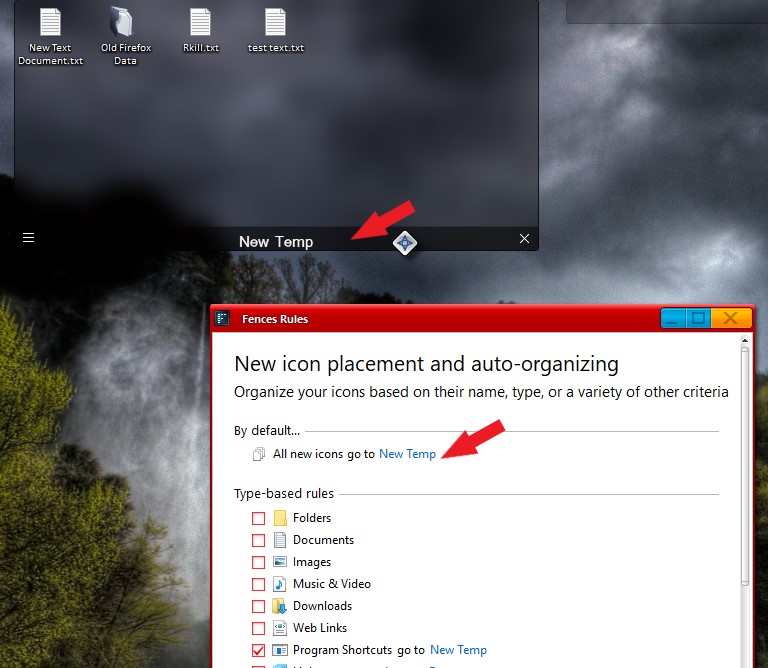
Sorry to hear you are having issues. I believe it is best to have all icons inside a Fences so that those icons behavior can be control via Fences. What I do on my system is that I setup a temporary Fences with Fences rules setup on it so that all new icons come into desktop area will automatically be send into that Fences. I can than from time to time to check that Fence and move those icons to any other specific Fence. With this no icons will be hidden behind any Fences. I only have one icon on my desktop, recycle bin.


Basj,
Stardock Community Assistant.