
Mouseover Brightness

3 monitors extended as one

I have 3 monitors extended as one.  On the furthest left monitor, as I move the cursor further to the left, the top left fence gets brighter.  This is the only place on three monitors that this happens.  When the cursor is on the other two monitors only that one fence gets darker as if I was reducing the brightness.

6,312 views 8 replies
Reply #1 Top

Hello,
Sorry to hear you are having issues. But, not really sure what is happening. Unless you can post a video on it.

What I can guess from limited information I have. It might be related to your difference in opacity setting in per-Fence transparency (while not mouse over)

or background transparency setting while mouse over.

Thanks
Basj,
Stardock Community Assistant.

Reply #2 Top

Good morning,  I was able to change the opacity to 100% / visible and it solved the problem!  |-)   (If you picture walking through a grocery store and as approaching the frozen food doors of each section, the lights come on from your motion.  That's what was happening when I moved the cursor over one particular fence.  It was going from not so bright to well lit)

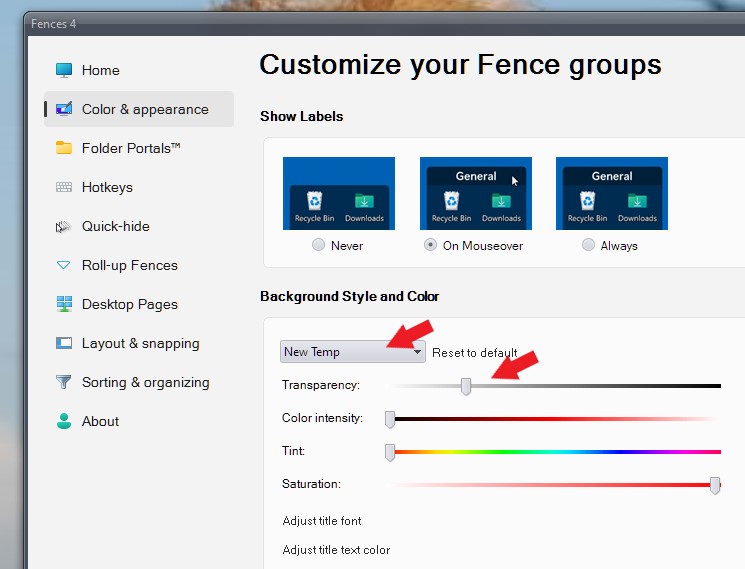
How do I find my way to your 2nd screen shot that says "Customize Your Fence Groups" ?

Thank you !


Reply #3 Top

Hello,

To open the "Customize Your Fence Groups". You will need to open Fences configuration Windows and, click on the "Color & Apperance" tab

To open Fences configuration Windows in Windows 11, you just need to right click anywhere empty on your desktop ->View-> Click on "Configure Fences". Refer screenshot below.

Thank you,

Basj,
Stardock Community Assistant

Reply #5 Top

Yes that is the same as mine. What or which part in my second screenshot you actually looking to get to?

Thank you,

Basj,
Stardock Community Assistant

Reply #7 Top

"New Temp" is one of Fences that I created in my system. If you click down on that drop down arrow menu, you should see list of all your Fences name. And if you select any of them, than change those sliders. The "reset to default" will appear. This function as a reset to default button if you wish to reset all your changes done to default. If you have not done any change, The button does not appear.

Thank you,

Basj,
Stardock Community Assistant