Icons in Start 11 too small relative to the text.

Sizes of the text and icons should be independently controllable.

I am testing Start11 with Windows 11 and the Windows 11 style menu mainly to use groups of icons. The icons seem small compared to the text. It would be better if the icons started off the same size as in the original menu and the text and icon size could be varied independently:

Start 11 v. Windows 11

3,518 views 3 replies
Reply #1 Top

Hello,
I have forward your request to the Stardock Support Team for their review and recommendations. Please keep an eye on this thread for any updates. We really do appreciate your feedback, Thanks

Basj,
Stardock Community Assistant.

Reply #2 Top

I like the feature that let's you remove the captions from the icons. But, the icons look even smaller! Also, it would be good to be able to remove all the captions from a group rather than select each App individually.

Reply #3 Top

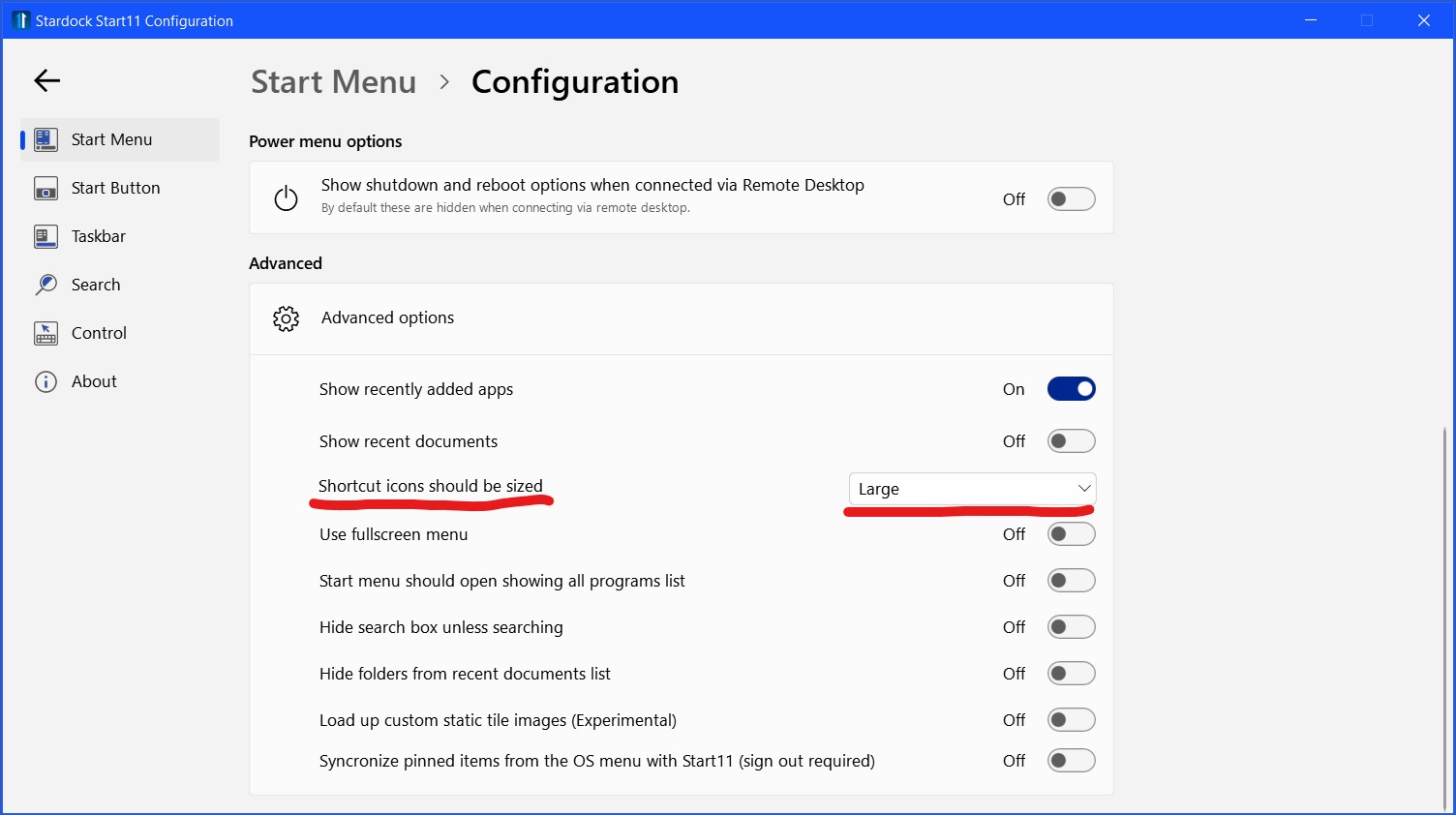
You can accomplish what you are asking for by adjusting the icon size in the configuration settings by going to Start Menu>Configuration>Shortcut Icons Should be Sized pull-down menu. Then go to Start Menu>Configuration>Visual Appearance>Make Menu Font Bigger or Smaller. Making the Menu Font bigger or smaller will also adjust the icon size, so you might have to go back and forth between those settings to achieve the look you like.